Chat is a backend focused application where I implemented many software concepts and tecnologies, such as:
- CQRS
- Mediator
- SignalR
- Clean Arquitecture
- RabbitMQ
- Domain Events
- Ef Core
- Quartz
- AutoMapper
- Minimal Api's
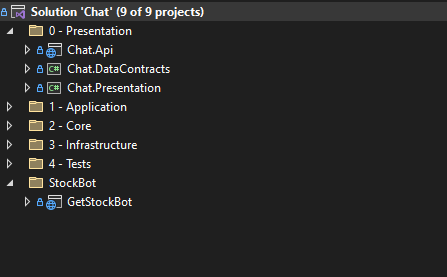
- .Net 6
- RabbitMq
- SQL Server Instance
- Npm and NodeJs (to fronend)
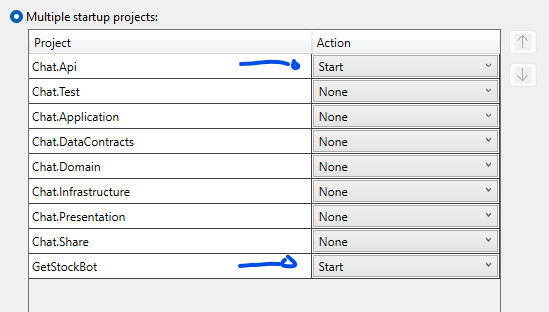
1 - You must to start "Chat.Api" and "GetStockBot" in the same time, to do it go to the solution and right click then in Properties select the option "Multi startup projects" and select the Start option for them:
2 - Setup the appsettings.json in both applications such as the follow images: 2.A Chat.Api appsettings.Json:
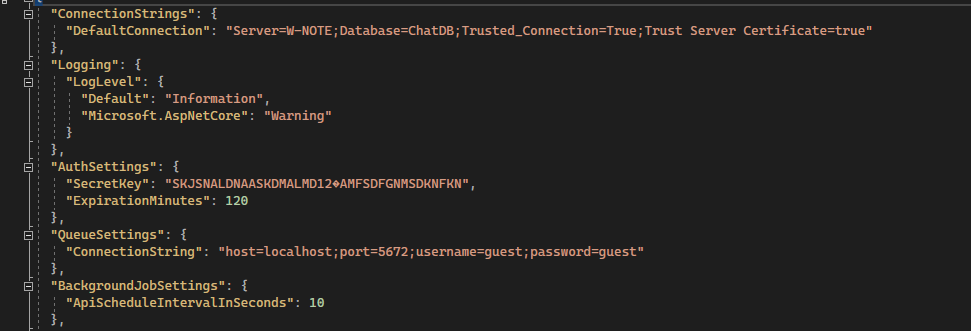
- "ConnectionStrings: DefaultConnection" is a sql server connection string.
- "QueueSettings: ConnectionString" is a RabbitMq connection string.
- "BackgroundJobSettings: ApiScheduleIntervalInSeconds": is how long time the application background service should waiting to schedule in seconds.
2.B GetStockBot appsettings.Json:
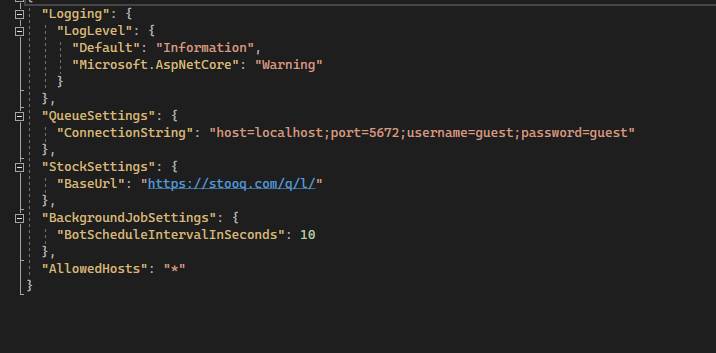
- "StockSettings: BaseUrl" is a base url where we will to get the stock info.
- "QueueSettings: ConnectionString" is a RabbitMq connection string.
- "BackgroundJobSettings: BotScheduleIntervalInSeconds": is how long time the application background service should waiting to schedule in seconds.
3 - Run the database create script in the follow link: https://github.com/wellyngtond2/Chat/tree/master/Scripts
- This project is focused on backend, so the front here is just minimal to see the project working.
- The tests does not have full test coverage, because is an example to create the others one.
- The fronend was made in ReactJs, so you need open the frontend folder in a terminal and run the command 'npm' to dowlonad the packages dependences, then run 'npm start' to run application.
- The frontend is waiting that backend run in localhost:5001, if was this different you must to update in all places on frontend.
- As the frontend is a minimal you must register new users by API swagger interface.
- To use the application by frontend insert you registered email and password:
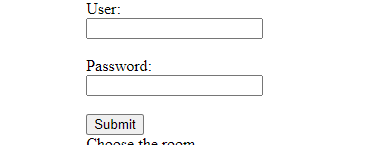
- Then choose you room and send the messages:

- To create new rooms you must be it by API swagger.