







The Kedro-Dagster plugin enables seamless integration between Kedro, a framework for creating reproducible and maintainable data science code, and Dagster, a data orchestrator for machine learning and data pipelines. This plugin makes use of Dagster's orchestration capabilities to automate and monitor Kedro pipelines effectively.
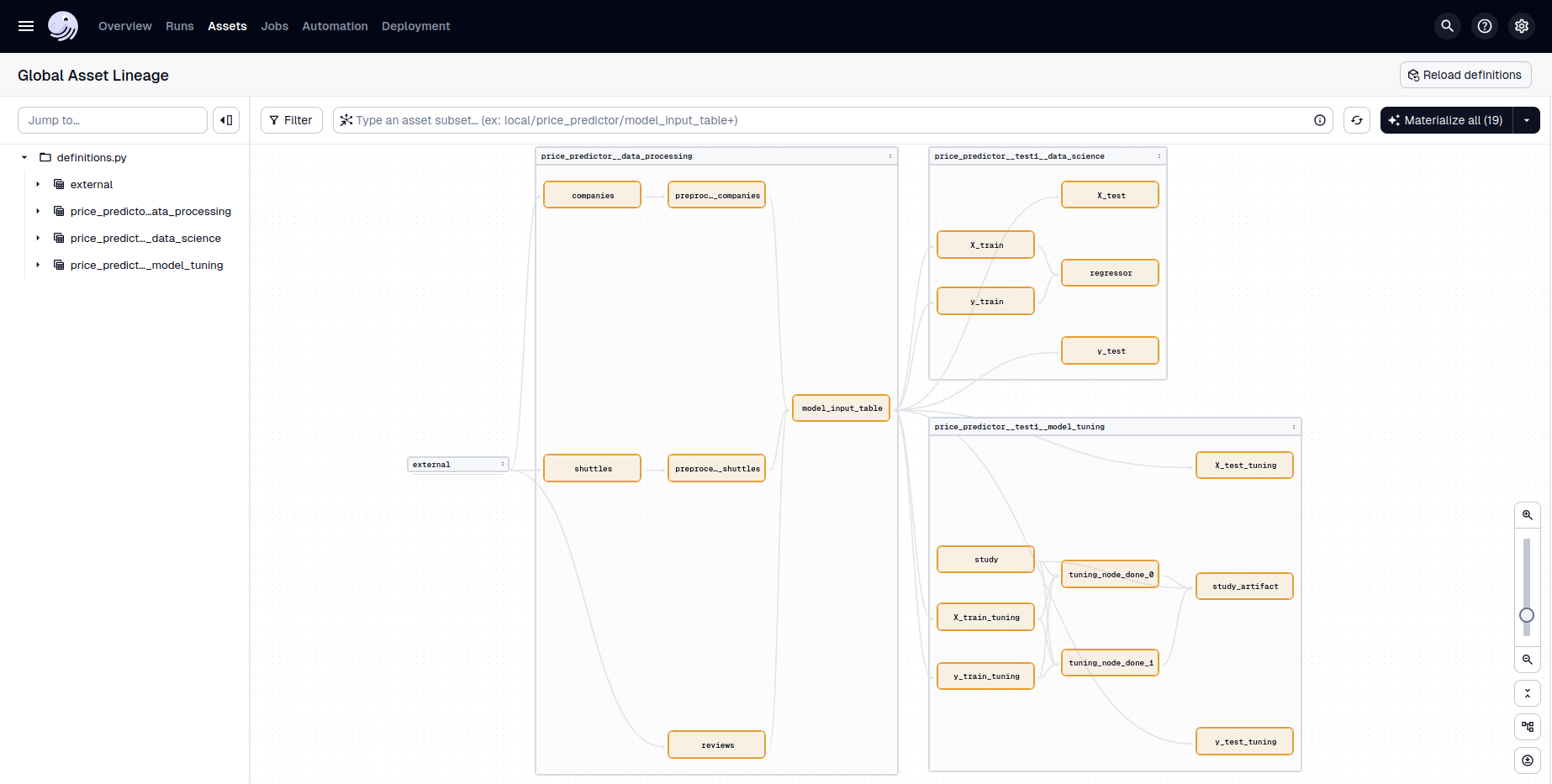
Currently, Kedro-Dagster supports Kedro versions 0.19.x and 1.x, and Dagster versions 1.10.x, 1.11.x, and 1.12.x.
- Configuration-driven workflows: Centralize orchestration settings in a
dagster.ymlfile for each Kedro environment. Define jobs from filtered Kedro pipelines, assign executors, schedules. - Customization: The core integration lives in the auto-generated Dagster
definitions.py. For advanced use cases, you can extend or override these definitions. - Kedro hooks preservation: Kedro hooks are preserved and called at the appropriate time during pipeline execution, so custom logic (e.g., data validation, logging) continues to work seamlessly.
- MLflow compatibility: Use Kedro-MLflow with Dagster’s MLflow integration to track experiments, log models, and register artifacts.
- Logger integration: Unifies Kedro and Dagster logging so logs from Kedro nodes appear in the Dagster UI and are easy to trace and debug. Additionally, provides configuration to customize Dagster run loggers.
- (Experimental) Dagster partition support: Make use of Dagster's partitions to fan-out Kedro nodes acting on partitioned data.
Install the Kedro-Dagster plugin using pip:
pip install kedro-dagsteror using uv:
uv pip install kedro-dagsteror using conda:
conda install -c conda-forge kedro-dagsteror using mamba:
mamba install -c conda-forge kedro-dagsteror alternatively, add kedro-dagster to your requirements.txt or pyproject.toml file.
- Initialize the plugin in your Kedro project
Use the following command to generate a definitions.py file, where all translated Kedro objects are available as Dagster objects, and a dagster.yml configuration file:
kedro dagster init --env <ENV_NAME>- Configure jobs, executors, and schedules
Define your job executors and schedules in the dagster.yml configuration file located in your Kedro project's conf/<ENV_NAME> directory. This file allows you to filter Kedro pipelines and assign specific executors and schedules to them.
# conf/local/dagster.yml
schedules:
  daily: # Schedule name
    cron_schedule: "0 0 * * *" # Schedule parameters

executors: # Executor name
  sequential: # Executor parameters
    in_process:

  multiprocess:
    multiprocess:
      max_concurrent: 2

jobs:
  default: # Job name
    pipeline: # Pipeline filter parameters
      pipeline_name: __default__
    executor: sequential

  parallel_data_processing:
    pipeline:
      pipeline_name: data_processing
      node_names:
      - preprocess_companies_node
      - preprocess_shuttles_node
    schedule: daily
    executor: multiprocess

  data_science:
    pipeline:
      pipeline_name: data_science
    schedule: daily
executor: sequential- Launch the Dagster UI
Start the Dagster UI to monitor and manage your pipelines using the following command:
kedro dagster dev --env <ENV_NAME>The Dagster UI will be available at http://127.0.0.1:3000.
For a concrete use-case, see the Kedro-Dagster example repository.
Full documentation is available at https://kedro-dagster.readthedocs.io/.
We welcome contributions, feedback, and questions:
- Report issues or request features: GitHub Issues
- Join the discussion: GitHub Discussions
- Contributing Guide: CONTRIBUTING.md
If you are interested in becoming a maintainer or taking a more active role, please reach out to Guillaume Tauzin on GitHub Discussions.
- Full documentation: https://kedro-dagster.readthedocs.io/
- GitHub Discussions: https://github.com/stateful-y/kedro-dagster/discussions
For questions and discussions, you can also open a discussion.
This project is licensed under the terms of the Apache-2.0 License.
If you use Kedro-Dagster in work you publish, please cite it:
Guillaume Tauzin. Kedro-Dagster: Deploy Kedro projects to Dagster. https://github.com/stateful-y/kedro-dagster
Or in BibTeX:
@software{kedro_dagster,
  author  = "Guillaume Tauzin",
  title   = "{Kedro-Dagster: Deploy Kedro projects to Dagster}",
  url     = "https://github.com/stateful-y/kedro-dagster",
  license = "Apache-2.0"
}
Reference managers can read CITATION.cff directly. To cite a specific version, see the citation page.
This project is maintained by stateful-y, an ML consultancy specializing in MLOps and data science & engineering. If you're interested in collaborating or learning more about our services, please visit our website.
