Multilingual natural-language motions and text objects for Neovim, powered by Apple NLTokenizer.
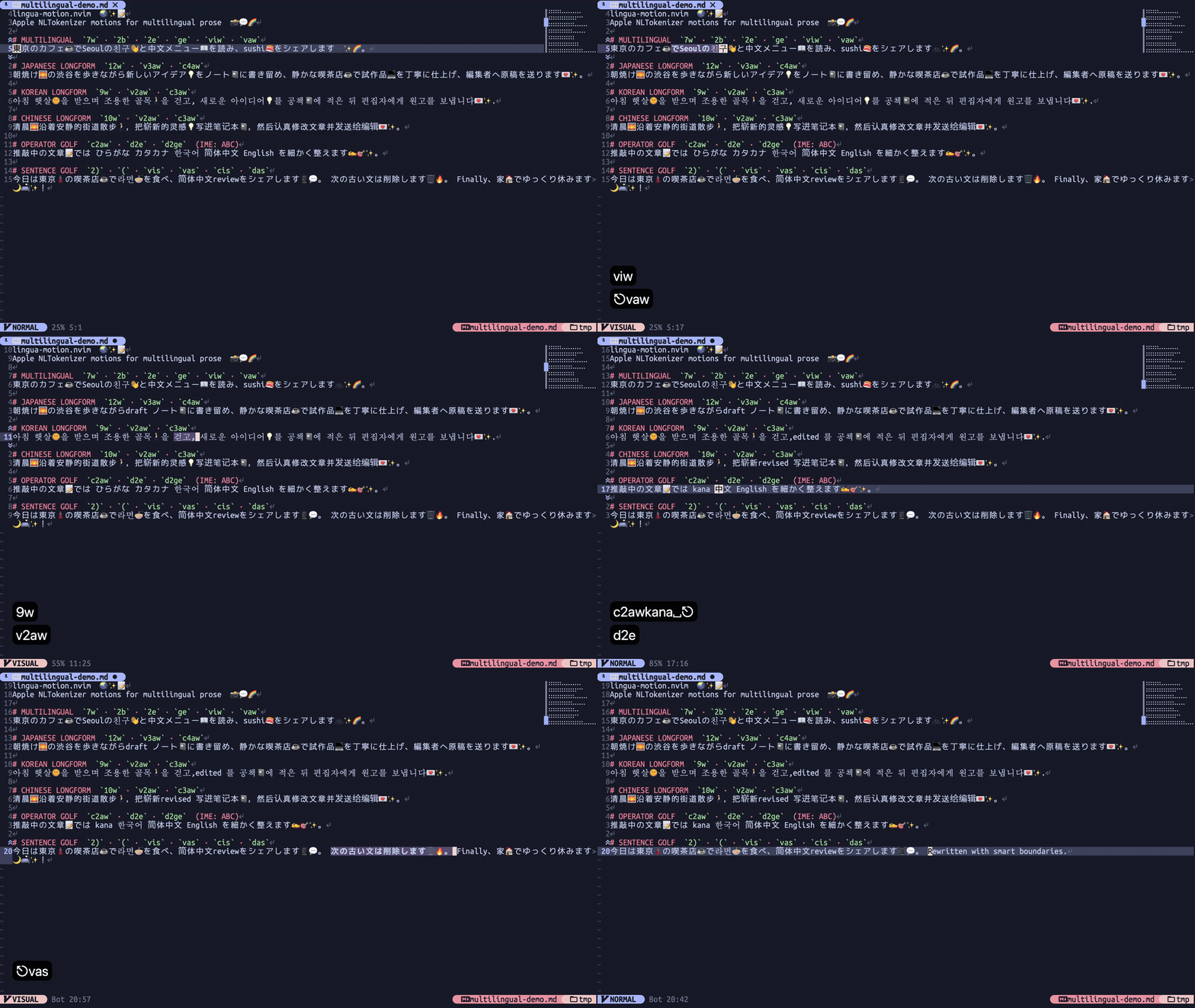
- Natural-language
w,e,b,ge,(, and)motions. iw,aw,is, andastext objects.- Japanese, Korean, English, Chinese, and mixed-text tokenization.
- Counts and Normal, Visual, and Operator-pending modes, including
diw,ciw,dis, andyas. - Native Neovim fallback when the helper is unavailable or returns an invalid response.
- macOS; Apple NaturalLanguage is the tokenizer backend.
- Neovim 0.10 or later.
- Swift 6 when building the helper directly.
Warning
The default configuration replaces Neovim's w, e, b, ge, (, ), iw, aw, is, and as mappings in Normal, Visual, and Operator-pending modes. Set mappings = false or configure custom lhs values to preserve them.
With lazy.nvim, build the helper inside the plugin directory and pass its exact path to setup():
{
  "mi2428/lingua-motion.nvim",
  build = "make lingua-motion-helper",
  config = function(plugin)
    require("lingua_motion").setup({
      helper_path = plugin.dir .. "/lingua-motion-helper",
    })
  end,
}
To install the helper on PATH instead, run this from the repository root:
make lingua-motion-helper
install -d "$HOME/.local/bin"
install -m 755 lingua-motion-helper "$HOME/.local/bin/lingua-motion-helper"
Ensure $HOME/.local/bin is on PATH, install the Lua plugin with your preferred plugin manager, then call:
require("lingua_motion").setup()On Apple Silicon, Nix can install the helper directly on PATH:
nix profile install github:mi2428/lingua-motion.nvim#lingua-motion-helperAfter setup() runs, check the platform, configured helper path, and a real tokenization request with:
:checkhealth lingua-motionHelper timeout, crash, and invalid-response failures use non-recursive native motions or text objects and retry the helper on a later request.
The default mappings keep Neovim's lhs values while changing their boundaries to Apple NaturalLanguage tokens:
| Mappings | Behavior |
|---|---|
w, e, b, ge |
Move between natural-language words, symbols, and emoji |
iw |
Select the current natural-language token |
aw |
Select the token with following whitespace, then preceding whitespace |
(, ) |
Move between Apple sentence starts |
is |
Select one Apple sentence |
as |
Select the sentence with trailing whitespace, then leading whitespace |
Counts work in Normal, Visual, and Operator-pending modes. Consecutive Japanese tokens remain iw-sized for aw. Sentence analysis is limited to the current blank-line-delimited paragraph and accesses buffer lines lazily.
See :help lingua-motion for the complete reference.
The defaults are:
require("lingua_motion").setup({
  helper_path = vim.fn.exepath("lingua-motion-helper"),
  timeout_ms = 200,
  language = "auto",
  mappings = true,
})| Option | Description |
|---|---|
helper_path |
Executable helper path |
timeout_ms |
Maximum wait for one helper response |
language |
auto or an NLLanguage raw code such as ja, en, or zh-Hans |
mappings |
true for defaults, false for none, or a mapping-group table |
Mapping groups can be disabled or assigned custom lhs values. The inner table maps the original operation name to its new lhs; false disables that operation:
require("lingua_motion").setup({
  mappings = {
    word_motions = { w = "gw", e = "ge", b = false, ge = "gE" },
    word_textobjects = true,
    sentence_motions = false,
    sentence_textobjects = true,
  },
})
Only n, x, and o mappings are installed. Loading the plugin itself has no helper, keymap, autocmd, or IME side effects; setup() must be called explicitly. Insert, Command-line, and Terminal mappings, autocmds, input sources, and IME state are not touched.
The Swift helper uses Apple NaturalLanguage directly. Word tokens retain UTF-8 byte spans and numeric, symbolic, and emoji attributes. Sentence tokens preserve Apple's sentence boundaries without punctuation-specific splitting. Cache entries are bounded by unit + language + text.
The plugin does not provide a Linux or Windows backend, paragraph/document motions, part-of-speech tagging, embeddings, or IME integration.
lingua-motion-helper is one long-lived JSONL process. stdout is protocol-only; diagnostics go to stderr. Each request has an id, text, unit, and language:
{"id":1,"text":"日本語。English.","unit":"word","language":"auto"}Responses contain UTF-8 byte [start,end) ranges and raw/decoded tokenizer attributes:
{"id":1,"tokens":[{"start":0,"end":6,"attributes":0,"numeric":false,"symbolic":false,"emoji":false}]}Unknown units return an id-matched error. The helper warms both tokenizer units, reuses tokenizers by unit/language, and wraps each request in autoreleasepool.
Run the complete runtime suite, including the RSS soak:
tests/run.shThe reproducible recording setup and generated GIF live on the orphan demo branch:
git switch demo
make check
make recordRun all formatters, linters, strict type checks, and the Swift compiler check:
tests/lint.shRun the reproducible Nix checks without the sandbox-incompatible RSS check:
nix flake check --all-systemsThe runtime helper is created under ${TMPDIR} and removed by a trap. The host matrix is authoritative: tests/lint.sh uses Apple Swift 6 with strict concurrency and full SwiftLint. The locked nixpkgs compatibility matrix uses Swift 5.10.1 and disables only SwiftLint's unavailable SourceKit integration.