


Copilot Cockpit is one workflow system for AI work in VS Code: planning and triage, execution and scheduling, and optional tool/control-plane integration.
Most AI tooling still reads like feature accumulation: a todo board here, a scheduler there, a tool bridge somewhere else. Copilot Cockpit is meant to feel like one coherent stack.
It connects three tightly linked layers:
- Planning and triage in
Todo Cockpit - Execution and scheduling through
TasksandJobs - Tool and control-plane integration through
Research,MCP, and optional agent surfaces
The workflow is explicit on purpose. A Todo is the planning artifact. A Task is one executable unit. A Job is an orchestrated or scheduled run built from steps. Research is an exploratory context-building artifact when the system still needs evidence before execution.
That structure keeps the LLM as the native execution chat surface while Copilot Cockpit provides the approval, scheduling, and control layer around it. The goal is not less automation. The goal is accountable automation that can move from intake to execution without losing review, context, or ownership.
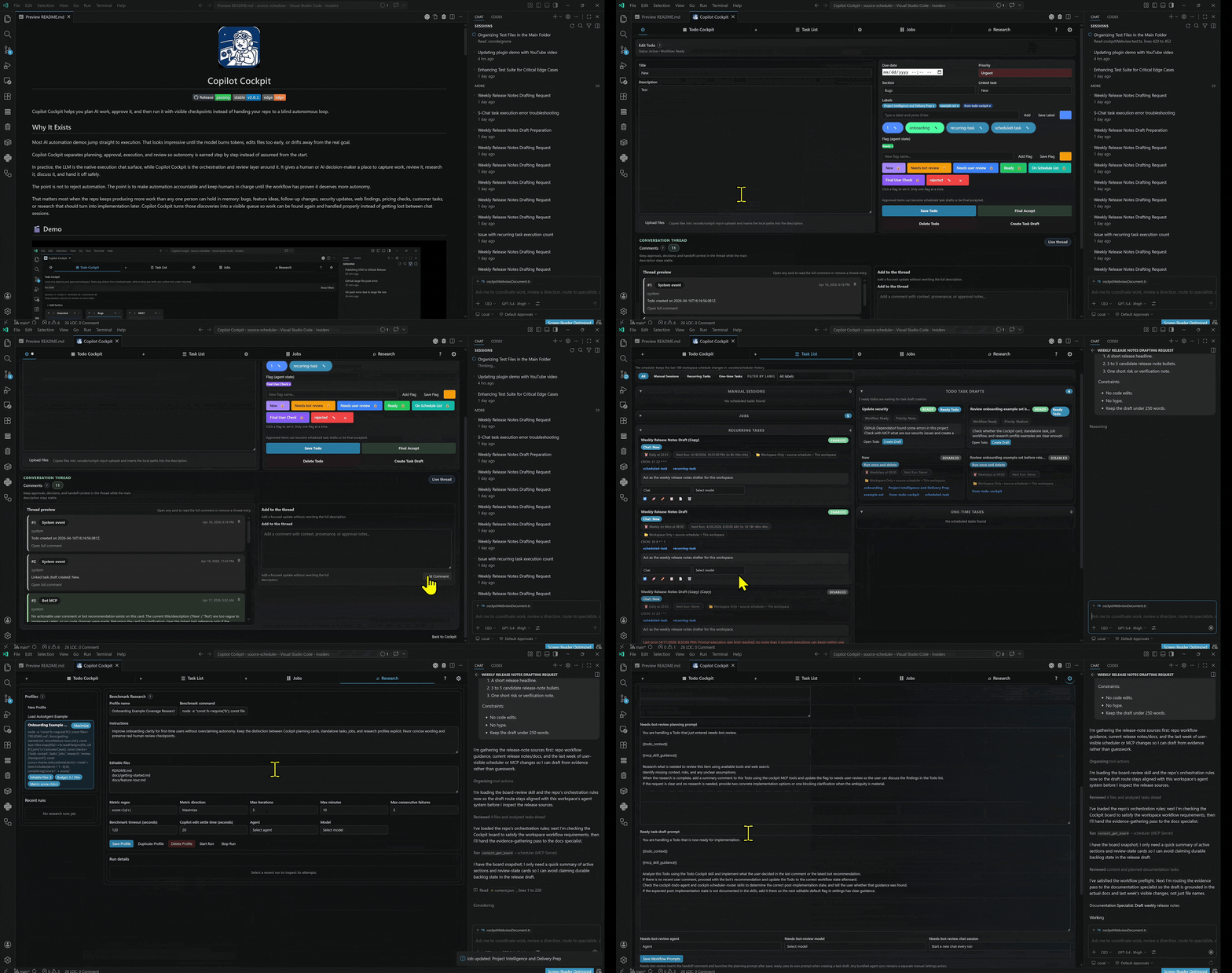
Use the feature tour below for the slower tab-by-tab explanation.
For the step-by-step walkthrough, open docs/feature-tour.md.
The recommended default path is simple:
- Start with a
TodoinTodo Cockpitfor intake, planning, and triage. - Use
Researchonly when context is missing or the direction still needs evidence. - Promote approved work into a
Taskfor one executable unit or aJobfor an orchestrated run. - Review the result before granting more autonomy or scheduling the next cycle.
- Add
MCP, repo-local skills, or agent/control-plane features only when the core loop is already working.
This keeps the relationship collaborative: the workflow starts with planning, earns execution, and only then extends into higher-autonomy integrations.
Copilot Cockpit is not a standalone model host. It is a control and orchestration layer built on top of the Visual Studio Code extension platform, the native VS Code chat surface, GitHub Copilot in VS Code, and compatible chat-provider setups that can expose other models through the same workflow.
That distinction matters. The rapid model updates, agent improvements, and chat-surface improvements come from the teams behind VS Code, GitHub Copilot, and the model providers that Copilot or OpenRouter can surface in your editor. Copilot Cockpit adds structure around that foundation: planning, approval, scheduling, MCP tools, repo-local skills, review checkpoints, and project memory.
In other words:
- VS Code provides the extension runtime, chat UI, commands, and customization surfaces.
- GitHub Copilot provides the native chat execution surface and model-routing experience used by the scheduler.
- OpenRouter or other compatible providers can extend model choice when they are exposed through the same VS Code chat environment.
- Copilot Cockpit provides the workflow harness that makes those capabilities operational for real project work.
This is why the project can stay useful as the surrounding platform improves. The cockpit does not need to outgrow the editor. It needs to make the editor's AI surfaces safer, clearer, and more repeatable.
flowchart LR
    A[VS Code chat] --> B[GitHub Copilot or connected provider]
    B --> C[Copilot Cockpit control layer]
    C --> D[Workflow review and scheduling]
    C --> E[MCP tools]
    C --> F[Repo-local skills and prompts]
When you manually use Stage Bundled Agents for a compare-first mirror under .vscode/copilot-cockpit-support/bundled-agents, or Sync Bundled Agents for live .github/agents installation, Copilot Cockpit can add an optional orchestration layer on top of the normal task, job, and research workflow. The goal is not to replace repo-local systems or create a bloated generalist loop. The goal is to let a top-level orchestrator stay focused on direction, routing, and closeout while bounded specialists handle the detailed execution work.
This is efficient because the CEO or orchestrator does the initial thinking once, then delegates to a subagent session (with stronger context than a typical raw user prompt: the request, relevant repo research, controlling files, constraints, and acceptance criteria. The specialist can then work inside a narrow responsibility boundary, validate that slice, and report back for final review instead of forcing the orchestrator to carry every intermediate implementation detail in one chat thread.
Note: Custom subagents must be enabled in //settings/chat.customAgentInSubagent.enabled of github copilot plugin
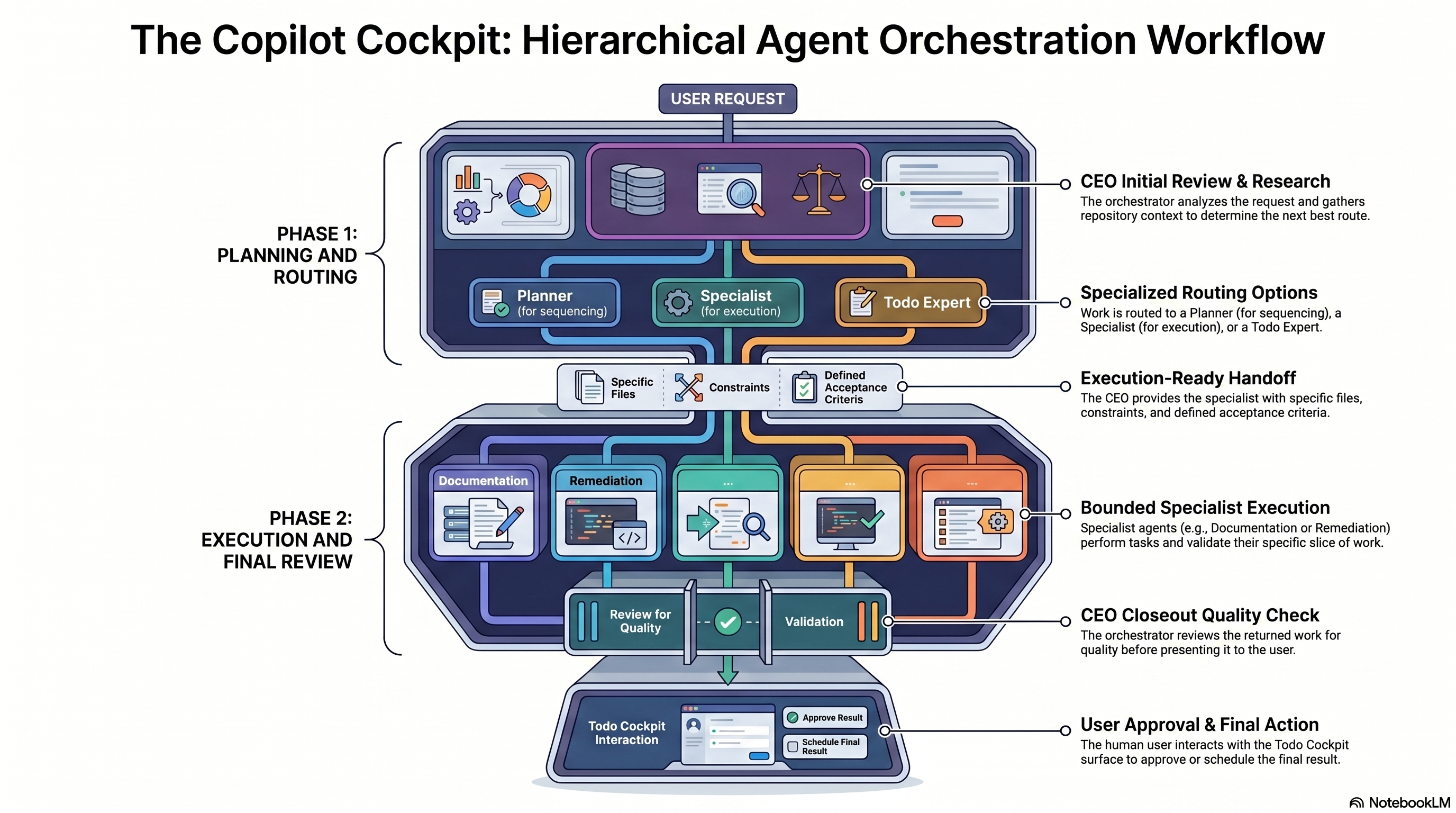
The optional layer stays practical because responsibilities are split deliberately:
CEOinspects the request, gathers the minimum repo context, chooses the route, and validates the returned result.Planneris used when the work needs sequencing, tradeoff analysis, or a clearer validation plan.- Specialists such as
Remediation ImplementerorDocumentation Specialistrun bounded work and report back with validation. Cockpit Todo Expertowns durable approval state and backlog hygiene inTodo Cockpit.
Bundled-agent staging and sync are manual by design. Stage Bundled Agents refreshes a comparison copy under .vscode/copilot-cockpit-support/bundled-agents without touching the live repo-local system. Sync Bundled Agents is the explicit live install path into .github/agents. Repo-local agent systems are user-owned, so Copilot Cockpit only offers the starter pack as an optional baseline and does not overwrite customized workspace copies during sync. For the deeper operating model, see docs/agent-workflow.md.
These are the default path and the main product surface.
Todo Cockpit is the planning and triage layer. A Todo stays a planning artifact: capture work, add comments, apply labels and workflow flags, and decide what should happen next.
Tasks are the simplest execution layer artifact: one executable unit, one prompt, one scheduled action, one concrete piece of work. Use them for one-time runs or recurring execution.
That includes recurring tasks such as security research, market checks, feature scouting, maintenance prompts, prompt refinement, repo upkeep, or any other repeated work that should run on a schedule and return to review.
Jobs are the orchestration layer inside execution: ordered multi-step workflows with reusable actions and pause checkpoints. Use them when work should not run as one uninterrupted chain.
Think of Jobs as deeper agentic workflows inside VS Code: research, decision support, implementation steps, maintenance steps, MCP calls, or external-tool sequences that should be inspected at explicit checkpoints instead of left to one opaque run.
Research is the exploratory context-building layer. Use it when the system is missing context, needs outside evidence, or should iterate against a benchmark before you decide on execution.
Research is especially useful when work should pull in fresher outside knowledge first, through web search, Perplexity, scrapers, or other tooling, and then return that material for user review before implementation begins.
These capabilities stay discoverable, but they are not required for the default path.
Copilot Cockpit is designed for mixed-model work. Sometimes one model is better for planning, another for implementation, and another for research or code review. The goal is not to crown one universal expert, but to let specialized agents and model choices work together under one controlled workflow.
That also creates a control layer for cost: GitHub Copilot or OpenRouter can use different models with different pricing, and tasks can be routed to different agents depending on the importance, difficulty, or budget of the work. Expensive models can be reserved for the hard parts, while cheaper models handle routine research, monitoring, or maintenance.
Settings configure workspace defaults, integrations, storage mode, and execution preferences so the cockpit matches the repo you are operating in. They are also where you can optionally incorporate repo-local agents or the bundled starter pack when you want an extra control-plane layer that lets the orchestrator stay focused on routing, planning, and validation while specialists handle bounded work. See docs/agent-workflow.md for the operating model.
How To Use is the built-in onboarding tab. Start there if you want the recommended path explained in order: Todo first, Research when context is missing, Task or Job for execution, then optional control-plane integration after the core loop is working.
Capture work in Todo Cockpit, discuss it, move it into ready, and only then prepare the execution unit.
Use Research, web search, or tool-assisted discovery to gather current information first. Review that output with the user, discuss changes, and only then convert the result into scheduled implementation work.
Use Tasks when one piece of work should run once or on a recurring schedule.
Use Jobs when work needs ordered stages and review points. Use Research when the goal is measured improvement over time.
Run non-conflicting work in parallel, but keep conflicting work visible and scheduled in a controlled way. Copilot Cockpit helps decide what can safely run side by side and what should wait for review or sequencing.
That includes deciding which agent or model should do which task, so quality, speed, and wallet impact stay under user control instead of being hidden inside one opaque automation path.
Archive completed work, rejected ideas, and reviewed research so the repo gains project-specific intelligence over time instead of starting from scratch on every new chat.
Start with one recurring loop that produces useful work instead of toy output.
Small Project Opportunity Scout (Daily)turns repo signals into a short list of next-step proposals.Delivery Risk and Security Watch (Daily)looks for shipping, trust, and operational blind spots.Knowledge and Shipping Packager (Daily)stages reusable docs, memory candidates, and release material for later curation.Project Intelligence and Delivery Prepruns those steps in sequence and stops at a review checkpoint before anything turns into real execution.Onboarding Example Coverage Researchstarts with a Todo Cockpit intake item, uses Research to gather or benchmark onboarding evidence, and then promotes approved follow-up into Tasks or Jobs.
Use that onboarding example when you want one concrete loop to demonstrate the product: start in Todo Cockpit, gather context with Research, promote approved work into Tasks or Jobs, and stop at a review checkpoint before autonomy expands.
This is a good fit for a solo product, an internal tool, a small SaaS, or an actively maintained extension like this repo.
The same operating model scales by giving each team its own bounded loops, models, and review checkpoints.
- Product and marketing teams can triage customer signals, monitor competitors, prepare launch briefs, and keep content pipelines moving.
- Engineering and security teams can watch dependencies, review release readiness, monitor operational drift, and stage migration or maintenance work.
- Operations and support teams can cluster recurring requests, maintain SOPs, monitor vendors or accounts, and convert findings into visible follow-up queues.
The point is not to overclaim autonomy. The point is to show recurring, inspectable work that is useful at small scale and still makes sense when the organization gets larger.
- Open Copilot Cockpit from the activity bar or run
Copilot Cockpit: Create Scheduled Prompt (GUI)from the command palette. Or use the todo-list icon in the top right. - Start in
How To Useif you are new to the extension, or click the top-barIntro Tutorialbutton for the same guided walkthrough. - Capture or refine work in
Todo Cockpituntil the planning artifact is clear. - Use
Researchif the work still needs exploratory context or outside evidence. - Move approved work into
ready, then promote it into aTaskfor one executable unit or aJobfor an orchestrated run. - Open
Settingsto configure repo-local defaults. AddMCP, Copilot skills, starter agents, or other control-plane features only when you want those optional extensions.
The Settings tab also lets you choose between Stage Bundled Agents for a staged comparison/reference copy under .vscode/copilot-cockpit-support/bundled-agents and Sync Bundled Agents for live .github/agents installation when you want that optional specialist layer. This is useful when the orchestrator should hand work to the right specialist instead of stuffing planning, execution, and review into one long chat. Treat any existing repo-local agent setup as user-owned first. Use stage-first when the repo already has a richer local system, and only approve sync when you want the live install path. Back up .github first when it already exists, and keep in mind that customized workspace copies are skipped so your repo-specific agent edits are not overwritten.
If you want the rationale and workflow diagram for that pattern, see docs/agent-workflow.md.
edgeis the rolling prerelease channel. Every push tomainvalidates the build on GitHub, packages a VSIX, and updates theedgeGitHub prerelease.- Stable releases stay tag-based. Push a version tag such as
v1.1.150when you want a durable release entry instead of the rolling preview channel. - The local VSIX install flow is still useful for immediate testing in your own editor, but GitHub now builds the release artifacts automatically.
Detailed documentation lives under docs/index.md.
- Getting Started
- Feature Tour
- Agent Workflow
- Workflows
- Integrations
- Storage and Boundaries
- Architecture and Principles
- Todo Cockpit Feature Notes
These extend the core workflow. They are optional and should not be mandatory for onboarding.
MCPgives AI agents a controlled tool surface to use the plugin inside the workspace.- Support for Copilot-first workflows, with experimental Codex integration for repo-local coordination.
- Bundled starter agents can be staged under
.vscode/copilot-cockpit-support/bundled-agentsfor comparison/reference or synced into.github/agentsas a small default orchestration layer:CEO,Planner,Remediation Implementer,Documentation Specialist,Custom Agent Foundry, andCockpit Todo Expert. The pattern is optional, keeps the top-level orchestrator cleaner, and is described in docs/agent-workflow.md. - Specialized agents, skills, prompts, hooks, memories, and tool connections can be maintained as part of the same controlled workflow.
- External systems such as email handling, web data collection, price checks, or other connected tools can feed into scheduled work when exposed through MCP or related integration layers.
- Active review state is carried by canonical workflow flags such as
needs-user-review,ready,ON-SCHEDULE-LIST, andFINAL-USER-CHECK. - During execution handoff, live scheduled cards use the built-in
ON-SCHEDULE-LISTflag, and final acceptance handoff can useFINAL-USER-CHECK.
Choose the channel you want:
Stableis the safer tagged release for normal use.Edgeis the rolling prerelease channel for the newest changes frommain.


- Download the VSIX from the stable release page or the edge prerelease page
- Run
Extensions: Install from VSIX...in VS Code. - Select the VSIX and reload VS Code.
npm run package:vsix
npm run install:vsix
npm run install:vsix:insiders
npm run install:vsix:both
After installation, the extension creates or repairs repo-local support files for the current workspace.
| Purpose | Copilot / Native Path | Codex Path |
|---|---|---|
| MCP config | .vscode/mcp.json |
.codex/config.toml |
| Skills | .github/skills |
.agents/skills |
| Instructions | prompt and skill references in the repo | AGENTS.md |
| Stable MCP launcher | .vscode/copilot-cockpit-support/mcp/launcher.js |
uses the repo-local Codex config entry |
Bring your own LLM via:
| Surface | Status | What It Can Do |
|---|---|---|
| GitHub Copilot in VS Code | Primary | Full planning, task scheduling, task execution, jobs, research, and MCP-driven workflows |
| OpenRouter.ai | Supported | Full planning, task scheduling, task execution, jobs, research, and MCP-driven workflows |
| ChatGPT Codex in VS Code | Experimental | Repo-local MCP, repo-local skills, todo coordination, and task-draft coordination |
Model availability is determined by the chat providers and integrations available in your VS Code environment. Copilot Cockpit does not bundle its own frontier models. It orchestrates the models and agents that your VS Code chat setup makes available.
The plugin already contains a concrete harness around VS Code chat and Copilot instead of only describing one at a high level.
- Scheduled execution opens or focuses the native VS Code chat surface and submits prompts through VS Code chat commands.
- Tasks can request a specific agent or mode, including built-in slash agents and custom repo-local agents.
- Tasks can request a specific model ID when the active chat surface supports that selector.
- The scheduler can start a fresh chat or continue an existing session depending on task configuration.
- Repo-local MCP setup exposes the cockpit state and scheduler operations as tools instead of relying on hidden background mutation.
- Repo-local Copilot skills under
.github/skillsshape how Copilot approaches planning, routing, and approval-aware execution in the workspace.
That means Copilot Cockpit is deeper than a UI wrapper. It already uses VS Code chat as the execution harness, MCP as the structured tool harness, and repo-local skills as the behavior harness.
Codex support is currently limited. It can help create and coordinate todos and task drafts, but scheduled task execution does not run through Codex today. Tasks run through Copilot Chat in VS Code. Scheduling tasks directly through the Codex VS Code extension is not implemented yet.
- The extension bundles an embedded MCP server at
out/server.js. Set Up MCPrepairs only the local scheduler entry and preserves unrelated MCP servers.Sync Bundled Skillstargets Copilot-style repo-local skills under.github/skills.Add Skills To Codextargets Codex-style repo-local skills under.agents/skillsand refreshes the managedAGENTS.mdblock.- The workflow is inspired by the AK TM style of agent-oriented task management and disciplined handoff.
Copilot Cockpit is built upon vscode-copilot-scheduler by aktsmm.
It also depends heavily on the broader platform work provided by Visual Studio Code and GitHub Copilot. This project uses the VS Code extension runtime, the native chat surface, repo-local customization patterns, and Copilot-oriented workflows as the execution foundation that the cockpit organizes around.
Credit is also due to the model and provider ecosystem that users can reach through those surfaces. In practice that can include GitHub Copilot-hosted models, OpenRouter-backed setups, and other provider integrations exposed through VS Code chat. Copilot Cockpit does not replace that layer. It makes that layer more usable for structured project delivery.
Useful platform references:
- Visual Studio Code documentation
- VS Code AI agents and agent loop concepts
- Customize Copilot with instructions, prompts, and MCP
This repository contains a mix of:
- derived or adapted portions that originate from
vscode-copilot-schedulerand remain subject toCC BY-NC-SA 4.0 - later original additions in this repository, including major Cockpit-specific surfaces such as Todo Cockpit, Research Manager, SQLite-backed storage support, Jobs workflows, Codex coordination support, and newer MCP-oriented orchestration layers
The top-level license notice and a more detailed breakdown live in LICENSE and PROVENANCE.md.
See LICENSE for the mixed-license notice covering derived CC BY-NC-SA 4.0 portions and later original additions in this repository. See PROVENANCE.md for a brief derived-vs-original breakdown.