You signed in with another tab or window. Reload to refresh your session.You signed out in another tab or window. Reload to refresh your session.You switched accounts on another tab or window. Reload to refresh your session.Dismiss alert
To upload the code, make sure to have an USB cable with every pin wired: cheap charging cables often have just +5V and ground wired
Uploading from PlatformIO to DigiSpark needs you to plug the DigiSpark after compiling, even though the console doesn't warn "now it's time to plug your DigiSpark", as Arduino IDE does.
Quick fix for issue in uploading to DigiSpark from PlatformIO on MacOS: PIO issue 111
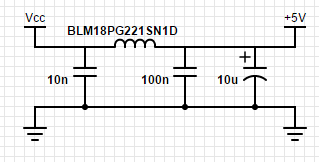
Cheap USB chargers may provide dirty/noisy output, which could make LEDs oddly flicker expecially at low brightness: make sure to have a clean 5VDC source, or to filter adding a capacitor or a more proper circuit like this one:
About
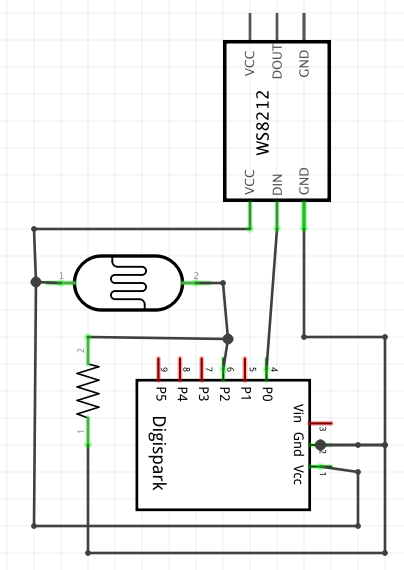
DigiSpark clone 8x WS2812 rainbow wheel with LDR brightness adjustment