An animated, shape-agnostic border light for Flutter. It supports arbitrary
Path masks, inner-only multi-layer glow, smooth enable/disable transitions,
asymmetric light tails, and pulse.
No fragment shader or platform-specific code is used.
| Arbitrary shapes | Compact controls |
|---|---|
 |
 |
- Works with any
CustomClipper<Path>or FlutterShapeBorder. - Keeps the glow inside the widget bounds.
- Supports layered glow, animated color, pulse, and smooth transitions.
- Follows live size changes and morphing masks.
- Uses Flutter canvas APIs only—no fragment shaders or platform code.
dependencies:
  border_beam_effect: ^1.0.0
Then import the package:
import 'package:border_beam_effect/border_beam_effect.dart';Use the same shape for the widget decoration and the effect mask:
final shape = RoundedSuperellipseBorder(
  borderRadius: BorderRadius.circular(30),
);

BorderBeamEffect(
  mask: ShapeBorderClipper(shape: shape),
  enableEffect: true,
  borderColor: Colors.white,
  beamColors: const [
    Colors.cyanAccent,
    Colors.purpleAccent,
    Colors.limeAccent,
  ],
  child: Container(
    decoration: ShapeDecoration(color: Colors.black, shape: shape),
    child: const SizedBox(width: 320, height: 120),
  ),
)BorderBeamEffect(
mask: ShapeBorderClipper(shape: shape),
enableEffect: enabled,
// Sharp animated light.
borderColor: Colors.white,
borderWidth: 1,
// Colored glow.
beamColors: const [Colors.cyan, Colors.pink, Colors.lime],
beamColorStops: const [0, .45, 1],
beamWidth: 1,
gradientMode: BorderBeamGradientMode.rotating,
glowLayers: const [
BorderBeamGlow(
blurRadius: 3,
spread: 1,
opacity: .9,
blendMode: BlendMode.plus,
maxBlurFraction: .05,
),
BorderBeamGlow(
blurRadius: 12,
spread: 5,
opacity: .45,
blendMode: BlendMode.plus,
maxBlurFraction: .12,
),
],
// Short head and long tail.
beamExtent: .4,
seamlessFullExtent: true,
beamMaskStops: const [0, .08, .3, 1],
beamMaskOpacities: const [0, 1, .65, 0],
beamRiseCurve: Curves.easeInOutCubic,
beamFallCurve: Curves.easeInOutCubic,
maskSamples: 40,
// Motion.
clockwise: true,
startPosition: 0,
duration: const Duration(milliseconds: 2500),
// Transitions and subtle glow breathing.
fadeDuration: const Duration(milliseconds: 300),
pulseMinOpacity: .88,
pulseMaxOpacity: 1,
pulseDuration: const Duration(milliseconds: 1600),
pulseCurve: Curves.easeInOutSine,
child: child,
)glowLayers accepts any number of BorderBeamGlow objects. Use an empty list
to keep only the sharp animated border. When it is omitted, two adaptive layers
are generated from beamBlurRadius for backwards compatibility.
Each layer controls:
blurRadius— requested blur sigma;spread— glow-source width without changing the sharp line;opacity— layer intensity;blendMode—BlendMode.plusworks well on dark surfaces;maxBlurFraction— optional cap relative to the shortest widget side.
The entire effect is clipped by mask, so glow is always painted inward.
Brightness is controlled without a hidden global multiplier:
- use
beamMaskOpacitiesto shape the bright core and its tail; - use each
BorderBeamGlow.opacityfor glow intensity; - use
pulseMinOpacityandpulseMaxOpacityfor breathing depth; - use
BlendMode.plusfor additive light on dark surfaces.
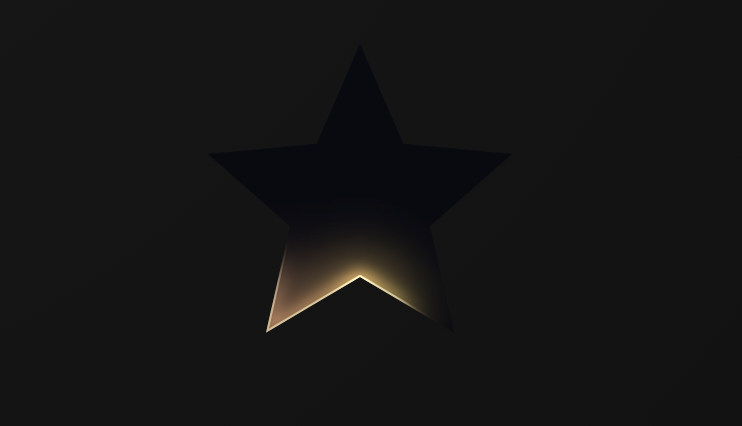
Any CustomClipper<Path> can be used as the mask:
BorderBeamEffect(
  mask: const StarClipper(),
  // ...
  child: child,
)
The same mask clips the child and defines the animated border.
The project in example/ contains five interactive demos:
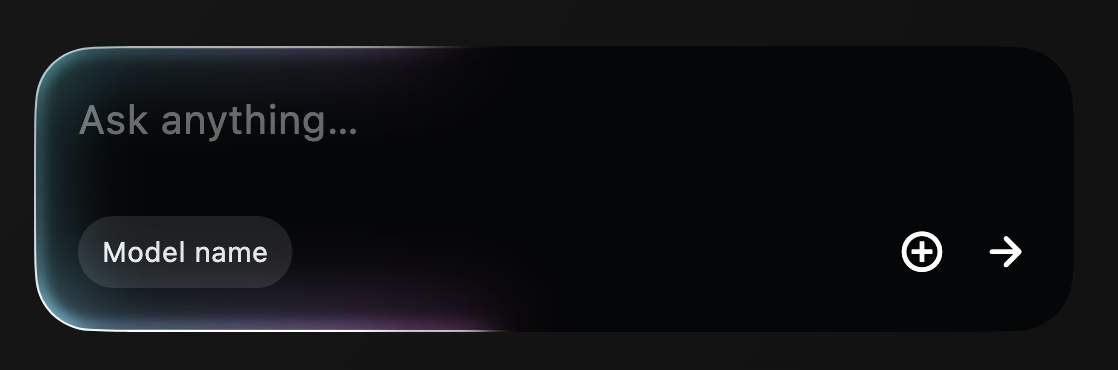
- an AI prompt card using
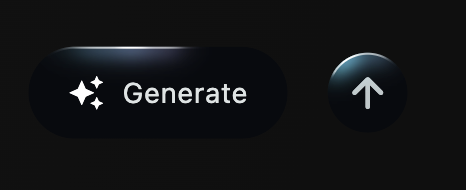
RoundedSuperellipseBorder; - compact pill and circular action buttons;
- a custom star showing that the mask can have any shape;
- a continuously morphing squircle-to-circle mask;
- a compact action that animates between expanded and collapsed sizes.
Every demo includes live controls for glow blur radius (1–200) and beam length, so the same effect can be tuned against different sizes and shapes.
Run it with:
cd example
flutter run
The original focused playground is also preserved:
cd example
flutter run -t lib/playground.dart