
Simplified judgels deployment with docker compose without using the official ansible deployment guide.
This docker-compose configuration supports two deployment topologies:
-
Multi-VM (recommended for production): 1 core VM +
$N$ grader VMs. Graders fetch problem data from the core VM over SSH. Gives you resource isolation between the core services and the untrusted user code that graders sandbox. The steps below cover this setup. - Single-VM: everything runs on one host. Graders read problem data via a local bind mount instead of SSH. Simpler to set up, but grader sandboxes share the host with the core DB/API — a sandbox escape has a larger blast radius. See Single-VM deployment.
For multi-VM:
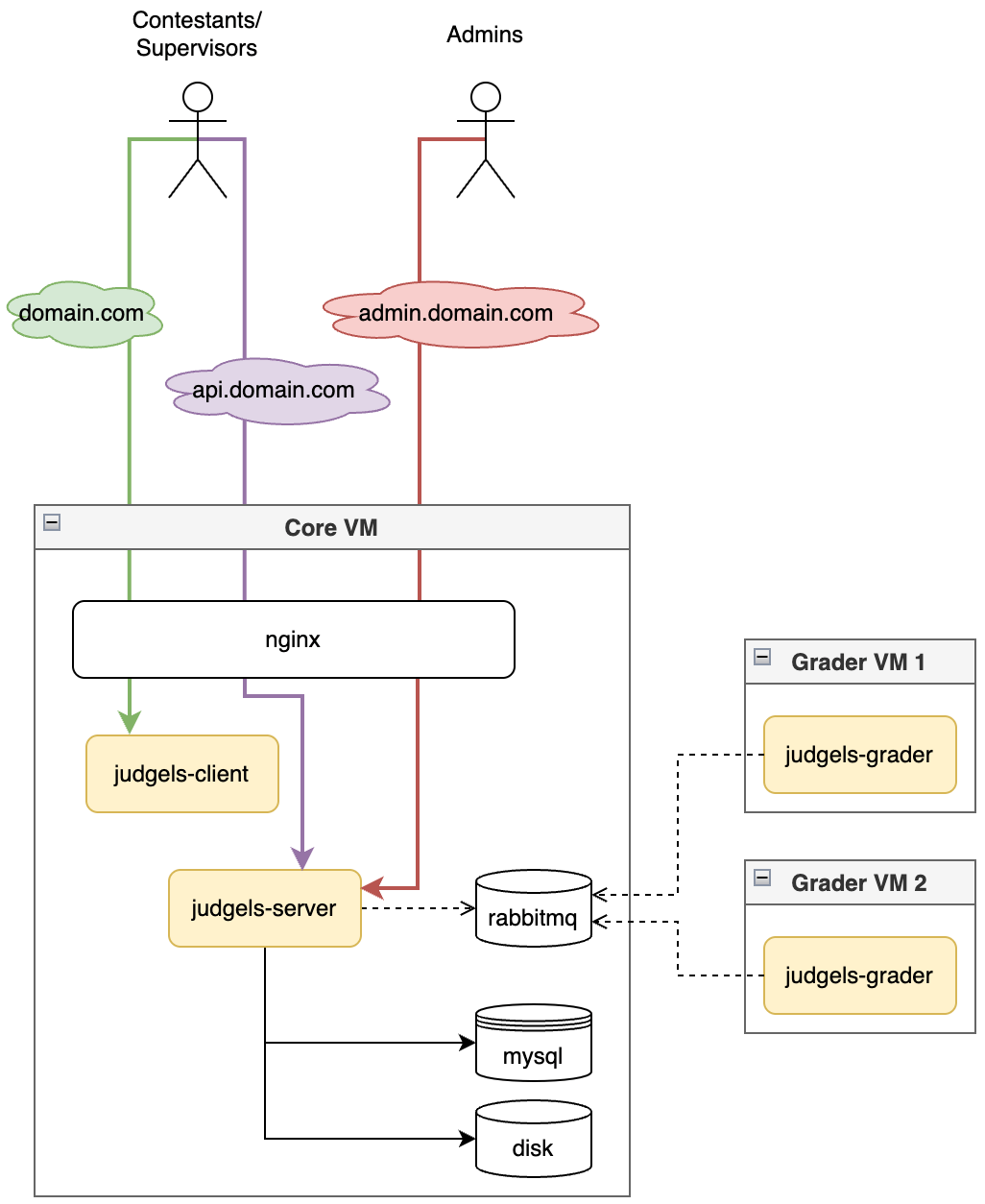
- Core VM will be used to host the React Client, Java Server, MySQL Database and RabbitMQ Message Broker that can be spin up with containers defined in docker-compose.yml.
- The Grader VM is used to run the grading system. You can also run the grader on your local machine, as long as it has the SSH private key that corresponds to the Grader VM’s public key. The Grader VM’s SSH public key must be added to the Core VM’s
authorized_keysto allow SSH access. You can start the grader container using thespawn-grader.shscript.
For more understanding about how this system works, please see the architecture diagram and the concepts in the official judgels website.
Note
Make sure Core VM and Grader VM already has docker installed!
- Clone this repository in
Core VM
git clone https://github.com/bccfilkom-cp/judgels-compose.git
cd judgels-compose- Copy the
.env.examplefile to.envand defined your database and rabbitmq credentials there.
cp .env.example .env
vim .env # or nano .env-
Change the variables in ./conf/judgels-client.js file and ./conf/judgels-server.yml that marked as
CHANGE THIS. You can also change the rabbitmq port forwarding in docker-compose.yml for security purpose. -
Now made core-deploy.sh bash script to be executeable by running the following command.
chmod +x ./core-deploy.sh- Execute the bash script with sudo.
sudo ./core-deploy.sh- If all goes well, now we need to prepare the grader container, clone this repository again in
Grader VM
git clone https://github.com/bccfilkom-cp/judgels-compose.git
cd judgels-compose-
Adjust the variables in judgels-grader.yml
-
Provision the Grader VM with prov-grader.sh bash script, execute it with sudo.
chmod +x ./prov-grader.sh
sudo ./prov-grader.sh- After rebooting, add the Grader VM SSH pubkey to Core VM to allow Grader VM to SSH to Core VM
- Spawn the grader containers with spawn-grader.sh bash script. You can change how many containers you needed
chmod +x ./spawn-grader.sh
sudo ./spawn-grader.sh- And that's all, you're good to go. You can access the web client interface (User and Admin for creating contests) at
CORE_VM_IP, and the web admin interface (Admin for managing problemsets) atCORE_VM_IP:9101, depending on the ports defined in the judgels-server container of your docker-compose.yml. To create a contest, log in as superadmin through the web client interface.
Runs the core services and graders on the same host. Use this for local development, small deployments, or when you don't need the isolation boundary that multi-VM provides.
Warning
Grader sandboxes will share the host with the core DB, API, and RabbitMQ. A sandbox escape from untrusted user code has a larger blast radius than in the multi-VM setup. Prefer multi-VM for production.
From the core VM, after completing steps 1–5 from the multi-VM instructions above:
- Provision the host for the grader sandbox (kernel tuning, reboots at the end):
chmod +x ./prov-grader.sh
sudo ./prov-grader.sh- Edit ./conf/judgels-grader.yml and set:
gabriel:
  cache:
    serverBaseDataDir: /judgels/server/var/data
No user@host: prefix. This is the path inside the grader container where the server data directory will be bind-mounted read-only. rsyncIdentityFile can be left at its default since rsync ignores the SSH transport when both source and destination are local paths.
- Spawn the grader containers on the same host:
chmod +x ./spawn-grader.sh
sudo ./spawn-grader.sh
The script detects the running judgels-server container and bind-mounts ./judgels/server/var/data into each grader. No SSH keypair, no authorized_keys entry, and no separate Grader VM are needed.
- Access the interfaces as described in the multi-VM step 10, except
CORE_VM_IPis your single host's address (uselocalhostif accessing from the same machine).
If you discovered any issue regarding the judgels docker configuration, please see ISSUES.md to create new issue.