






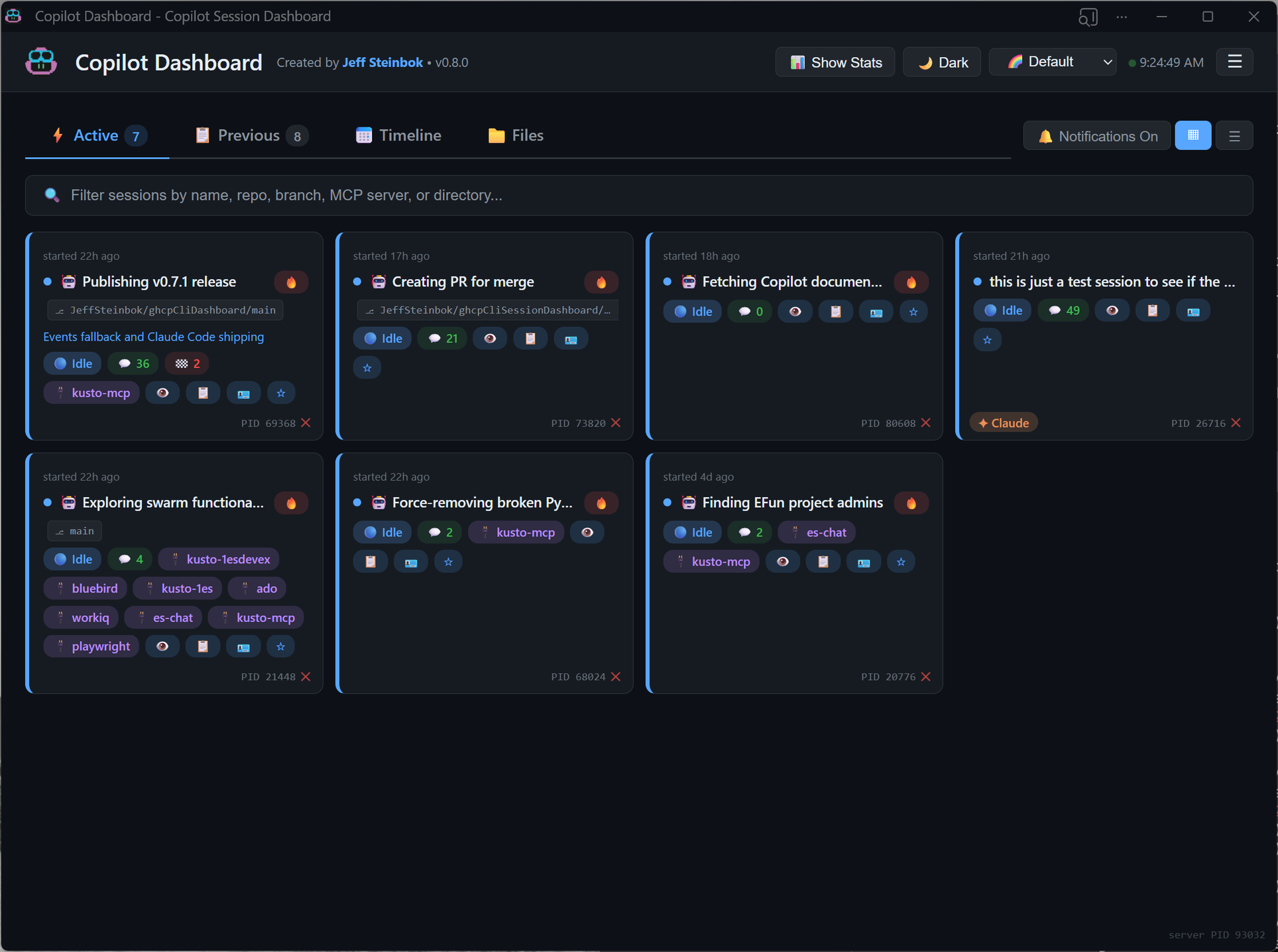
A local web dashboard that monitors all your GitHub Copilot CLI, Claude Code, and Microsoft Scout sessions in real-time. Designed for power users running multiple AI coding sessions simultaneously.
pip install agenteye-app# Clone the repo
git clone https://github.com/JeffSteinbok/agenteye.git
cd agenteye
# Install in editable mode
pip install -e .Run as a native desktop app with system tray integration:
# Start the tray app (window + tray icon)
agenteye app

# Start minimized to tray
agenteye app --hidden

# Custom port
agenteye app --port 8080
The tray app provides:
- Native window with dark/light title bar matching app theme
- System tray icon with quick access menu
- Close (X) minimizes to tray, quit from tray menu exits
- Native Windows notifications (no browser permission needed)
Run as a background server and open in your browser:
# Start the dashboard
agenteye start

# Start in background
agenteye start --background

# Check status
agenteye status

# Stop
agenteye stop

# Upgrade to the latest version (restarts automatically if running)
agenteye upgrade
Open http://localhost:5111 in your browser.
# Start tray app on login (recommended)
agenteye autostart --mode app

# Start background server on login
agenteye autostart --mode server

# Custom port
agenteye autostart --mode app --port 8080

# Remove login startup
agenteye autostart-remove- Working / Thinking (green) — session is actively running tools or reasoning
- Waiting (yellow) — session needs your input (
ask_userorask_permissionpending) - Idle (blue) — session is done and ready for your next task
- Native tray app —
agenteye appruns as a native desktop application with system tray integration, eliminating the need for a separate browser tab - Dark/light title bar — window title bar automatically matches your chosen theme
- Native notifications — Windows toast notifications with proper app name and icon (no browser permission prompts)
- Start hidden —
--hiddenflag starts the app minimized to tray (great for autostart) - Claude Code support — automatically discovers Claude Code sessions from
~/.claude/projects/. Active Claude sessions appear alongside Copilot sessions with a✦ Claudebadge. - Microsoft Scout support — automatically discovers Scout's embedded Copilot sessions from
~/.scout/copilot/. Active Scout sessions appear with a🧭 Scoutbadge. - Cross-machine sync — see active sessions from all your machines in one dashboard, powered by OneDrive or any cloud-synced folder. See Cross-Machine Sync for details.
- Settings menu — ☰ hamburger menu in the header with toggles for autostart-on-login and remote sync.
- Upgrade command —
agenteye upgradestops the server, upgrades via pip, and restarts automatically. - Desktop notifications — get alerts when sessions transition between states
- Focus window — bring an active session's terminal to the foreground with one click
- Restart commands — copy-pasteable
copilot --resume <id>commands for every session - Dismiss sessions — hide completed/noisy sessions from the dashboard without deleting them on disk
- Waiting context — shows what a waiting session is asking (e.g. the
ask_userquestion and choices) - Background tasks — shows count of running subagents per session
- Session details — click any session to see checkpoints, recent tool output, references, and conversation history
- Tile & List views — compact card grid or detailed expandable rows
- 9 color palettes and light/dark mode
See active sessions from all your machines in one dashboard — powered by OneDrive, Google Drive, or any cloud-synced folder. No Git commits needed.
How it works:
- On each poll cycle, the dashboard exports your active sessions as JSON files to a shared cloud folder
- Other machines read those files and display them in a "Remote Sessions" section under Active
- Each machine only writes to its own subfolder — no sync conflicts
Auto-detection (priority order):
OneDriveCommercial(preferred — prevents data leakage to personal accounts)OneDriveConsumer- User Documents folder
Configuration (~/.copilot/dashboard-config.json):
{
  "sync": {
    "enabled": true,
    "folder": "D:\\MyCloudSync"
  }
}- Set
"enabled": falseto disable sync entirely - Set
"folder"to override auto-detection with a specific path
What remote sessions show:
- Live state indicators (working, waiting, idle)
- Session summary, intent, branch, MCP servers, turn/checkpoint counts
- Machine name badge (e.g.
🖥️ LAPTOP-HOME)
What remote sessions don't show:
- No detail drill-down (checkpoints, turns, files)
- No focus or kill actions (those are local-only)
- No past/previous sessions from remote machines
| Package | Purpose |
|---|---|
fastapi |
Web framework with auto-generated OpenAPI docs |
uvicorn |
ASGI server |
pywinauto |
Window focus and process detection (Windows-only) |
pywebview |
Native window for tray app |
pystray |
System tray icon |
plyer |
Native OS notifications |
All are installed automatically via pip install agenteye-app.
For more details on architecture, data sources, and API endpoints, see DEVELOPMENT.md.