






This is the central hub for the Jaidevstudio open-source community. Whether you want to join the organization, get help with a project, share ideas, or connect with fellow developers -- this is the place.
Our automated systems handle membership invitations so you can get started within minutes.

Click here to submit your invitation request
Joining is free, open to everyone, and processed automatically. Once submitted, the system validates your account and sends the invitation. You will receive a comment on your issue with next steps.
- Accept the invitation -- check your email or visit https://github.com/orgs/Jaidevstudio/invitation
- Set membership to Public -- go to https://github.com/orgs/Jaidevstudio/people, find your name, click the dropdown, select Public
- Pick a project -- browse our repositories below and look for issues labeled
good first issue
Visual guide: Setting membership to Public
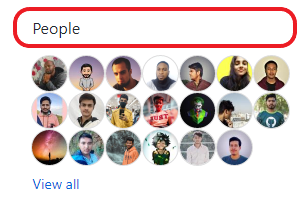
Navigate to the organization members page:
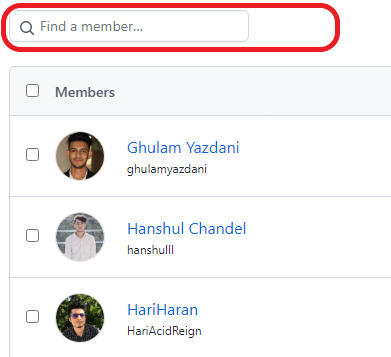
Search for your username:
Change from Private to Public:

| Repository | Description | Links |
|---|---|---|
| MotherTongue | Write and run code in your mother language -- our flagship interpreter with 17 language slots | Repo |
| DevToolkit | Collection of free developer utilities -- each tool is one PR | Repo |
| OpenSource Challenges | Weekly coding challenges for all skill levels | Repo |
| CodeSnippets | Community-built library of reusable code snippets in every language | Repo |
| Unique Github Profiles | Curated collection of inspiring GitHub profile READMEs | Repo |
| Member.json | Member directory -- add yourself after joining | Repo |
| About | Our community values, mission, and core beliefs | Repo |
Where to start:
- Look for issues labeled
good first issuein any of our repositories - Check the issue queue for open tasks
- Join Discord and ask in the
#first-timerschannel
Contribution steps:
- Fork the repository
- Clone your fork locally
- Create a branch --
git checkout -b my-feature - Commit your changes with descriptive messages
- Push to your fork and open a Pull Request
- A maintainer will review and merge your work
Use Issues for actionable items:
- Organization invitation requests
- Bug reports
- Feature requests
- Portfolio, resume, or open-source project reviews
Use Discussions for conversation:
- General questions
- Ideas and brainstorming
- Showcasing your work for community feedback
What is a GitHub Organization?
A way to group repositories and people under one entity. Examples: Netflix, Facebook, and Jaidevstudio. Learn more on GitHub docs.
How do I keep my fork up to date?
Add a remote called
upstream pointing to the original repo:
git remote add upstream https://github.com/Jaidevstudio/REPO_NAME.git
git fetch upstream
git merge upstream/main
How do I get started with open source?
Start by making your first pull request in this repository. Contributing to open source is not just about code -- it is about collaboration, communication, and adding value. If you need help, ask in our Discord.



Built with purpose by the Jaidevstudio community