Skip to content

Fix - Company cards verification always forwards to Add New, skipping feed and upgrade branches - #99184

Open
jmusial wants to merge 4 commits into
Expensify:mainfrom
software-mansion-labs:fix/company-cards-verify-account-flow
Open

Fix - Company cards verification always forwards to Add New, skipping feed and upgrade branches#99184
jmusial wants to merge 4 commits into
Expensify:mainfrom
software-mansion-labs:fix/company-cards-verify-account-flow

Conversation

@jmusial

@jmusial jmusial commented Aug 21, 2026

Copy link
Copy Markdown
Contributor

Explanation of Change

  • Moved all three company-cards verify-account entry points (empty state CTA, feed selector CTA, settings feed refresh) to useVerifyAccountAndResume.
  • Registered the company-cards screens as entryScreens on the verify-account dynamic route and deleted the now-redundant static WORKSPACE_COMPANY_CARDS_VERIFY_ACCOUNT route, screen, and page.
  • Fixes: unvalidated users now respect the upgrade path and the feed selector instead of always jumping to add-new.

Fixed Issues

$ #98066
PROPOSAL:

Tests

Precondition: account that is unvalidated .
(can be faked with await Onyx.merge('account', {validated: false}); in browser console)

Scenario 1

  1. Open app, go to a workspace with at least one existing company card feed.
  2. Navigate to More features> Company cards, then open the feed switcher and tap Add cards.
  3. Verify the verify-account RHP opens, enter the magic code, and verify you land on the add-card-feed flow.

Scenario 2

  1. Open app, go to a workspace that is Collect workspace with at least one existing company card feed.
  2. Navigate to More features> Company cards, then open the feed switcher and tap Add cards.
  3. Verify the verify-account RHP opens, enter the magic code, and verify you land on upgrade workspace page.

Scenario 3

  1. Open app, go to a workspace with at least one existing direct company card feed
  2. Navigate to said workspace > More features > Company cards, open the feed Settings (gear icon), and tap Assign new cards.
  3. Verify the verify-account RHP opens, enter the magic code, and verify the assign-card modal opens on the bank connection and no infinite loading happens.

Offline tests

QA Steps

Same as tests

PR Author Checklist

  • I linked the correct issue in the ### Fixed Issues section above
  • I wrote clear testing steps that cover the changes made in this PR
    • I added steps for local testing in the Tests section
    • I added steps for the expected offline behavior in the Offline steps section
    • I added steps for Staging and/or Production testing in the QA steps section
    • I added steps to cover failure scenarios (i.e. verify an input displays the correct error message if the entered data is not correct)
    • I turned off my network connection and tested it while offline to ensure it matches the expected behavior (i.e. verify the default avatar icon is displayed if app is offline)
    • I tested this PR with a High Traffic account against the staging or production API to ensure there are no regressions (e.g. long loading states that impact usability).
  • I included screenshots or videos for tests on all platforms
  • I ran the tests on all platforms & verified they passed on:
    • Android: Native
    • Android: mWeb Chrome
    • iOS: Native
    • iOS: mWeb Safari
    • MacOS: Chrome / Safari
  • I verified there are no console errors (if there's a console error not related to the PR, report it or open an issue for it to be fixed)
  • I followed proper code patterns (see Reviewing the code)
    • I verified that comments were added to code that is not self explanatory
    • I verified that any new or modified comments were clear, correct English, and explained "why" the code was doing something instead of only explaining "what" the code was doing.
    • I verified any copy / text that was added to the app is grammatically correct in English. It adheres to proper capitalization guidelines (note: only the first word of header/labels should be capitalized), and is either coming verbatim from figma or has been approved by marketing (in order to get marketing approval, ask the Bug Zero team member to add the Waiting for copy label to the issue)
  • If a new code pattern is added I verified it was agreed to be used by multiple Expensify engineers
  • I followed the guidelines as stated in the Review Guidelines
  • I tested other components that can be impacted by my changes (i.e. if the PR modifies a shared library or component like Avatar, I verified the components using Avatar are working as expected)
  • If a new CSS style is added I verified that:
    • A similar style doesn't already exist
    • The style can't be created with an existing StyleUtils function (i.e. StyleUtils.getBackgroundAndBorderStyle(theme.componentBG))
  • If new assets were added or existing ones were modified, I verified that:
    • The assets are optimized and compressed (for SVG files, run npm run compress-svg)
    • The assets load correctly across all supported platforms.
  • If the PR modifies code that runs when editing or sending messages, I tested and verified there is no unexpected behavior for all supported markdown - URLs, single line code, code blocks, quotes, headings, bold, strikethrough, and italic.
  • If the PR modifies a generic component, I tested and verified that those changes do not break usages of that component in the rest of the App (i.e. if a shared library or component like Avatar is modified, I verified that Avatar is working as expected in all cases)
  • If the PR modifies a component related to any of the existing Storybook stories, I tested and verified all stories for that component are still working as expected.
  • If the PR modifies a component or page that can be accessed by a direct deeplink, I verified that the code functions as expected when the deeplink is used - from a logged in and logged out account.
  • If the PR modifies the UI (e.g. new buttons, new UI components, changing the padding/spacing/sizing, moving components, etc) or modifies the form input styles:
    • I verified that all the inputs inside a form are aligned with each other.
    • I added Design label and/or tagged @Expensify/design so the design team can review the changes.
  • I added unit tests for any new feature or bug fix in this PR to help automatically prevent regressions in this user flow.
  • If the main branch was merged into this PR after a review, I tested again and verified the outcome was still expected according to the Test steps.

Screenshots/Videos

Android: Native
Screen.Recording.2026-08-21.at.16.20.34.mov
Android: mWeb Chrome
iOS: Native
Screen.Recording.2026-08-21.at.16.12.01.mov
iOS: mWeb Safari
Screen.Recording.2026-08-21.at.16.15.31.mov
MacOS: Chrome / Safari
Screen.Recording.2026-08-21.at.15.52.47.mov

@jmusial

jmusial commented Aug 21, 2026

Copy link
Copy Markdown
Contributor Author

@codex review

@codecov

codecov Bot commented Aug 21, 2026

Copy link
Copy Markdown

Codecov Report

✅ Changes either increased or maintained existing code coverage, great job!

Files with missing lines Coverage Δ
src/ROUTES.ts 26.95% <ø> (+0.31%) ⬆️
src/SCREENS.ts 100.00% <ø> (ø)
...gation/AppNavigator/ModalStackNavigators/index.tsx 6.32% <ø> (ø)
src/libs/Navigation/linkingConfig/config.ts 66.66% <ø> (ø)
...panyCards/WorkspaceCompanyCardFeedSelectorPage.tsx 65.57% <100.00%> (+65.57%) ⬆️
...ompanyCards/WorkspaceCompanyCardPageEmptyState.tsx 90.90% <83.33%> (+90.90%) ⬆️
src/libs/actions/CompanyCards.ts 34.14% <0.00%> (+0.41%) ⬆️
...space/companyCards/BankConnection/index.native.tsx 0.00% <0.00%> (ø)
...es/workspace/companyCards/BankConnection/index.tsx 0.00% <0.00%> (ø)
...companyCards/WorkspaceCompanyCardsSettingsPage.tsx 0.00% <0.00%> (ø)
... and 385 files with indirect coverage changes

@chatgpt-codex-connector

Copy link
Copy Markdown

Codex Review: Didn't find any major issues. More of your lovely PRs please.

Reviewed commit: 14c0ecfc23

ℹ️ About Codex in GitHub

Codex has been enabled to automatically review pull requests in this repo. Reviews are triggered when you

  • Open a pull request for review
  • Mark a draft as ready
  • Comment "@codex review".

If Codex has suggestions, it will comment; otherwise it will react with 👍.

When you sign up for Codex through ChatGPT, Codex can also answer questions or update the PR, like "@codex address that feedback".

@jmusial
jmusial marked this pull request as ready for review August 21, 2026 14:25
@jmusial
jmusial requested review from a team as code owners August 21, 2026 14:25
@melvin-bot
melvin-bot Bot requested review from aimane-chnaif and flaviadefaria and removed request for a team August 21, 2026 14:25
@melvin-bot

melvin-bot Bot commented Aug 21, 2026

Copy link
Copy Markdown

@aimane-chnaif Please copy/paste the Reviewer Checklist from here into a new comment on this PR and complete it. If you have the K2 extension, you can simply click: [this button]

@melvin-bot
melvin-bot Bot removed the request for review from a team August 21, 2026 14:25

@chatgpt-codex-connector chatgpt-codex-connector Bot left a comment

Copy link
Copy Markdown

Choose a reason for hiding this comment

The reason will be displayed to describe this comment to others. Learn more.

💡 Codex Review

Here are some automated review suggestions for this pull request.

Reviewed commit: 14c0ecfc23

ℹ️ About Codex in GitHub

Codex has been enabled to automatically review pull requests in this repo. Reviews are triggered when you

  • Open a pull request for review
  • Mark a draft as ready
  • Comment "@codex review".

If Codex has suggestions, it will comment; otherwise it will react with 👍.

When you sign up for Codex through ChatGPT, Codex can also answer questions or update the PR, like "@codex address that feedback".

}
if (!isUserValidated) {
Navigation.navigate(ROUTES.WORKSPACE_COMPANY_CARDS_VERIFY_ACCOUNT.getRoute(policyID, selectedFeed));
verifyAccountAndResume(undefined);

Copy link
Copy Markdown

Choose a reason for hiding this comment

The reason will be displayed to describe this comment to others. Learn more.

P2 Badge Preserve the refresh intent across verification reloads

When an unvalidated user starts a card-feed refresh and then reloads the web page or restores the app after process termination, the resume callback is lost because useVerifyAccountAndResume stores it only in component state. The removed verification route encoded feed in the URL and supplied a deterministic forward destination, but the restored generic verify page now merely returns to settings, so this callback never runs and the refresh flow silently stops. Persist or encode the pending refresh intent so it can survive remounting.

Useful? React with 👍 / 👎.

Copy link
Copy Markdown
Contributor Author

Choose a reason for hiding this comment

The reason will be displayed to describe this comment to others. Learn more.

While true, I think we're accepting this on all resume after verification flows

Comment thread tests/ui/WorkspaceCompanyCardFeedSelectorPageTest.tsx Outdated
Comment thread tests/ui/WorkspaceCompanyCardPageEmptyStateTest.tsx Outdated
@jmusial

jmusial commented Aug 24, 2026

Copy link
Copy Markdown
Contributor Author

@aimane-chnaif kind bump

@jmusial

jmusial commented Aug 25, 2026

Copy link
Copy Markdown
Contributor Author

@aimane-chnaif bumpity bump

@aimane-chnaif

Copy link
Copy Markdown
Contributor

reviewing today

@aimane-chnaif

aimane-chnaif commented Aug 25, 2026

Copy link
Copy Markdown
Contributor

Reviewer Checklist

  • I have verified the author checklist is complete (all boxes are checked off).
  • I verified the correct issue is linked in the ### Fixed Issues section above
  • I verified testing steps are clear and they cover the changes made in this PR
    • I verified the steps for local testing are in the Tests section
    • I verified the steps for Staging and/or Production testing are in the QA steps section
    • I verified the steps cover any possible failure scenarios (i.e. verify an input displays the correct error message if the entered data is not correct)
    • I turned off my network connection and tested it while offline to ensure it matches the expected behavior (i.e. verify the default avatar icon is displayed if app is offline)
  • I checked that screenshots or videos are included for tests on all platforms
  • I included screenshots or videos for tests on all platforms
  • I verified that the composer does not automatically focus or open the keyboard on mobile unless explicitly intended. This includes checking that returning the app from the background does not unexpectedly open the keyboard.
  • I verified tests pass on all platforms & I tested again on:
    • Android: HybridApp
    • Android: mWeb Chrome
    • iOS: HybridApp
    • iOS: mWeb Safari
    • MacOS: Chrome / Safari
  • If there are any errors in the console that are unrelated to this PR, I either fixed them (preferred) or linked to where I reported them in Slack
  • I verified proper code patterns were followed (see Reviewing the code)
    • I verified that any callback methods that were added or modified are named for what the method does and never what callback they handle (i.e. toggleReport and not onIconClick).
    • I verified that comments were added to code that is not self explanatory
    • I verified that any new or modified comments were clear, correct English, and explained "why" the code was doing something instead of only explaining "what" the code was doing.
    • I verified any copy / text that was added to the app is grammatically correct in English. It adheres to proper capitalization guidelines (note: only the first word of header/labels should be capitalized), and is either coming verbatim from figma or has been approved by marketing (in order to get marketing approval, ask the Bug Zero team member to add the Waiting for copy label to the issue)
  • If a new code pattern is added I verified it was agreed to be used by multiple Expensify engineers
  • I verified that this PR follows the guidelines as stated in the Review Guidelines
  • I verified other components that can be impacted by these changes have been tested, and I retested again (i.e. if the PR modifies a shared library or component like Avatar, I verified the components using Avatar have been tested & I retested again)
  • If a new component is created I verified that:
    • A similar component doesn't exist in the codebase
    • All props are defined accurately and each prop has a /** comment above it */
    • The file is named correctly
    • The component has a clear name that is non-ambiguous and the purpose of the component can be inferred from the name alone
    • The only data being stored in the state is data necessary for rendering and nothing else
    • For Class Components, any internal methods passed to components event handlers are bound to this properly so there are no scoping issues (i.e. for onClick={this.submit} the method this.submit should be bound to this in the constructor)
    • Any internal methods bound to this are necessary to be bound (i.e. avoid this.submit = this.submit.bind(this); if this.submit is never passed to a component event handler like onClick)
    • All JSX used for rendering exists in the render method
    • The component has the minimum amount of code necessary for its purpose, and it is broken down into smaller components in order to separate concerns and functions
  • If any new file was added I verified that:
    • The file has a description of what it does and/or why is needed at the top of the file if the code is not self explanatory
  • If a new CSS style is added I verified that:
    • A similar style doesn't already exist
    • The style can't be created with an existing StyleUtils function (i.e. StyleUtils.getBackgroundAndBorderStyle(theme.componentBG)
  • If the PR modifies code that runs when editing or sending messages, I tested and verified there is no unexpected behavior for all supported markdown - URLs, single line code, code blocks, quotes, headings, bold, strikethrough, and italic.
  • If the PR modifies a generic component, I tested and verified that those changes do not break usages of that component in the rest of the App (i.e. if a shared library or component like Avatar is modified, I verified that Avatar is working as expected in all cases)
  • If the PR modifies a component related to any of the existing Storybook stories, I tested and verified all stories for that component are still working as expected.
  • If the PR modifies a component or page that can be accessed by a direct deeplink, I verified that the code functions as expected when the deeplink is used - from a logged in and logged out account.
  • If the PR modifies the UI (e.g. new buttons, new UI components, changing the padding/spacing/sizing, moving components, etc) or modifies the form input styles:
    • I verified that all the inputs inside a form are aligned with each other.
    • I added Design label and/or tagged @Expensify/design so the design team can review the changes.
  • For any bug fix or new feature in this PR, I verified that sufficient unit tests are included to prevent regressions in this flow.
  • If the main branch was merged into this PR after a review, I tested again and verified the outcome was still expected according to the Test steps.
  • I have checked off every checkbox in the PR reviewer checklist, including those that don't apply to this PR.

Screenshots/Videos

Android: HybridApp
Android: mWeb Chrome
iOS: HybridApp
ios.mov
iOS: mWeb Safari
MacOS: Chrome / Safari
web1.mov
web2.mov
web3.mov

@jmusial

jmusial commented Aug 26, 2026

Copy link
Copy Markdown
Contributor Author

@aimane-chnaif bampity bumpity bump

@aimane-chnaif

Copy link
Copy Markdown
Contributor

I was testing this.

  1. Open app, go to a workspace with at least one existing company card feed.

How were you able to add one card feed without validating account?

@jmusial

jmusial commented Aug 26, 2026

Copy link
Copy Markdown
Contributor Author

I was testing this.

  1. Open app, go to a workspace with at least one existing company card feed.

How were you able to add one card feed without validating account?

You add it in workspace from validated account and add new account to said workspace as admin, then assign a card to it

}
if (!isUserValidated) {
Navigation.navigate(ROUTES.WORKSPACE_COMPANY_CARDS_VERIFY_ACCOUNT.getRoute(policyID, selectedFeed));
verifyAccountAndResume(undefined);

Copy link
Copy Markdown
Contributor

Choose a reason for hiding this comment

The reason will be displayed to describe this comment to others. Learn more.

The test case for this change is missing.

After validation, Assign new cards modal briefly shows and closes. Sometimes infinite loading shows. <-- bug?
With already validated, infinite loading shows. <-- this also happens on production.

If this is not caused by this PR, no need to block on this.

ios.mov
web3.mov

@aimane-chnaif

Copy link
Copy Markdown
Contributor

Please add Scenario 3 for #99184 (comment) and perform test

@chatgpt-codex-connector

Copy link
Copy Markdown

Codex Review: Didn't find any major issues. Keep it up!

Reviewed commit: 6b3171677a

ℹ️ About Codex in GitHub

Codex has been enabled to automatically review pull requests in this repo. Reviews are triggered when you

  • Open a pull request for review
  • Mark a draft as ready
  • Comment "@codex review".

If Codex has suggestions, it will comment; otherwise it will react with 👍.

When you sign up for Codex through ChatGPT, Codex can also answer questions or update the PR, like "@codex address that feedback".

@MelvinBot

Copy link
Copy Markdown
Contributor

Review — LGTM ✅

The refactor is correct and matches the fix described. Unvalidated users now run the same branching logic after validation that validated users get up front (upgrade gate / feed selector / add-new), instead of always being forwarded to add-new. Nice cleanup deleting the bespoke verify-account route/screen/page in favor of the shared useVerifyAccountAndResume + dynamic verify-account route.

What I checked:

  • All three entry screens are correctly added to DYNAMIC_ROUTES.VERIFY_ACCOUNT.entryScreens and match the actual screen names the pages render under (COMPANY_CARDS, COMPANY_CARDS_SELECT_FEED, COMPANY_CARDS_SETTINGS). The dynamic route is gated on the focused underlying screen being in entryScreens, so this is required and matches the pre-existing wallet/contact-method pattern — same mount-persistence contract, no new pattern introduced.
  • Branching after validation is restored correctly in all three callers (feed selector, empty state, settings).
  • Delegate / read-only checks still run before the validation check in the empty-state CTA — ordering preserved.
  • Passing an explicit basePath to createDynamicRoute in the resume callbacks is the right call (and well commented) — after the verify page dismisses, Navigation.getActiveRoute() isn't reliable, so relying on the default would be fragile.
  • No dangling references to the deleted WORKSPACE_COMPANY_CARDS_VERIFY_ACCOUNT route/screen, WorkspaceCompanyCardsVerifyAccountPage, or the removed seedCardFeedRefresh export anywhere in src/tests.
  • Good, focused test coverage added for the validated / unvalidated-then-resume / delegate / upgrade-vs-add-new branches in both the feed selector and empty-state pages, and the obsolete route-getter tests are removed.
Minor nits (non-blocking)
  • Settings page — the if (!selectedFeed) return; guard moved from the press handler into refreshCardFeed. For an unvalidated user this now navigates to verify-account before the selectedFeed check, and if there's no selected feed the resume would then no-op. In practice this can't happen because the "Assign new cards" menu item is gated behind isDirectFeedType, which is only true when selectedFeed is truthy — so the guard is now purely defensive. Just flagging that the reachability moved.
  • The new UI tests mock nearly every hook by hand rather than using the standard Onyx test harness. That's a legitimate way to unit-test the branching, but it couples the tests to the current hook wiring — fine as-is, just something to be aware of on future refactors.
What I could not verify in this run
  • Jest suite: I couldn't execute the test files in this environment (sandbox blocked local Node execution), so I reviewed them statically rather than confirming green. Worth a local npx jest tests/ui/WorkspaceCompanyCardFeedSelectorPageTest.tsx tests/ui/WorkspaceCompanyCardPageEmptyStateTest.tsx tests/unit/RefreshCardFeedConnectionPageTest.tsx if not already covered by CI.
  • Web smoke test: the automated web session came up on a blank page (0 DOM nodes, no network) before reaching any workspace — a test-infra issue unrelated to this PR — so I couldn't exercise the flow live. The one behavior worth a quick manual check with an unvalidated account is the two RHP entry points (feed selector + settings): open → trigger verify → validate → confirm the resume callback actually fires (i.e. the underlying RHP screen stayed mounted through the verify RHP). Static analysis says it will (identical to the shipping DYNAMIC_CONTACT_METHODS case), but it's the only spot that's stack-dispatch-dependent.

view run

@MelvinBot

Copy link
Copy Markdown
Contributor

Regression scan — no regressions found ✅

I traced every behavior this refactor touches (static analysis) and exercised the flow live on web. Nothing broke for existing/validated users, and the risky part of the refactor (the dynamic verify-account route resolving from the company-cards pages) works at runtime.

Runtime result: partial — the CI test account was actually unvalidated, which is the exact precondition this PR fixes, but that means the flow hit the real magic-code wall, which the automated tester can't clear (no mailbox). So I confirmed the entry into verification but not the resume after validation. Positive signal: pressing Add cards opened a correctly-rendered "Validate your account" RHP — not a Not Found / blank / crash — and backing out returned cleanly to the company-cards page. That's the main thing the entry-screen registration had to get right.

What I checked for regressions

Code-level regression vectors (all clear)
  • Add-new dynamic route still resolves from the new explicit base paths. Both callers now pass an explicit basePath to createDynamicRoute(WORKSPACE_COMPANY_CARDS_ADD_NEW.path, …) — empty state passes COMPANY_CARDS, feed selector passes COMPANY_CARDS_SELECT_FEED. WORKSPACE_COMPANY_CARDS_ADD_NEW.entryScreens contains exactly those two screens, so both resolve — and they match what the old default (Navigation.getActiveRoute()) would have produced for validated users, so no change for the existing path.
  • startCardFeedRefresh is the only surviving refresh entry point and its only caller is the settings page (CompanyCards.ts:1369, WorkspaceCompanyCardsSettingsPage.tsx:126). Folding seedCardFeedRefresh into it doesn't affect any other caller — there are none.
  • No dangling references to the removed WORKSPACE_COMPANY_CARDS_VERIFY_ACCOUNT route/screen, WorkspaceCompanyCardsVerifyAccountPage, or seedCardFeedRefresh anywhere in the repo (grepped .ts/.tsx/.js/.json, including Mobile-Expensify).
  • Delegate / read-only / clearAddNewCardFlow ordering preserved — for validated users the branch order and side effects are byte-for-byte equivalent to before (delegate check → validation check → upgrade-gate/feed/add-new), just refactored into a continueAddCardsFlow helper. The new tests assert this per-branch.
  • The isUserValidated Onyx subscription each page had was removed and replaced by the one the hook provides — net neutral, no extra subscriptions.
Behavior changes worth being aware of (not bugs)
  • The old company-cards/verify-account deep link is gone (removed from linkingConfig). It was an internal, transient verification route (unlikely to be bookmarked), and it's now unreachable by URL — reachable only by appending the dynamic suffix to an already-gated entry screen. The old dedicated page wrapped verification in AccessOrNotFoundWrapper (company-cards feature + write access); the shared dynamic verify page doesn't re-check that, but it's safe because the entry screens are themselves gated before you can reach the CTA.
  • Settings page: the !selectedFeed guard moved into refreshCardFeed, so an unvalidated user technically routes to verify before that guard. In practice the "Assign new cards" item only renders when isDirectFeedType is true, which requires a selected feed — so unreachable.

Not verified at runtime (OTP-gated)

Because the tester couldn't clear the emailed code, these still want a manual check with an unvalidated account (the PR's own test precondition) to fully close the loop:

  • Resume-after-validation actually fires the branching (upgrade vs feed selector vs add-new) from each of the three entry points.
  • The two RHP-over-RHP entry points (feed selector, settings) — confirm the underlying RHP screen stays mounted through the verify RHP so the resume callback runs. Static analysis says yes (identical to the shipping DYNAMIC_CONTACT_METHODS pattern), but it's the one stack-dispatch-dependent spot.
Live test — Company cards (web), unvalidated account

Company cards empty state loaded cleanly
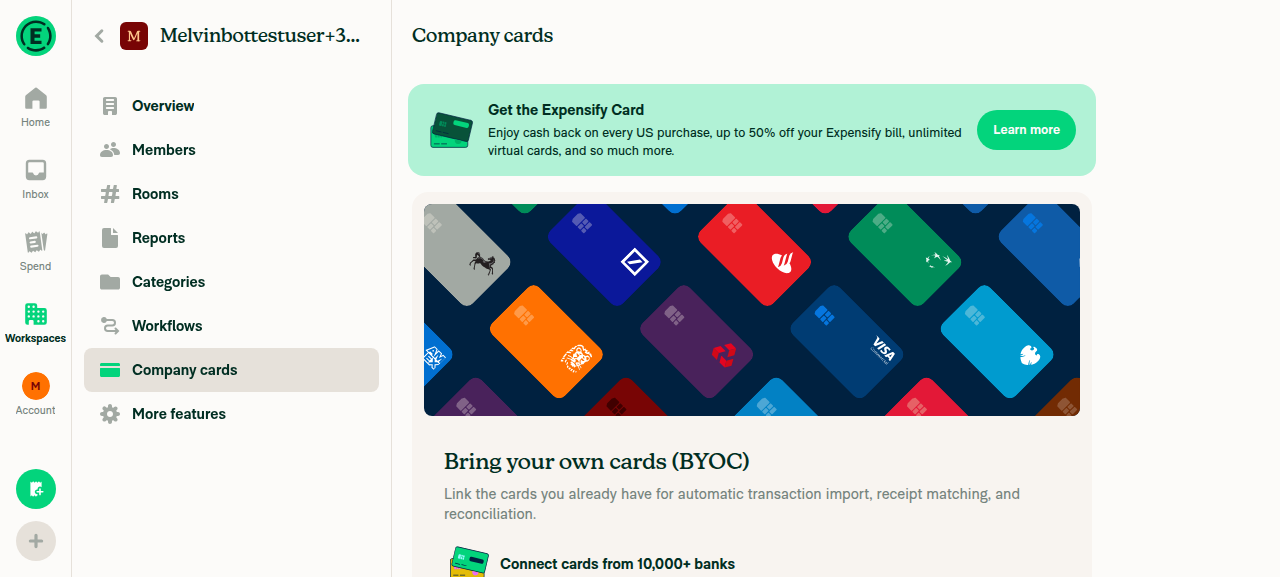
Company cards empty state loaded cleanly

Add cards opened Validate your account RHP (dynamic verify-account route resolved, no Not Found)
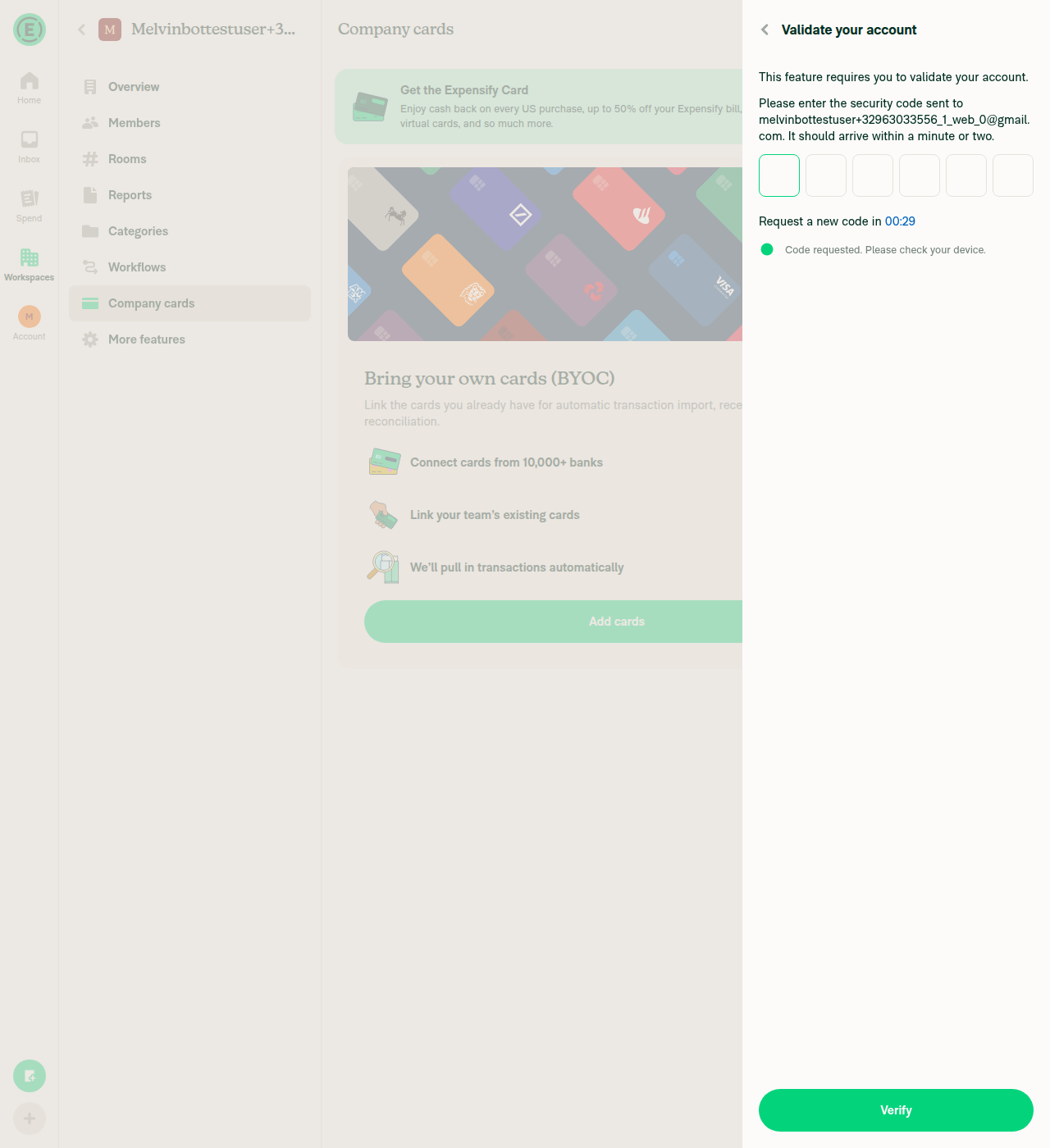
Add cards opened Validate your account RHP (dynamic verify-account route resolved, no Not Found)

Back navigation from verify screen returns cleanly to Company cards empty state
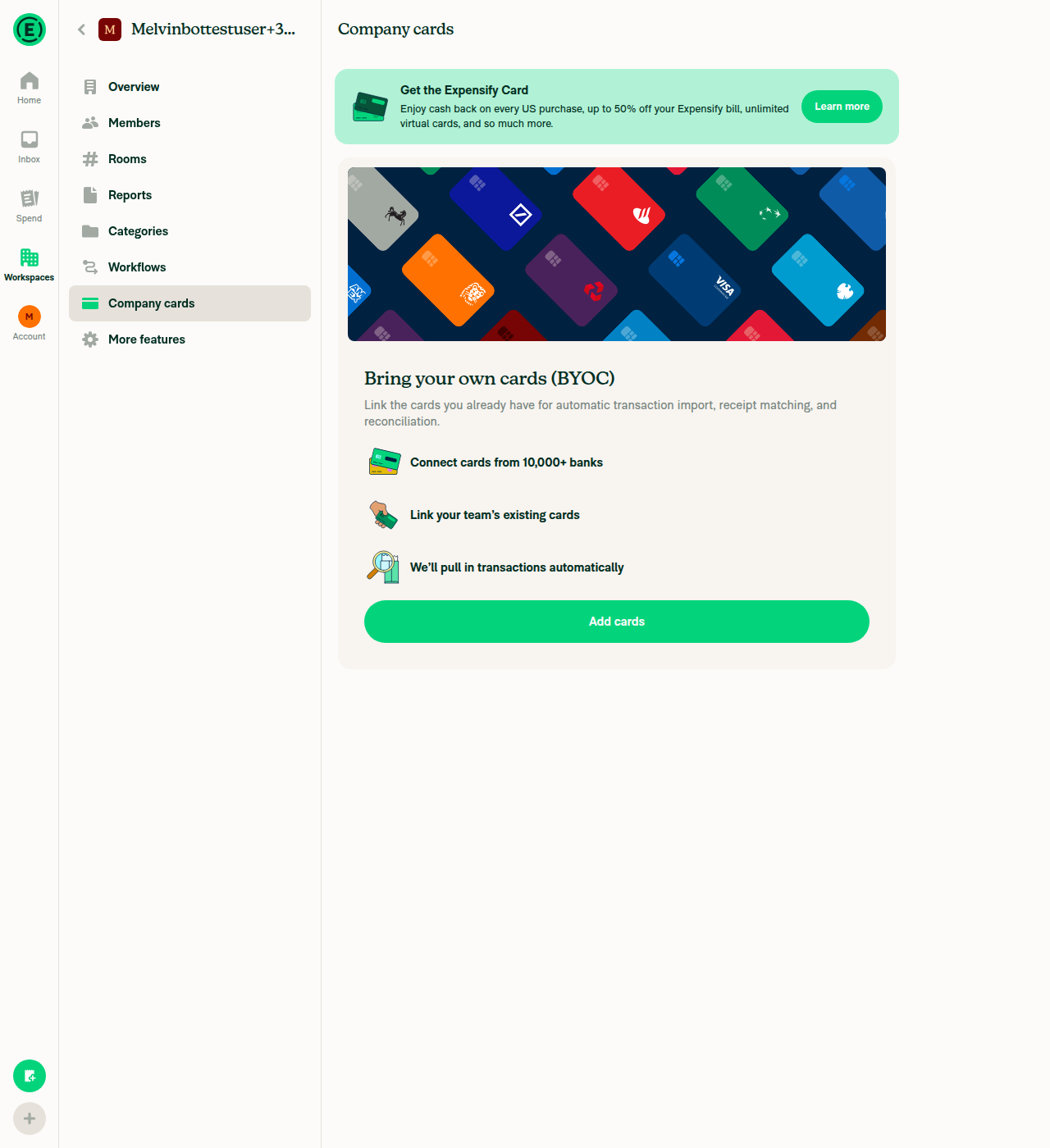
Back navigation from verify screen returns cleanly to Company cards empty state

Home shows account is genuinely unvalidated
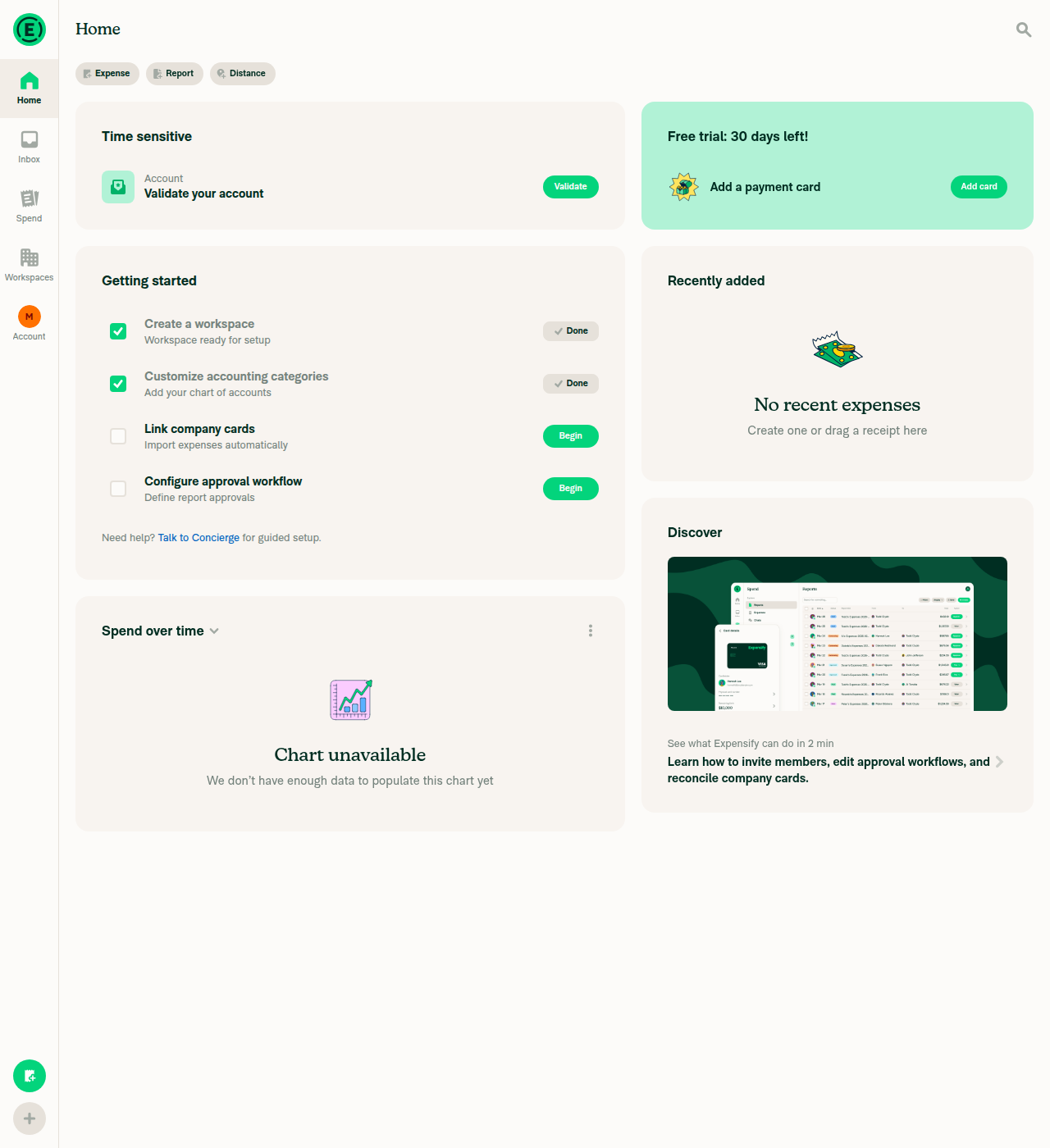
Home shows account is genuinely unvalidated

view run

@jmusial

jmusial commented Aug 26, 2026

Copy link
Copy Markdown
Contributor Author

Please add Scenario 3 for #99184 (comment) and perform test

Updated steps & fixed spinner bug - will add vids soom, run out of verification codes for now :(

@jmusial

jmusial commented Aug 26, 2026

Copy link
Copy Markdown
Contributor Author

@aimane-chnaif vids for scenario 3
Desktop

Screen.Recording.2026-08-26.at.16.16.40.mov

Native

Screen.Recording.2026-08-26.at.16.18.47.mov

@aimane-chnaif

Copy link
Copy Markdown
Contributor

@MelvinBot review last commit

Comment on lines +131 to +133
// When refreshing the feed, a healthy connection must not short-circuit into the assignee step.
// RefreshCardFeedConnectionPage can't render it and the modal would spin forever.
if (!assignCard?.isRefreshing) {

Copy link
Copy Markdown
Contributor

Choose a reason for hiding this comment

The reason will be displayed to describe this comment to others. Learn more.

ok, so this fixes the separate bug happening on production

@melvin-bot
melvin-bot Bot requested a review from mountiny August 26, 2026 14:41

@chatgpt-codex-connector chatgpt-codex-connector Bot left a comment

Copy link
Copy Markdown

Choose a reason for hiding this comment

The reason will be displayed to describe this comment to others. Learn more.

💡 Codex Review

Here are some automated review suggestions for this pull request.

Reviewed commit: 5539b0eac6

ℹ️ About Codex in GitHub

Codex has been enabled to automatically review pull requests in this repo. Reviews are triggered when you

  • Open a pull request for review
  • Mark a draft as ready
  • Comment "@codex review".

If Codex has suggestions, it will comment; otherwise it will react with 👍.

When you sign up for Codex through ChatGPT, Codex can also answer questions or update the PR, like "@codex address that feedback".

return;
// When refreshing the feed, a healthy connection must not short-circuit into the assignee step.
// RefreshCardFeedConnectionPage can't render it and the modal would spin forever.
if (!assignCard?.isRefreshing) {

Copy link
Copy Markdown

Choose a reason for hiding this comment

The reason will be displayed to describe this comment to others. Learn more.

P2 Badge Avoid reopening OAuth after a successful refresh

When an expired OAuth feed is successfully refreshed, isFeedExpired changes from true to false while assignCard.isRefreshing is still true. This effect therefore closes the completed popup, falls through this new condition, and calls openBankConnection(url) again; the parent RefreshCardFeedConnectionPage then closes the RHP after observing the expiration change, leaving a newly opened authentication popup behind in environments that permit it. Distinguish the initial healthy-feed launch from the expired-to-healthy completion so the latter returns without reopening OAuth.

Useful? React with 👍 / 👎.

Copy link
Copy Markdown
Contributor Author

Choose a reason for hiding this comment

The reason will be displayed to describe this comment to others. Learn more.

I didn't notice this effect when testing, did you @aimane-chnaif ?

@MelvinBot

Copy link
Copy Markdown
Contributor

Review of last commit — 5539b0e "fix endless spinner bug" — LGTM ✅

Correct and well-scoped fix. During a feed refresh of a healthy, non-expired direct feed, the BankConnection effect was advancing ASSIGN_CARD to the ASSIGNEE/CONFIRMATION step, but RefreshCardFeedConnectionPage only renders the BANK_CONNECTION/PLAID_CONNECTION steps — anything else falls to its default: <LoadingPage />, i.e. the endless spinner. Guarding that block with !assignCard?.isRefreshing correctly skips the assignee short-circuit on refresh while leaving the normal assign-card flow untouched.

I traced the fall-through for both platforms and it lands in the right place:

  • OAuth refresh (BANK_CONNECTION step, isPlaid false): web falls through to openBankConnection(url) and native renders the re-auth WebView — the connection reopens for re-authentication, then RefreshCardFeedConnectionPage's OAuth effect closes the RHP once expiration updates.
  • Plaid refresh goes through PlaidConnectionStep, not BankConnection, so the if (isPlaid) return; path here isn't the refresh path — no behavior change there.
  • Non-refresh assign flow (isRefreshing falsy) is unchanged, so no regression to card assignment.

Both index.tsx and index.native.tsx are updated identically, and assignCard?.isRefreshing is correctly added to each effect's dependency array. Comment explains the "why" clearly.

Minor note (non-blocking)

No unit coverage for the fixed branch: RefreshCardFeedConnectionPageTest mocks out BankConnection, so the isRefreshing short-circuit inside BankConnection isn't exercised. A small test asserting setAssignCardStepAndData is not called when assignCard.isRefreshing is true (and still called when false) would lock this in against regression. Not a blocker.

What I could not verify in this run

I reviewed this statically. I could not run typecheck / lint / React Compiler compliance or exercise the flow live — reproducing the endless spinner needs a workspace with a healthy, connected direct (OAuth) card feed and then hitting refresh, which isn't reproducible on a fresh test account without real bank credentials, so this path is best validated by QA on an account that already has a connected feed: open Company cards settings → Assign new cards / refresh on a healthy direct feed → confirm the re-auth screen opens (not an endless spinner) and the RHP closes on completion.


view run

Sign up for free to join this conversation on GitHub. Already have an account? Sign in to comment

Labels

None yet

Projects

None yet

Development

Successfully merging this pull request may close these issues.

3 participants