Skip to content

fix: localization dates not being localized correctly - #91569

Open
TaduJR wants to merge 107 commits into
Expensify:mainfrom
TaduJR:fix-localization-dates-not-being-localized-correctly
Open

fix: localization dates not being localized correctly#91569
TaduJR wants to merge 107 commits into
Expensify:mainfrom
TaduJR:fix-localization-dates-not-being-localized-correctly

Conversation

@TaduJR

@TaduJR TaduJR commented May 25, 2026

Copy link
Copy Markdown
Contributor

Explanation of Change

Display dates ignored the user's language. A Spanish user saw ago 19, 2025 a 12:02 PM: the month name was translated, but the order, the separators and the 12-hour clock were still English. Spanish writes 19 ago 2025. Translating the words isn't enough field order and clock style are part of the language too, and only Intl.DateTimeFormat knows them per locale.

Every date a user reads now goes through Intl.DateTimeFormat using a named format from CONST.DATE.INTL_FORMATS, with the locale passed in as an argument rather than read from a global.

Dates sent to the API or written to Onyx are untouched and still use yyyy-MM-dd HH:mm:ss. Those formats now have their own type, so a locale can no longer be passed where a format string belongs that mix-up is what crashed the second attempt.

The calendar starts the week on the correct day per locale via Intl.Locale.getWeekInfo(), with a fallback for Firefox and older Hermes builds that don't expose it.

Two things I'd like your call on:

  • English stays on Monday. CLDR maps en to en-US, which starts on Sunday. Following that would shift the calendar for every existing English user, so I kept Monday. Easy to change if you'd prefer the CLDR behaviour.
  • This adds @formatjs/intl-relativetimeformat (native only). Hermes doesn't implement Intl.RelativeTimeFormat, so "Last synced 2 hours ago" renders blank on iOS and Android without it. It's the fifth polyfill of this kind already in the repo and it no-ops on web, where the API exists.

Fixed Issues

$ #69562
PROPOSAL: #69562 (comment)

Tests

Setup: You will switch languages several times. The language setting is at Settings > Preferences > Language. Switch back to English between sections unless a step says otherwise.

Throughout, a date is only correct if the whole thing matches the reference table below, not just the month name. The bug being fixed is that dates used Spanish/German words in English order.

Reference — a date/time of 19 August 2025, 2:30 PM should read:

Language Full date Date, no year Time
English Aug 19, 2025 Aug 19 2:30 PM
Spanish 19 ago 2025 19 ago 14:30
German 19.08.2025 19. Aug. 14:30
French 19 août 2025 19 août 14:30
Japanese 2025/08/19 8月19日 14:30
Portuguese (BR) 19 de ago. de 2025 19 de ago. 14:30

Two things that are correct and should not be reported as bugs:

  • Spanish, French and Portuguese month names are lowercase (19 ago, not 19 Ago). Those languages do not capitalise months.
  • German full dates are all numbers (19.08.2025). That is how German writes a medium date.

1. Chat message timestamps

  1. Open any chat with older messages.
  2. In English, check the timestamp next to a sender's name. Today's messages read Today at 2:30 PM, older ones Aug 19, 2025 at 2:30 PM.
  3. Switch to Spanish. The same timestamps now read Hoy a las 14:30 and 19 ago 2025 a 14:30.
  4. Switch to German: Heute um 14:30 and 19.08.2025 um 14:30.
  5. Verify no timestamp is blank, and none shows a stray word on its own (e.g. Today at with no time after it).

2. Expense list dates

  1. Go to the Reports / expense list with expenses from this year and last year.
  2. In English, this year's expenses show Aug 19 and older ones show Aug 19, 2025.
  3. Switch to Spanish: 19 ago and 19 ago 2025.
  4. Switch to Japanese: 8月19日 and 2025/08/19.
  5. Open an expense and confirm the date on the detail page matches the list.

3. Calendar — first day of the week

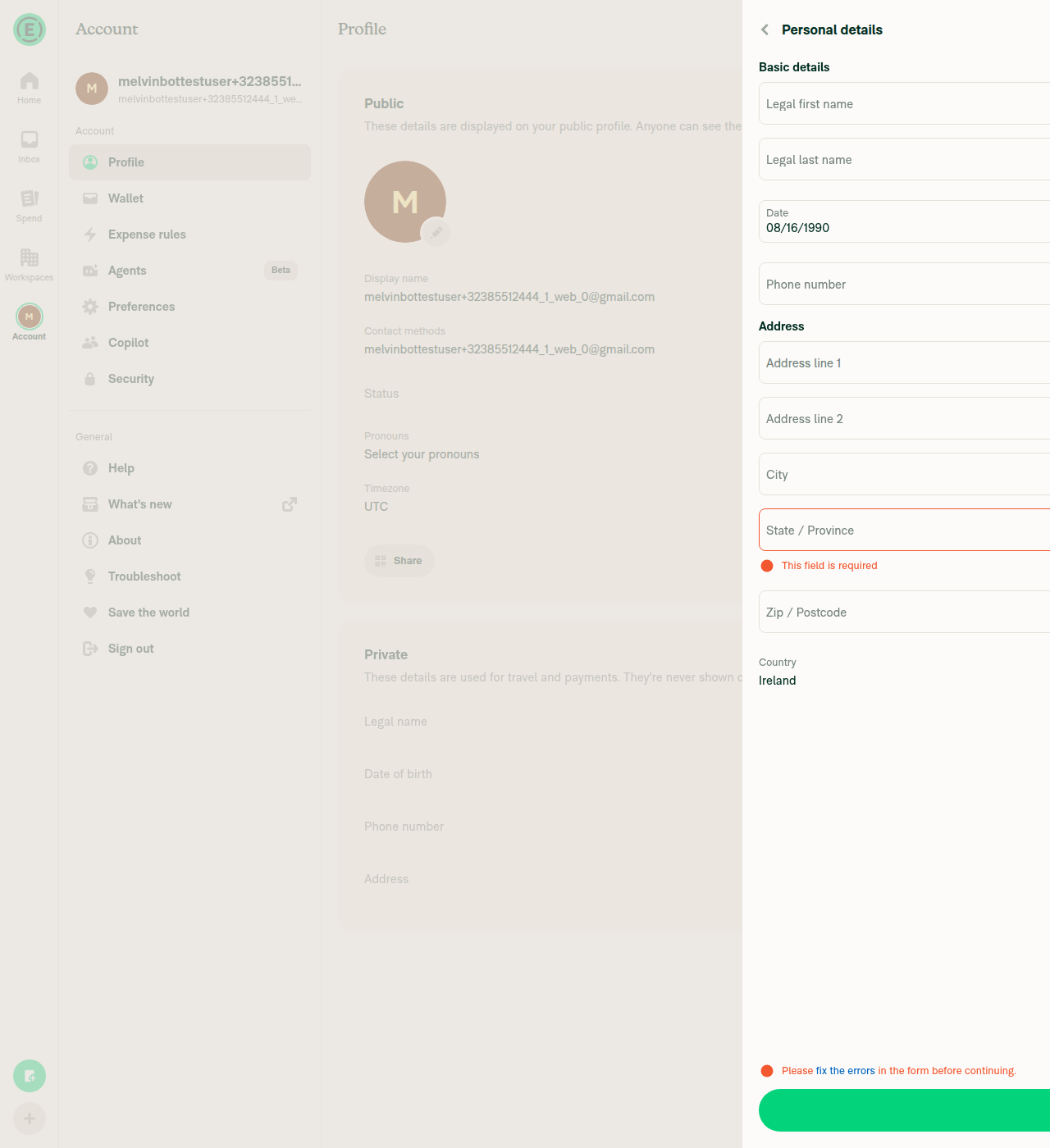
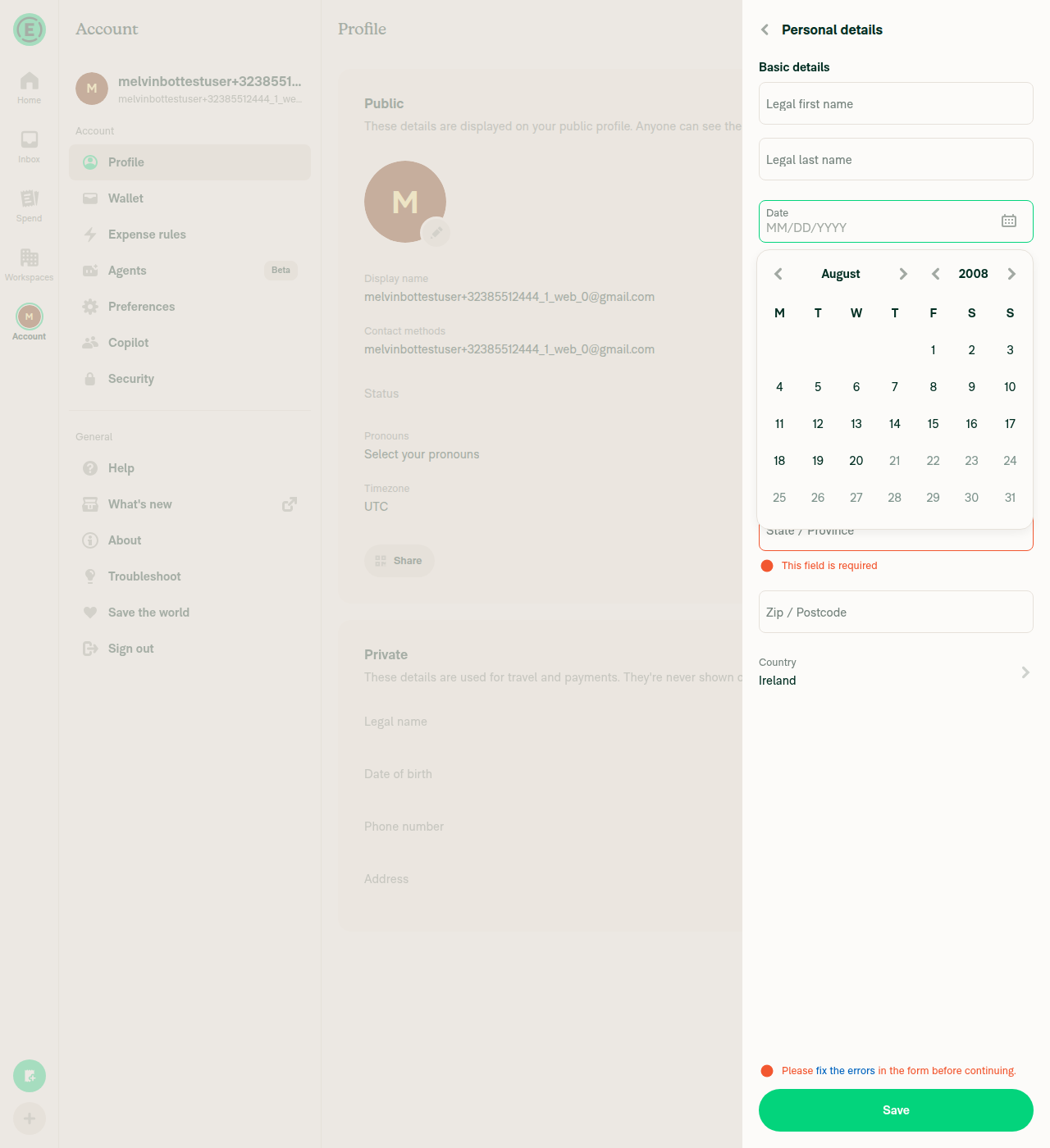
  1. Go to Settings > Profile > Personal details > Date of birth and open the date picker.
  2. In English, the week starts on Monday (M T W T F S S).
  3. Switch to Spanish, German, French: still start on Monday.
  4. Switch to Japanese: the week now starts on Sunday.
  5. Switch to Portuguese (BR): the week starts on Sunday.
  6. In each language, check the weekday letters above the grid are in that language, and the dates line up under the correct weekday.

4. Calendar — month names

  1. In the same date picker, tap the month/year to open the month list.
  2. In Spanish the months read Enero, Febrero, Marzo… (capitalised here — this is a standalone list, so capitals are correct).
  3. In French: Janvier, Février, Mars…. In German: Januar, Februar, März….

5. Date field placeholder

  1. Settings > Profile > Personal details > Date of birth, with no date set yet.
  2. In English the empty field shows MM/DD/YYYY.
  3. Switch to German: DD.MM.YYYY. Japanese: YYYY/MM/DD.
  4. Pick a date and confirm the filled-in value uses the same order and separators as the placeholder did.

6. Selected date must not shift by a day

  1. Set the device timezone to a US timezone (behind UTC).
  2. Settings > Profile > Personal details > Date of birth > pick a date, e.g. 15 June 1990.
  3. The field must show the date you picked. Not the day before.
  4. Save, leave the page, come back. It must still be the same date.
  5. Repeat with Settings > Profile > Status > Clear after > Custom > Date.
  6. Repeat with Workspace > Company cards > assign a card > Transaction start date.
  7. Now set the device to an Asian timezone (ahead of UTC) and repeat steps 2–6.
  8. Repeat the whole section with the app language set to Spanish and to Japanese.

7. Merging expenses must not crash

  1. In a workspace chat, create two expenses and submit them.
  2. Open the expense report and select both with the checkboxes.
  3. From the dropdown choose Merge, pick any details, tap Next.
  4. The app must not crash and the confirmation must show a readable date.
  5. Switch to Spanish and repeat. The date must be a real date, not a bare number.

8. Split expense on Android

  1. On Android, open an expense and choose Split.
  2. The page must open normally, in English and again in Spanish.

9. "Last synced" text — needs iOS and Android

  1. On iOS and on Android, go to Settings > Security > Device management.
  2. Each device row shows a relative time, e.g. 2 hours ago / 3 days ago. It must not be empty.
  3. Switch to Spanish: the same rows read hace 2 horas.
  4. If you have a workspace with an accounting connection: Workspace > Accounting shows Last synced … — confirm it is not blank in both languages.

10. Travel and trip dates

  1. Open a trip / travel booking in chat (flight, hotel, car or train).
  2. Check the departure and arrival dates, the date range, and any cancellation deadline.
  3. In Spanish and German confirm they use that language's date order.
  4. Confirm no date range shows a dangling dash or a separator with nothing next to it (e.g. - 10:30).
  5. Date ranges within one month should read Aug 17-20 in English and 17-20 ago in Spanish — the month must not sit between the two days.

11. Search filters

  1. Open Search and apply a date filter with a custom range.
  2. Check the filter chip label shows the range in the current language.
  3. Switch language while the filter is still applied and confirm the chip updates to the new language.

12. Per Diem — including a previously reported save failure

  1. Set the language to German.
  2. Create a Per Diem expense, set a start and end time, and save it.
  3. It must save. Previously German users got "Please choose a time that is at least one minute in the future" and could not save.
  4. Open the saved expense and confirm the date range on it reads as German.
  5. Repeat in Spanish and Japanese.

13. Other date surfaces

Confirm dates read in the selected language on:

  1. Settings > Wallet — card details and statements
  2. Settings > Subscription — billing dates and renewal date
  3. Workspace > Workflows — monthly report submission day (e.g. "the 15th of each month")
  4. Workspace > Expensify Card > Settings — settlement date
  5. Profile page of another user — their local time, and confirm it updates on its own after a minute
  6. Schedule a call flow — available time slots and the confirmation screen
  • Verify that no errors appear in the JS console

Offline tests

Same as tests

QA Steps

// TODO: These must be filled out, or the issue title must include "[No QA]."
Same as tests

  • Verify that no errors appear in the JS console

PR Author Checklist

  • I linked the correct issue in the ### Fixed Issues section above
  • I wrote clear testing steps that cover the changes made in this PR
    • I added steps for local testing in the Tests section
    • I added steps for the expected offline behavior in the Offline steps section
    • I added steps for Staging and/or Production testing in the QA steps section
    • I added steps to cover failure scenarios (i.e. verify an input displays the correct error message if the entered data is not correct)
    • I turned off my network connection and tested it while offline to ensure it matches the expected behavior (i.e. verify the default avatar icon is displayed if app is offline)
    • I tested this PR with a High Traffic account against the staging or production API to ensure there are no regressions (e.g. long loading states that impact usability).
  • I included screenshots or videos for tests on all platforms
  • I ran the tests on all platforms & verified they passed on:
    • Android: Native
    • Android: mWeb Chrome
    • iOS: Native
    • iOS: mWeb Safari
    • MacOS: Chrome / Safari
    • MacOS: Desktop
  • I verified there are no console errors (if there's a console error not related to the PR, report it or open an issue for it to be fixed)
  • I verified there are no new alerts related to the canBeMissing param for useOnyx
  • I followed proper code patterns (see Reviewing the code)
    • I verified that any callback methods that were added or modified are named for what the method does and never what callback they handle (i.e. toggleReport and not onIconClick)
    • I verified that comments were added to code that is not self explanatory
    • I verified that any new or modified comments were clear, correct English, and explained "why" the code was doing something instead of only explaining "what" the code was doing.
    • I verified any copy / text shown in the product is localized by adding it to src/languages/* files and using the translation method
      • If any non-english text was added/modified, I used JaimeGPT to get English > Spanish translation. I then posted it in #expensify-open-source and it was approved by an internal Expensify engineer. Link to Slack message:
    • I verified all numbers, amounts, dates and phone numbers shown in the product are using the localization methods
    • I verified any copy / text that was added to the app is grammatically correct in English. It adheres to proper capitalization guidelines (note: only the first word of header/labels should be capitalized), and is either coming verbatim from figma or has been approved by marketing (in order to get marketing approval, ask the Bug Zero team member to add the Waiting for copy label to the issue)
    • I verified proper file naming conventions were followed for any new files or renamed files. All non-platform specific files are named after what they export and are not named "index.js". All platform-specific files are named for the platform the code supports as outlined in the README.
    • I verified the JSDocs style guidelines (in STYLE.md) were followed
  • If a new code pattern is added I verified it was agreed to be used by multiple Expensify engineers
  • I followed the guidelines as stated in the Review Guidelines
  • I tested other components that can be impacted by my changes (i.e. if the PR modifies a shared library or component like Avatar, I verified the components using Avatar are working as expected)
  • I verified all code is DRY (the PR doesn't include any logic written more than once, with the exception of tests)
  • I verified any variables that can be defined as constants (ie. in CONST.ts or at the top of the file that uses the constant) are defined as such
  • I verified that if a function's arguments changed that all usages have also been updated correctly
  • If any new file was added I verified that:
    • The file has a description of what it does and/or why is needed at the top of the file if the code is not self explanatory
  • If a new CSS style is added I verified that:
    • A similar style doesn't already exist
    • The style can't be created with an existing StyleUtils function (i.e. StyleUtils.getBackgroundAndBorderStyle(theme.componentBG))
  • If new assets were added or existing ones were modified, I verified that:
    • The assets are optimized and compressed (for SVG files, run npm run compress-svg)
    • The assets load correctly across all supported platforms.
  • If the PR modifies code that runs when editing or sending messages, I tested and verified there is no unexpected behavior for all supported markdown - URLs, single line code, code blocks, quotes, headings, bold, strikethrough, and italic.
  • If the PR modifies a generic component, I tested and verified that those changes do not break usages of that component in the rest of the App (i.e. if a shared library or component like Avatar is modified, I verified that Avatar is working as expected in all cases)
  • If the PR modifies a component related to any of the existing Storybook stories, I tested and verified all stories for that component are still working as expected.
  • If the PR modifies a component or page that can be accessed by a direct deeplink, I verified that the code functions as expected when the deeplink is used - from a logged in and logged out account.
  • If the PR modifies the UI (e.g. new buttons, new UI components, changing the padding/spacing/sizing, moving components, etc) or modifies the form input styles:
    • I verified that all the inputs inside a form are aligned with each other.
    • I added Design label and/or tagged @Expensify/design so the design team can review the changes.
  • If a new page is added, I verified it's using the ScrollView component to make it scrollable when more elements are added to the page.
  • I added unit tests for any new feature or bug fix in this PR to help automatically prevent regressions in this user flow.
  • If the main branch was merged into this PR after a review, I tested again and verified the outcome was still expected according to the Test steps.

Screenshots/Videos

Android: Native
Android: mWeb Chrome
iOS: Native
iOS: mWeb Safari
MacOS: Chrome / Safari
Mac-Chrome.mp4

@TaduJR
TaduJR requested review from a team as code owners May 25, 2026 06:40
@melvin-bot
melvin-bot Bot requested a review from situchan May 25, 2026 06:40
@melvin-bot

melvin-bot Bot commented May 25, 2026

Copy link
Copy Markdown

Hey! I see that you made changes to our Form component. Make sure to update the docs in FORMS.md accordingly. Cheers!

@melvin-bot
melvin-bot Bot requested review from heyjennahay and removed request for a team May 25, 2026 06:40
@melvin-bot

melvin-bot Bot commented May 25, 2026

Copy link
Copy Markdown

@situchan Please copy/paste the Reviewer Checklist from here into a new comment on this PR and complete it. If you have the K2 extension, you can simply click: [this button]

@melvin-bot
melvin-bot Bot removed the request for review from a team May 25, 2026 06:40
Comment thread src/hooks/useNow.ts Outdated
@codecov

codecov Bot commented May 25, 2026

Copy link
Copy Markdown

Codecov Report

❌ Looks like you've decreased code coverage for some files. Please write tests to increase, or at least maintain, the existing level of code coverage. See our documentation here for how to interpret this table.

Files with missing lines Coverage Δ
src/CONST/index.ts 94.85% <ø> (ø)
src/Expensify.tsx 85.36% <100.00%> (-0.47%) ⬇️
...s/DatePicker/CalendarPicker/generateMonthMatrix.ts 100.00% <100.00%> (ø)
src/components/DatePicker/CalendarPicker/index.tsx 96.57% <100.00%> (ø)
src/components/DatePicker/index.tsx 51.85% <100.00%> (-1.42%) ⬇️
...s/LHNOptionsList/OptionRowLHN/OptionRow/Status.tsx 47.05% <100.00%> (ø)
...s/LHNOptionsList/OptionRowLHN/OptionRowLHNData.tsx 88.00% <100.00%> (ø)
...oneyRequestConfirmationList/sections/RateField.tsx 80.00% <100.00%> (ø)
src/components/OnboardingHelpDropdownButton.tsx 96.07% <100.00%> (+0.42%) ⬆️
...ponents/ReportActionItem/ChronosOOOListActions.tsx 43.75% <100.00%> (ø)
... and 138 more
... and 38 files with indirect coverage changes

…ation-dates-not-being-localized-correctly

# Conflicts:
#	src/pages/Travel/FlightTripDetails.tsx
@MelvinBot

Copy link
Copy Markdown
Contributor

PR Review

Well-executed migration from date-fns format strings to Intl.DateTimeFormat. The IntlStore / useSyncExternalStore architecture is clean, the useNow hook is correctly implemented, and locale threading is consistent across callers. A few items worth addressing:

Issues to fix

1. Mock type mismatch — src/languages/__mocks__/IntlStore.ts:7
The mock declares currentLocale: Locale | undefined while production now uses Locale (non-optional). This means getCurrentLocale() in the mock has an inferred return type of Locale | undefined, which doesn't match production. Tests could pass while incorrectly handling undefined. Change to Locale (no | undefined).

2. getStablePerDiemMerchantDateRange byte-stability concern — src/libs/DateUtils.ts
The comment says output "must stay byte-stable across user-locale changes." The locale is correctly pinned, but switching from format(date, 'MMM d, yyyy') (deterministic template) to Intl.DateTimeFormat('en', {dateStyle: 'medium'}) means output now depends on the platform's ICU version. iOS, Android, and web can produce subtly different strings (e.g., "Jun 5, 2025" vs "Jun. 5, 2025"). If this string is matched/compared on the backend, that's a problem.

3. datetimeToRelative still produces English-only output — src/libs/DateUtils.ts:256-260
This function accepts a locale parameter but never passes a date-fns locale to formatDistance. Relative strings like "12 minutes ago" are always English regardless of the user's locale. Pre-existing issue, but a notable omission given the PR's goal.

Suggestions (non-blocking)

4. SHORT_DATE vs SHORT_DATE_PADDED separator consistency
getLocalizedDatePlaceholder derives field ORDER from SHORT_DATE (dateStyle: 'short') but the actual display uses SHORT_DATE_PADDED ({year:'numeric', month:'2-digit', day:'2-digit'}). These can theoretically produce different separators in some locales (e.g., / vs .). Worth cross-locale testing.

5. CalendarPicker missing useMemo
monthNames, daysOfWeekLong, daysOfWeek at src/components/DatePicker/CalendarPicker/index.tsx are recalculated every render. Wrapping in useMemo with preferredLocale as dependency would avoid unnecessary array allocations.

6. getWeekStartsOn tests are ICU-dependent
The parameterized tests for ja and pt-BR expect Sunday-start via Intl.Locale.getWeekInfo(). If CI has small-icu Node builds, these fall back to Monday and fail.

What's done well

  • UTC anchoring via toUTCDate/toLocalDate prevents the classic date-only-string timezone shift bug
  • NNBSP stripping regex is precise — only targets space before AM/PM, preserving French/Slavic typography
  • useNow hook is textbook useSyncExternalStore: stable function references, ref-counted subscriptions, monotonic minute indices, correct cleanup
  • IntlStore race guard (monotonic load token) correctly handles rapid locale switches
  • zh-hans narrow weekday test guards against CJK narrow-name collision — excellent edge case coverage
  • Type narrowing from Locale | undefinedLocale throughout is safe now that IntlStore pre-seeds EN

@situchan

Copy link
Copy Markdown
Contributor

@TaduJR you're missing native platform tests.

Please test various timezones (US timezone UTC-X, Asia timezone UTC+X)

@chatgpt-codex-connector chatgpt-codex-connector Bot left a comment

Copy link
Copy Markdown

Choose a reason for hiding this comment

The reason will be displayed to describe this comment to others. Learn more.

💡 Codex Review

Here are some automated review suggestions for this pull request.

Reviewed commit: e56f6b81c3

ℹ️ About Codex in GitHub

Codex has been enabled to automatically review pull requests in this repo. Reviews are triggered when you

  • Open a pull request for review
  • Mark a draft as ready
  • Comment "@codex review".

If Codex has suggestions, it will comment; otherwise it will react with 👍.

When you sign up for Codex through ChatGPT, Codex can also answer questions or update the PR, like "@codex address that feedback".

Comment thread src/components/LocaleContextProvider.tsx Outdated

@chatgpt-codex-connector chatgpt-codex-connector Bot left a comment

Copy link
Copy Markdown

Choose a reason for hiding this comment

The reason will be displayed to describe this comment to others. Learn more.

💡 Codex Review

Here are some automated review suggestions for this pull request.

Reviewed commit: 64f6c4cb74

ℹ️ About Codex in GitHub

Codex has been enabled to automatically review pull requests in this repo. Reviews are triggered when you

  • Open a pull request for review
  • Mark a draft as ready
  • Comment "@codex review".

If Codex has suggestions, it will comment; otherwise it will react with 👍.

When you sign up for Codex through ChatGPT, Codex can also answer questions or update the PR, like "@codex address that feedback".

Comment thread src/languages/IntlStore.ts Outdated
@TaduJR

TaduJR commented Aug 20, 2026

Copy link
Copy Markdown
Contributor Author

@codex review

…ation-dates-not-being-localized-correctly
@MelvinBot

Copy link
Copy Markdown
Contributor

Regression hunt

Bottom line: No confirmed regressions. I ran a live web pass + a focused delta check at the current head (7dc3f22). Localized dates render correctly on every surface I could verify, the main-merge added no un-localized date call sites, and the two CI failures from my last review are fixed. The live test flagged two anomalies (a DOB-picker off-by-one and an inert language selector) — but both trace to test-harness click flakiness this session, not the code. They're worth a ~1-min manual confirmation.

✅ Verified clean

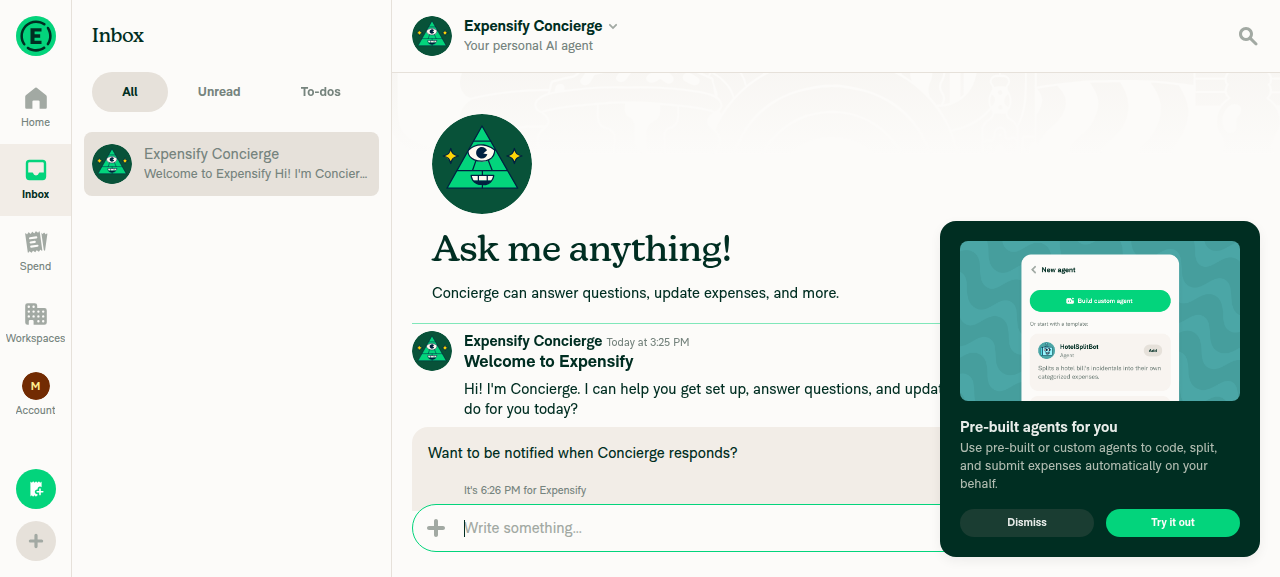
  • Chat/inbox timestamps render as real localized strings ("Today at 3:25 PM") — no raw i18n keys, no "Invalid Date", no blanks.
  • Calendar grid — weekday header M T W T F S S (Monday start for en) and cell weekday/date alignment are correct (ARIA labels matched the real calendar). The Fix localization: dates not being localized correctly #69945-class wrong-column bug is not reintroduced.
  • Delta since my last review (41de24c7dc3f22) is mostly a main merge. It added zero new display-date call sites (no new date-fns format(), no toLocale* date methods), the localization core files have no conflict markers, and en week-start is still pinned to Monday via a new override short-circuit in getWeekStartsOn.
  • The two CI failures I flagged last time are resolved: relativetimeformat was added to cspell.json, and the truncated-labels golden PNG was regenerated. That confirms the new "As of:" label localization visibly shifts that one chart (~511px) — but localizeVictoryChartLabelText only rewrites the As of: string, never chart data or axes, so it's cosmetic. Just sign off on the new render.

⚠️ Two live-test anomalies — likely harness, please spot-check

1. DOB picker appeared to save the next day. The tester clicked "Wednesday, August 15" and the field filled 08/16 (repro'd for 2007 and 1990). I could not reproduce this in code — the path is timezone-independent and correct:

  • onDayPressed saves the raw clicked day as yyyy-MM-dd.
  • The field renders it via formatToLocalizedShortDateformatIntl(…, toUTCDate(value), 'UTC'), which pins the day in UTC regardless of device timezone.

So a click on that cell can only produce 08/15. The most plausible cause is a coordinate click landing on the adjacent cell — and in the same session the language-list rows were also unclickable (below), so the harness was struggling to hit list/grid targets. Worth a manual click-through to be sure, but this reads as a test artifact, not a code bug.

2. Language switch didn't take. Clicking Español (and other rows) had no effect while the panel's Back button did respond. Given the same row-click flakiness, I couldn't verify whether this is real. The locale-switch path (IntlStore.load + LocaleContextProvider) was verified sound in the earlier deep review, so please confirm a real switch manually (es should reorder dates, e.g. 19 ago 2025).

Evidence

DOB calendar: after selecting a day the field showed the next day (observed in test)

DOB calendar off-by-one observed in test

DOB field filled 08/16/1990 after clicking Aug 15 1990

DOB field filled 08/16/1990 after clicking Aug 15 1990

DOB calendar (English): header M T W T F S S, alignment correct

DOB calendar English header and alignment correct

Inbox chat: correctly localized "Today at 3:25 PM" timestamp

Inbox chat showing localized Today at 3:25 PM timestamp


view run

@chatgpt-codex-connector chatgpt-codex-connector Bot left a comment

Copy link
Copy Markdown

Choose a reason for hiding this comment

The reason will be displayed to describe this comment to others. Learn more.

💡 Codex Review

Here are some automated review suggestions for this pull request.

Reviewed commit: 4387fb4992

ℹ️ About Codex in GitHub

Codex has been enabled to automatically review pull requests in this repo. Reviews are triggered when you

  • Open a pull request for review
  • Mark a draft as ready
  • Comment "@codex review".

If Codex has suggestions, it will comment; otherwise it will react with 👍.

When you sign up for Codex through ChatGPT, Codex can also answer questions or update the PR, like "@codex address that feedback".

@MelvinBot

Copy link
Copy Markdown
Contributor

⏱️ Ran out of time before I could finish. This usually means the task was too complex or I got stuck exploring. Please try again with a more specific request or post in #melvinbot-ai.

Run details

TaduJR added 2 commits August 21, 2026 05:57
…ation-dates-not-being-localized-correctly

# Conflicts:
#	src/pages/iou/request/step/DynamicIOURequestStepDistanceManual.tsx
#	src/pages/iou/request/step/IOURequestStepAmount.tsx
#	src/pages/iou/request/step/IOURequestStepDistanceGPS/index.native.tsx
@TaduJR

TaduJR commented Aug 21, 2026

Copy link
Copy Markdown
Contributor Author

@codex review

@chatgpt-codex-connector

Copy link
Copy Markdown

Codex Review: Didn't find any major issues. Keep it up!

Reviewed commit: 879a5caedb

ℹ️ About Codex in GitHub

Codex has been enabled to automatically review pull requests in this repo. Reviews are triggered when you

  • Open a pull request for review
  • Mark a draft as ready
  • Comment "@codex review".

If Codex has suggestions, it will comment; otherwise it will react with 👍.

When you sign up for Codex through ChatGPT, Codex can also answer questions or update the PR, like "@codex address that feedback".

@situchan

Copy link
Copy Markdown
Contributor

Please fix conflict before going off for weekend. Then I'll review during weekend

@TaduJR

TaduJR commented Aug 22, 2026

Copy link
Copy Markdown
Contributor Author

@codex review

@chatgpt-codex-connector

Copy link
Copy Markdown

Codex Review: Didn't find any major issues. What shall we delve into next?

Reviewed commit: 4acba89c64

ℹ️ About Codex in GitHub

Codex has been enabled to automatically review pull requests in this repo. Reviews are triggered when you

  • Open a pull request for review
  • Mark a draft as ready
  • Comment "@codex review".

If Codex has suggestions, it will comment; otherwise it will react with 👍.

When you sign up for Codex through ChatGPT, Codex can also answer questions or update the PR, like "@codex address that feedback".

…ation-dates-not-being-localized-correctly

# Conflicts:
#	src/components/ReportActionItem/ChronosOOOListActions.tsx
@TaduJR

TaduJR commented Aug 24, 2026

Copy link
Copy Markdown
Contributor Author

@codex review

@chatgpt-codex-connector chatgpt-codex-connector Bot left a comment

Copy link
Copy Markdown

Choose a reason for hiding this comment

The reason will be displayed to describe this comment to others. Learn more.

💡 Codex Review

Here are some automated review suggestions for this pull request.

Reviewed commit: 7c5635e9d1

ℹ️ About Codex in GitHub

Codex has been enabled to automatically review pull requests in this repo. Reviews are triggered when you

  • Open a pull request for review
  • Mark a draft as ready
  • Comment "@codex review".

If Codex has suggestions, it will comment; otherwise it will react with 👍.

When you sign up for Codex through ChatGPT, Codex can also answer questions or update the PR, like "@codex address that feedback".

Comment thread src/libs/DateUtils.ts
@TaduJR

TaduJR commented Aug 24, 2026

Copy link
Copy Markdown
Contributor Author

@codex review

@chatgpt-codex-connector

Copy link
Copy Markdown

Codex Review: Didn't find any major issues. Hooray!

Reviewed commit: cf89381c9d

ℹ️ About Codex in GitHub

Codex has been enabled to automatically review pull requests in this repo. Reviews are triggered when you

  • Open a pull request for review
  • Mark a draft as ready
  • Comment "@codex review".

If Codex has suggestions, it will comment; otherwise it will react with 👍.

When you sign up for Codex through ChatGPT, Codex can also answer questions or update the PR, like "@codex address that feedback".

Sign up for free to join this conversation on GitHub. Already have an account? Sign in to comment

Labels

None yet

Projects

None yet

Development

Successfully merging this pull request may close these issues.

4 participants