



React bindings for
meta-pixel: an SSR-safe provider and a typed hook for Meta's Pixel. Works with Next.js (App & Pages Router), Vite, Remix, and any React 18+ app. Client-side only.
meta-pixel-react integrates the Meta Pixel — also known as the Facebook Pixel, fbq, or fbevents.js — into React and Next.js, with multiple pixels, advanced matching, and GDPR consent.
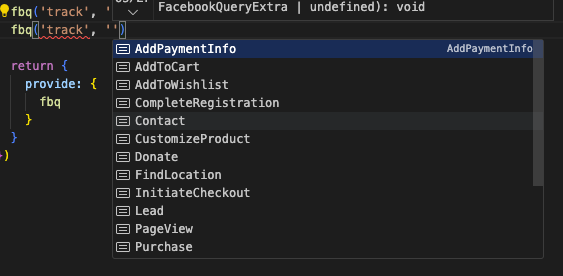
Most React pixel wrappers expose a singleton you must init yourself in an effect, throw window is undefined during SSR, and accept untyped track(event, data) calls. This package instead gives you:
- A real Provider + hook instead of a manually-initialized global singleton.
- SSR/RSC safety by construction — the script is injected in a client effect, so server rendering never touches
window/document. - Typed events from the
meta-pixelcore, so you can't ship a malformedPurchase. - Automatic, glob-matched page views wired to whatever router you use.
When to use this: any React 18+ app — Next.js (App & Pages Router), Vite, Remix. For a plain JavaScript/TypeScript app use meta-pixel; for Nuxt use nuxt-meta-pixel.
- ✨ Typed events inherited from
meta-pixel—Purchaserequirescurrency+value, advanced-matching fields are strings, etc. - 🧩 Idiomatic
<MetaPixelProvider>+useMetaPixel()hook — no manualinitin an effect. - 🔒 SSR/RSC-safe —
fbevents.jsloads only in a client effect, never during render. - 📨 Automatic route
PageView, glob-matched per pixel (router-agnostic). - 🤖 Multiple pixels, GDPR consent, and a global
enabledtoggle.
npm i meta-pixel-react
# react >= 18 is a peer dependency
import { MetaPixelProvider, useMetaPixel } from 'meta-pixel-react'
const pixelOptions = {
pixels: { main: { id: '1234567890' } },
} as const
function App({ children }: { children: React.ReactNode }) {
const pathname = usePathname() // next/navigation, react-router, etc.
return (
<MetaPixelProvider options={pixelOptions} pathname={pathname}>
{children}
</MetaPixelProvider>
)
}
function BuyButton() {
const { $fbq } = useMetaPixel()
return <button onClick={() => $fbq('track', 'Purchase', { value: 9.99, currency: 'EUR' })}>Buy</button>
}Define
optionsoutside the component (oruseMemoit) — it is read once on mount.
<MetaPixelProvider> is a Client Component, so wrap it in your own client providers file and mount it in the root layout. usePathname() drives the automatic PageView:
// app/providers.tsx
'use client'

import { usePathname } from 'next/navigation'
import { MetaPixelProvider } from 'meta-pixel-react'

const pixelOptions = {
  pixels: { main: { id: '1234567890' } },
} as const

export function Providers({ children }: { children: React.ReactNode }) {
  const pathname = usePathname()
  return (
    <MetaPixelProvider options={pixelOptions} pathname={pathname}>
      {children}
    </MetaPixelProvider>
  )
}
// app/layout.tsx (Server Component — no 'use client')
import { Providers } from './providers'
export default function RootLayout({ children }: { children: React.ReactNode }) {
return (
<html lang="en">
<body>
<Providers>{children}</Providers>
</body>
</html>
)
}Pages Router: pass
pathname={router.asPath.split('?')[0]}fromnext/router'suseRouter()instead ofusePathname().
import { useMetaPixel } from 'meta-pixel-react'

function CheckoutButton() {
  const { $fbq } = useMetaPixel()
  return (
    <button onClick={() => $fbq('track', 'Purchase', { value: 9.99, currency: 'EUR' })}>
      Buy
    </button>
  )
}
$fbq is the fully-typed query function — use it for track, trackCustom, trackSingle, and CAPI deduplication via the 4th eventID arg: $fbq('track', 'Purchase', {...}, { eventID }).
Configure consent: 'revoke' to hold delivery, then grant once the user accepts:
const { consent } = useMetaPixel()
// in your cookie-banner accept handler:
consent('grant')Omit pathname to disable automatic page views and fire them yourself:
const { pageView } = useMetaPixel()
pageView()              // every pixel
pageView('1234567890') // a single pixel (uses trackSingle)| Prop | Description |
|---|---|
options |
{ enabled?, consent?, pixels }. Read once on mount. |
pathname |
Current route path. When it changes, pixels whose pageView glob matches fire a PageView. Omit to disable auto page views. |
options.pixels is keyed by an arbitrary name; each pixel is { id, autoConfig?, advancedMatching?, pageView? }. enabled: false loads and sends nothing while keeping useMetaPixel() working (no-op $fbq).
Returns { $fbq, consent, pageView }. $fbq carries the full event typing from meta-pixel.
Patterns use meta-pixel's in-house matcher: **, *, ?, and a leading !. No brace/char-class expansion.
meta-pixel— the framework-agnostic corenuxt-meta-pixel— the Nuxt module- Pixel events & parameters
- Advanced matching
- GDPR consent
If this saved you some time, consider starring the repo ⭐ — it helps others find it.