| title | Using ion-item-group |
|---|
Most Ionic markup works without changes. When an ion-list uses inset="true", wrap its items in ion-item-group and keep ion-list-header outside the group.
The examples use framework-neutral Web Component markup. In React or Vue, use the equivalent component and property syntax.
<ion-list inset="true">
  <ion-list-header><ion-label>Connections</ion-label></ion-list-header>
  <ion-item-group>
    <ion-item>...</ion-item>
    <ion-item>...</ion-item>
  </ion-item-group>
</ion-list>
No wrapper is required for lists that do not use inset="true".
In Ionic Angular applications, the @rdlabo/rules/require-ion-item-group ESLint rule checks that each ion-item in an ion-list is wrapped by the group component that matches its behavior. The rule is included in the recommended preset and can automatically fix some violations.
Ionic normally gives ion-list its background, which makes ion-list-header appear inside the same surface as the items. The iOS 26 layout treats the header and item surface separately.
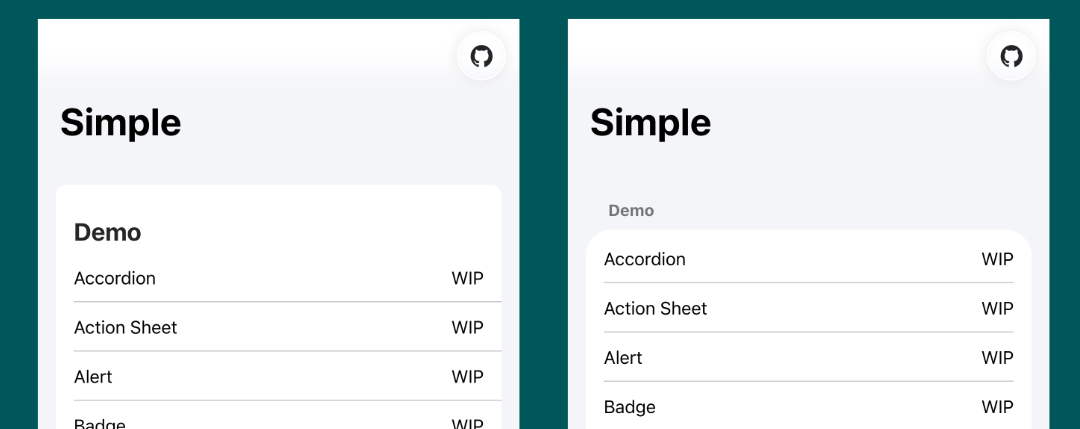
The theme therefore:
- makes the inset
ion-listbackground transparent; - applies the item surface to
ion-item-group; and - leaves
ion-list-headeroutside that surface.
@rdlabo/ionic-theme-md3 supports the same grouped markup, so one template can be used for both Ionic modes.
When an application uses this package without @rdlabo/ionic-theme-md3, import the optional stylesheet to apply the same grouped layout in Material mode:
@import '@rdlabo/ionic-theme-ios26/dist/css/md-ion-list-inset.css';For two-line items and section-header groups, see Special markup and classes.