- state
- props
- 状态提升 + 方法下放,简单说,就是所有状态,事件的方法函数全部在父组件,子组件接收父组件传递过去的状态和方法函数
- state只能在组件的·constructor·中初始化
- state只能使用
setState方法来更新数据 setState会导致render重新执行,渲染组件和子组件,子组件更新不会更新父组件(需要探索效率问题)
父->子组件间参数传递,props 无需定义,可直接使用
import Box from './Box'

class Page extend Component{
  ...

  render(){
    return (
      <div>
        <Box title="myBox" />
      </div>
    )
  }
}- 父组件Page
- 子组件Box
- 在父组件里面引入了子组件,可以通过添加属性的方式添加一个或多个属性
<Box title="myBox" name="hi" />
- 在子组件里面可以通过
this.props.title或this.props.name来接受翻父组件传进来的参数
注意:是将一个自定义的组件标签拆开,并放入其他组件标签来使用。而不是把普通html标签拆开放入自足见。因为html标签本来就可以拆开放子组件
import Box from './Box'
import Tag from './Tag'
class Page extend Component{
  ...

  render(){
    return (
      <div>
        <Box title="myBox">               // 自定义组件标签拆开,而不是html标签拆开
          <span>this is a span</span>
          <Tag tagname="tag">this is a Tag Component</Tag>
        </Box>
      </div>
    )
  }
}-
既可以像以前一样,在子组件里面使用
this.props.title来获取属性 -
也可以使用
this.props.children来原封不动的获取所有的子标签- 即返回两个标签,一个hmtl原生标签span,一个自定义组件标签Tag,可用于直接显示在页面中
<span>this is a span</span>
<Tag>this is a Tag Component</Tag>
- 在Box子组件中,不想原封不动回去子组件的html时,可以使用
this.props.children[1].props.tagname来获取子元素的具体某个属性的值- 级联使用props。因为children拿到的是一个数组,里面每个元素都是插入到父元素里面的子元素,第一个元素为span,第二个元素为Tag
- 要拿到第二个子元素的属性值,需要2使用props
- 在Tag子组件中,直接使用
this.props.tagname即可回去该参数的值
- 即返回两个标签,一个hmtl原生标签span,一个自定义组件标签Tag,可用于直接显示在页面中
-
但是子标签中的自定义组件标签可以继续传递参数,而原生html标签则不可以之间传递参数
<span mytitle='myspan'>this is a span</span>会报错
- App
- Frame
- Like
- Input
- Frame
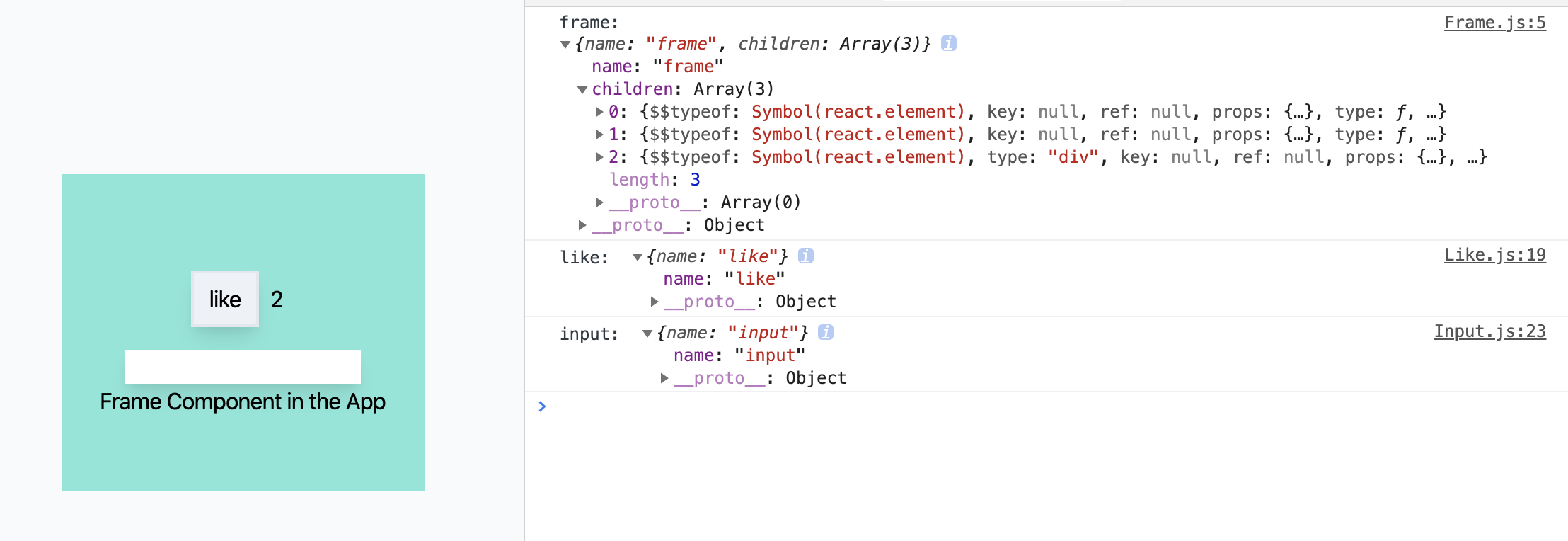
把一个自定义组件拆开,在放入其他子组件。即把
<Frame />组件拆开<Frame> </Frame>,并在其中放入其他子组件 FATHER.props.children[0].props.ATTRI,子元素的属性值获取方法
// App
import React from 'react'
import Like from './Like'
import Input from './Input'
import Frame from './Frame'

function App() {
    return (
        <div className='flex items-center justify-center h-screen bg-gray-100'>
            <Frame name="frame">
                <Like name="like"></Like>
                <Input name="input"></Input>
                <div>Frame Component in the App</div>
            </Frame>
        </div>
    )
}
export default App
// Frame
import React,{ Component } from "react";
class Frame extends Component{
render(){
console.log('frame: ', this.props); // children=[{Like},{Input},{div}]
console.log(this.props.children[0].props.name); // children的第一个元素的props的name属性
return (
<div className="frame w-64 h-56 bg-teal-300 flex flex-col justify-center items-center">
{this.props.children}
</div>
)
}
}
export default Frame// Like
render(){
console.log('like: ',this.props);
return (
<div className="flex m-4">
...
</div>
)
}// Input
render(){
console.log('input: ',this.props);
return (
<div>
...
</div>
)
}当前组件作用域下,修改其他组件的state
- 子组件的状态state全部放在共同的父元素中
- 父元素改变state的方法函数,通过属性props下放到子元素,子元素通过获取到的父元素的放哈函数,来改变父元素的状态
- 父元素状态改变后,在获取新的状态通过props传递给子元素,来更新子元素
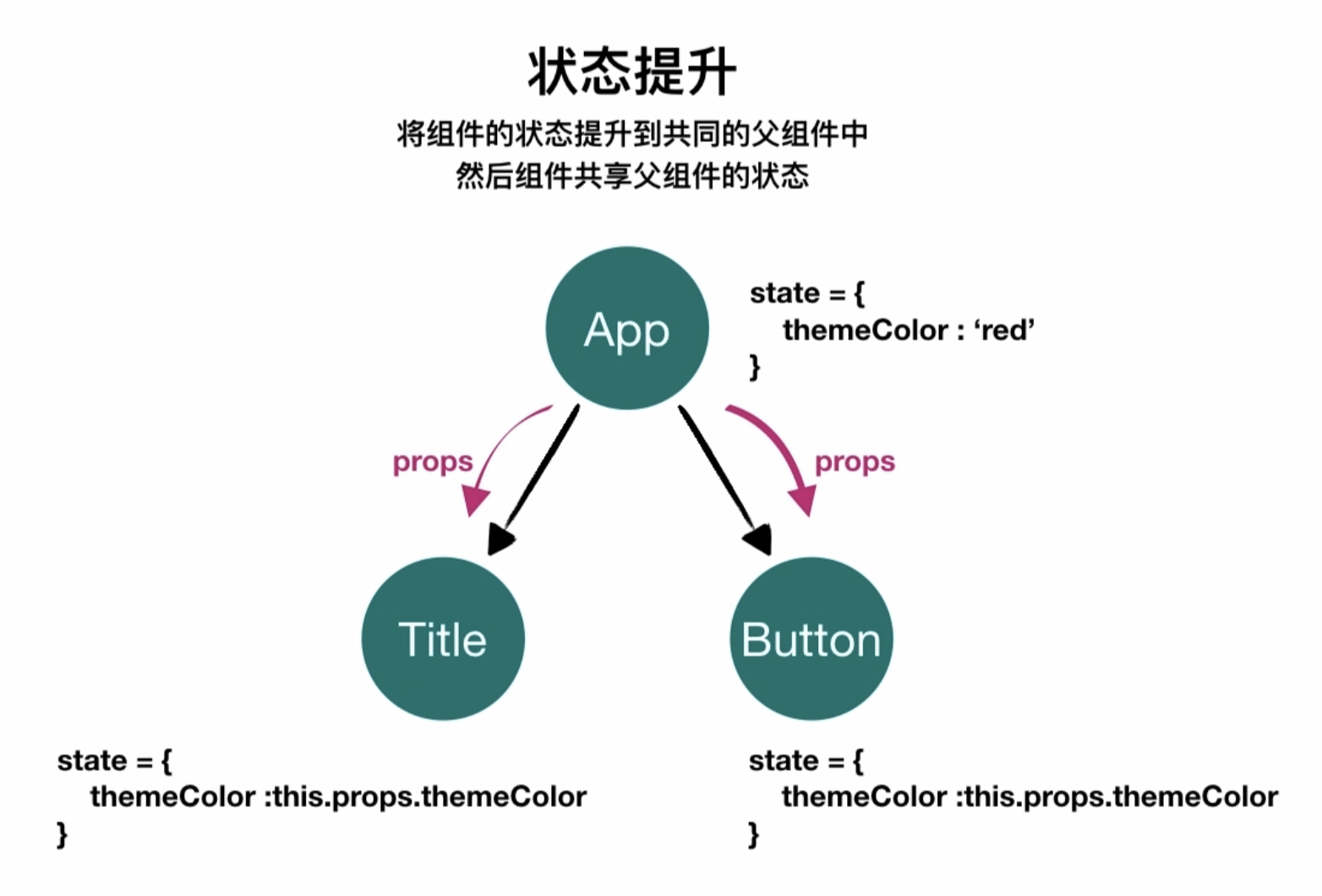
- 同在Frame父元素中的Title和Button元素
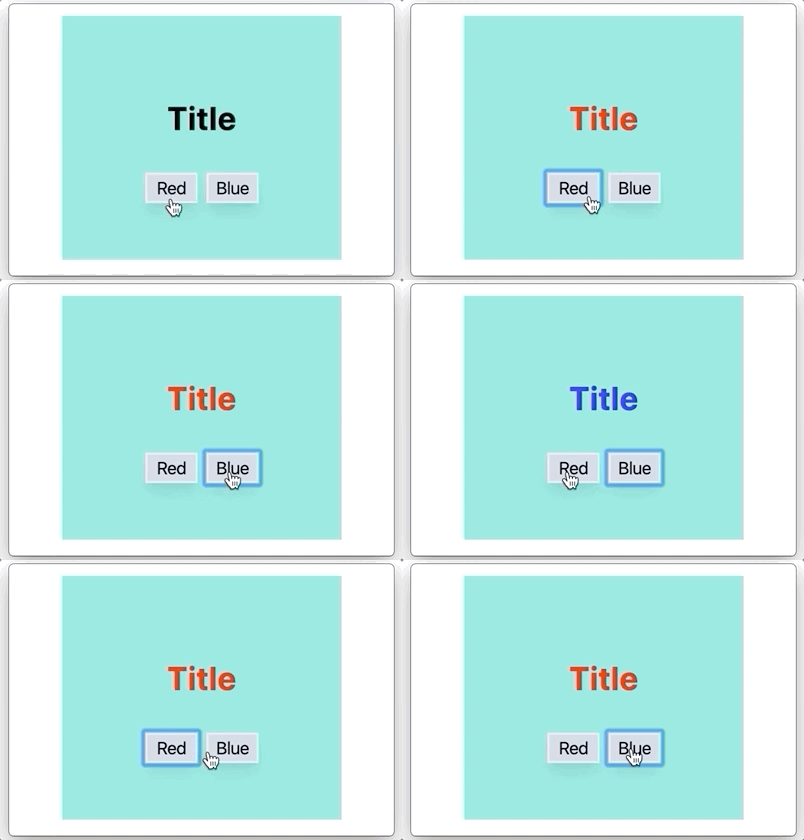
- 按钮Button通过父元素传递下来的方法函数来改变父元素的state
- 父元素状态改变后,再次通过props传递给Title子元素来变更样式
// App
import Frame from './Frame'

function App() {
    return (
        <div className='flex items-center justify-center h-screen bg-gray-100'>
            <Frame />
        </div>
    )
}
// Frame
import React,{ Component } from "react";
import Title from './Title'
import Button from './Button'
class Frame extends Component{
constructor(props){
super(props)
this.state = {
themeColor: ''
}
}
handleClick(color){
this.setState({
themeColor:color
})
}
render(){
return (
<div className="frame w-64 h-56 bg-teal-300 flex flex-col justify-center items-center">
<Title themeColor={this.state.themeColor}></Title>
<Button handleClick={(color)=>this.handleClick(color)}></Button>
</div>
)
}
}
export default Frame// Button
import React, { Component } from "react";
class Button extends Component{
constructor(props){
super(props)
}
render(){
return (
<div>
<button
onClick={()=>this.props.handleClick('red')}
className="w-12 m-1 shadow-lg border-2 bg-gray-400"
>Red</button>
<button
onClick={()=>this.props.handleClick('blue')}
className="w-12 m-1 shadow-lg border-2 bg-gray-400"
>Blue</button>
</div>
)
}
}
export default Button// Title
import React, { Component } from "react";
class Title extends Component{
render(){
return (
<div
style={{color:this.props.themeColor}}
className="m-6 text-3xl font-bold"
>Title</div>
)
}
}
export default Title