Docksentry sends notifications via Telegram (primary, with interactive commands) and optionally via Discord and/or generic webhooks. All channels receive notifications in parallel.
| Channel | Updates Available | Update Results | Interactive Commands |
|---|---|---|---|
| Telegram | with buttons | detailed | full control |
| Discord | rich embeds | rich embeds | via Web UI |
| Webhook | JSON | JSON | via Web UI |
When Docksentry starts, it sends a startup message to all configured channels. This is useful to detect server reboots or container restarts.
Set QUIET_HOURS_START and QUIET_HOURS_END (both HH:MM) to silence auto-notifications during a window — for example overnight:
environment:
  - QUIET_HOURS_START=22:00
  - QUIET_HOURS_END=07:00
What's affected:
- Suppressed during the window: scheduled update notifications, auto-update results, cleanup results, disk warnings — across Telegram, Discord, and generic webhook
- Always sent (regardless of the clock): replies to manual commands you trigger yourself (
/status,/check, Web UI button clicks). You're actively asking, you get an answer.
Notes:
- The window can wrap midnight —
22:00–07:00works as expected - Drops are silent — Docksentry doesn't queue and replay them later. The user explicitly opted into "leave me alone during these hours"
- Both empty = feature off
DISK_WARN_PERCENT (default 85, range 50..100) — when the data directory's filesystem usage exceeds this percentage, Docksentry sends a warning across all configured channels. Rate-limited to one notification per 23-hour window to prevent log floods.
environment:
  - DISK_WARN_PERCENT=85
  - DISK_WARN_AUTO_CLEANUP=false   # set true to also trigger image cleanup
When DISK_WARN_AUTO_CLEANUP=true, crossing the threshold also runs docker image prune (using the configured CLEANUP_GRACE_HOURS and CLEANUP_BACKUP_LOCAL_ONLY settings). The cleanup result is sent as a follow-up notification.
Note: the warning is based on the filesystem hosting
/data. In typical setups this shares the same disk as/var/lib/docker. If you're running with a separate Docker storage driver mount, the percentage may not reflect Docker's actual disk usage.
Add a webhook URL to receive notifications as rich embeds in a Discord channel:
- In Discord: Server Settings -> Integrations -> Webhooks -> New Webhook
- Copy the webhook URL
- Add to your container:
environment:
  - DISCORD_WEBHOOK=https://discord.com/api/webhooks/123456/abcdef...
You can also configure or change the Discord webhook URL via the Web UI settings page.
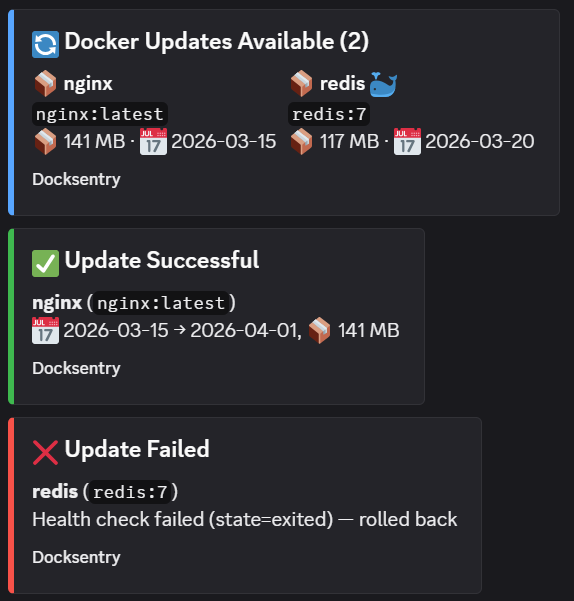
- Update available — blue embed with container list, image sizes, and creation dates
- Update successful — green embed with container name and details
- Update failed — red embed with error details
- Startup message — notification when the bot starts
Set NTFY_URL (a full topic URL) or NTFY_SERVER + NTFY_TOPIC.
For a protected topic — a self-hosted ntfy with auth-default-access: deny,
or a reserved topic on ntfy.sh:
environment:
  - NTFY_TOKEN=tk_...            # an ntfy access token
  # or
  - NTFY_USER=me
  - NTFY_PASSWORD=...
Titles containing emoji or umlauts are encoded properly. If you use a
BOT_LABEL like 🖥 pve1 — which the README suggests — versions before
1.69.0 dropped every ntfy notification silently; upgrade if that sounds
familiar.
For integration with Ntfy, Gotify, Home Assistant, or any service that accepts JSON POST requests:
environment:
- WEBHOOK_URL=https://your-service/webhook{
"event": "updates_available",
"source": "docksentry",
"count": 2,
"containers": [
{
"name": "nginx",
"image": "nginx:latest",
"size": "141 MB",
"created": "2026-03-15",
"compose": false
}
]
}| Event | Description |
|---|---|
updates_available |
New updates found during check |
update_result |
Single container update completed (success or failure) |
message |
General text message (startup, etc.) |