🇯🇵 日本語版紹介
💡🐞 You're welcome to post your suggestions and bug reports here.
Make Firefox support multiple rows of tabs.

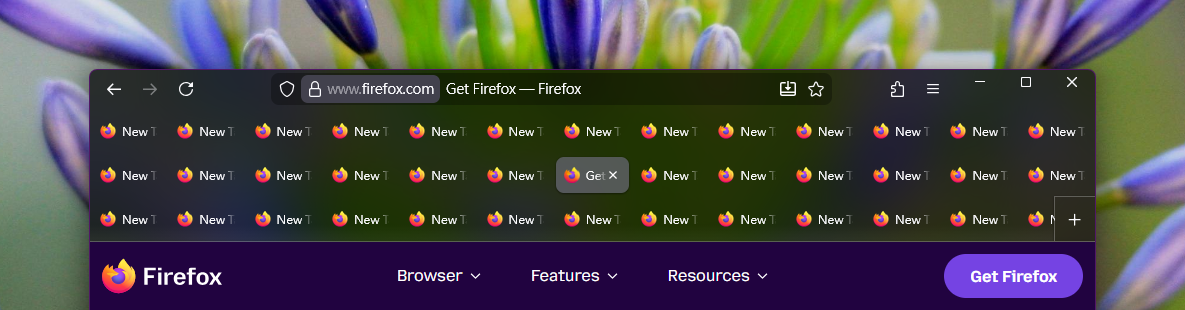
Check out the introduction page to explore the highlights with screenshots and detailed descriptions.
-
Firefox 115, 140, 151 - 153
-
Windows 7 - 11
-
Supports general userChrome.js script loaders, such as:
🚨 Please read the following notes carefully before using this script:
-
This script is developed for Windows and has been lightly tested on Ubuntu (Linux). It has not been tested on macOS and probably does not work there. Other Firefox-based derivative browsers are not supported.
-
Since this script contains many sensitive layout calculations designed for native Firefox, any tab-related legacy extensions (e.g. Tab Mix Plus), user scripts (
*.uc.js) or customized styles (userChrome.css) can cause weird glitches and bugs.⚠️ Please follow the installation steps below carefully. -
This is an unofficial and complex script maintained solely by me. It may contain unforeseen bugs, and if unexpected issues occur, restarting Firefox may be required. In extreme cases — especially when using an outdated version of the script with a newly updated Firefox — the browser may become unusable, potentially resulting in the permanent loss of your previous browsing session. You may need to disable the script in such situations. Please use this script only if you are capable of and prepared to handle these risks.
-
This script is more like a meticulous tab extension than a simple multi-row tweak. It consolidates thousands of lines of logic and styling into a single file, yet remains as manageable as a typical script. It is a hardcore implementation built with perfection and performance in mind. The number of lines is never a concern during development — just as Tab Mix Plus could never be achieved with only a few hundred lines of half-baked code. However, if you prefer something simple and fully understandable in coding — providing a stronger sense of safety and allowing you to easily make changes at will — this may not be your favorite choice.
-
Always use scripts and files from sources you trust. Malicious code can cause severe damage, such as corrupting your files, hacking into your accounts, or stealing sensitive information like bank and credit card details — and all of this can happen without you even noticing.
-
Please ensure you are using a Firefox version listed in the compatibility list above. Other Firefox versions and operating systems may potentially not be supported.
-
Install the script loader (userChrome.js). Skip to step 4 if you already have one in use. There are several script loaders available:
- MrOtherGuy/fx-autoconfig
- Firefox Scripts (forked from xiaoxiaoflood/firefox-scripts)
- alice0775/userChrome.js (Japanese)
- Endor8/userChrome.js (German)
- BSTweaker/UserChromeJS (Japanese)
There is no difference among them for applying this script, so simply choose your preferred one. If you have no preference, you can try MrOtherGuy/fx-autoconfig, which provides an update-checking feature, or follow the instructions in the Tab Mix Plus - Docs to install the Firefox Scripts.

⛔ Do not install Tab Mix Plus as it will cause conflict.
🚨 It is very common for script loaders to stop working after a Firefox update. Please check the pages above for the new version of your script loader if this happens.
-
Quit Firefox completely (
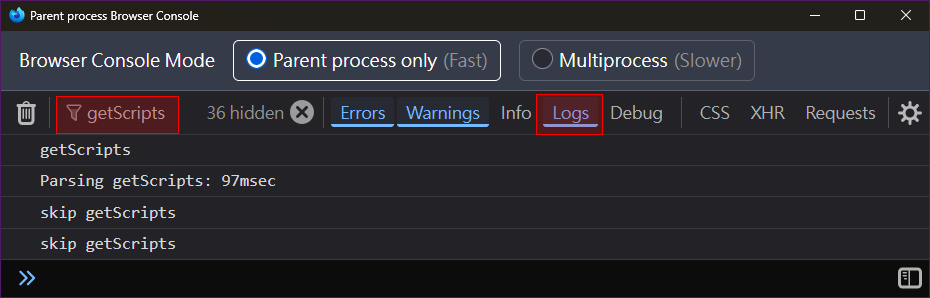
Ctrl+Shift+Q) and restart (or use the Clear startup cache button in about:support to restart), then check whether the script loader is running correctly if you are using:MrOtherGuy/fx-autoconfig On the first run, Firefox will display the notification message "fx-autoconfig: Firefox is being modified with custom autoconfig scripting". Additionally, A new item called userScripts appears in the Tools menu ( Alt+T).Firefox Scripts Open about:config and search for userChromeJS.enabledto verify whether the preference exists, and there is no delete button (🗑) on the right.alice0775/userChrome.js Press Ctrl+Shift+Jto open the Browser Console. Enable the Logs filter, entergetScriptsin the Filter Output, and verify whether the related logs appear.Screenshot
Endor8/userChrome.js There is no simple method to verify. BSTweaker/UserChromeJS A new item called UserChromeJSLoader appears in the Tools menu ( Alt+T). -
Make sure that no other tab-related scripts and customized styles are currently in use. Just in case, temporarily move all other
*.uc.jsanduserChrome.cssfiles out ofchrome.⚠️ There are many reports of issues caused by conflicts with customized styles inuserChrome.css. It is highly recommended to remove all styles related to tabs or the tab bar first, then rewrite afterward if the settings below do not cover. -
Download the 📥 script file (right-click and save as) and place it in
chrome(or inchrome/JSif you are using MrOtherGuy/fx-autoconfig).⚠️ Creating the file by copy & paste or other methods may cause incorrect encoding.⛔ Do not modify the file name during or after saving.
-
Restart Firefox to apply.
-
If you moved some files out of
chromein step 4, please confirm that this script works as expected. Once verified, you can move the files back. If any conflicts arise, modify the scripts and the style rules inuserChrome.cssaccordingly. If you need help, please provide the information 🛟 here.
Open about:config and search for the prefix userChromeJS.multiTabRows@Merci.chao.. Settings shown in gray are disabled due to dependency on other preferences.
If configuring via user.js (not recommended), be sure to include the prefix userChromeJS.multiTabRows@Merci.chao.. Example:
user_pref("userChromeJS.multiTabRows@Merci.chao.maxTabRows", 5);Note
Many of these settings may not take effect due to dependencies with other preferences. It is strongly recommended to configure them via about:config rather than using user.js.
| Name (w/ prefix) | Description |
|---|---|
animateTabMoveMaxCount |
Replaced with animateTabMoveUnderLimit. |
animateTabMoveShiftKeyToPause |
When pressing Shift key, pause the drag & drop animation and show the drop indicator instead. This feature can be helpful in special situations where it is difficult to move items next to a specific one in another row. |
animateTabMoveUnderLimit |
When the number of visible tabs reaches this amount, disable the drag & drop animation and show the drop indicator instead. Setting the value below 3 will effectively force using the indicator for moving. If dragging causes lag with many tabs, consider lowering this value. |
animationDuration |
Duration of animations in milliseconds (valid range: 0 - 1000). Note: Lengthy animations could strain system performance. |
disableDragToPinOrUnpin |
Use the built-in preference browser.tabs.dragDrop.dragToPin.enabled instead. |
dragStackPreceding |
Stack the preceding selected tabs of the dragged one (see browser.tabs.dragDrop.multiselectStacking). When dragging the middle tab among selected ones, the following ones of the selected tabs may move forward undesirably. Disabling this setting can avoid the issue. |
dragToGroupTabs |
Use the built-in preference browser.tabs.dragDrop.createGroup.enabled instead. |
dynamicMoveOverThreshold |
Make tab-dragging movement smoother in certain scenarios, e.g. dragging pinned or grouped tabs. Not available on Firefox 115, or browser.tabs.dragDrop.createGroup.enabled is false. |
hideDragPreview |
Hide the drag preview that appears next to the cursor during dragging:
|
hidePinnedDropIndicator |
Hide the indicator that appears when dragging a tab to pin it, if there are no existing pinned tabs. Not available on Firefox 115 and 140. |
hideScrollButtonsWhenDragging |
Visually hide the up/down scroll buttons when dragging. |
linesToDragScroll |
How many rows to scroll when dragging tabs to top/bottom edge. Minimum: 1. |
linesToScroll |
How many rows to scroll when using the mouse wheel. Minimum: 1. |
previewPanelNoteEditable |
Allow the tab preview panel to be hovered and the note inside to be editable when the tab note feature of Firefox is enabled. Not available on Firefox 115 and 140. |
previewPanelShifted |
Shift the preview panel when there are multiple rows, reducing the effect of the panel blocking items in the rows underneath. Affects tabs only when previewPanelNoteEditable is true. Not available on Firefox 115 and 140.
|
previewPanelShiftedAlways |
Shift the preview panel even when there is only one row. |
scrollButtonsSize |
The size (in pixels) of the scroll buttons during dragging. Minimum: 0, but it will be rendered as at least 2 device pixels in height; the maximum is limited to half the tab height. |
Note
Not suggested to set narrower than the default value, as Firefox is not designed to be compact and unexpected glitches may occur. These settings may be overridden by rules in userChrome.css and have no effect.
| Name (w/ prefix) | Description |
|---|---|
gapAfterPinned |
Empty space between the pinned tabs and normal tabs. Minimum: 0. |
lastRowTabsFlexibe |
Tabs in the last row have flexible width when multiple rows are present. Forcibly activated when justifyCenter is 2. |
pinnedTabsFlexWidth |
Make pinned tab sizing behave like normal tabs. Enabling this feature will forcibly disable positionPinnedTabs. |
pinnedTabsFlexWidthIndicator |
Display an icon on pinned tabs when pinnedTabsFlexWidth is enabled. |
tabContentHeight |
Height of tab content. Minimum: 16. |
tabHorizontalMargin |
Horizontal space around tab. Minimum: 0. |
tabHorizontalPadding |
Horizontal padding of tab. Minimum: 0. |
tabMaxWidth |
Maximum width of tabs, including the surrounding white space. Use browser.tabs.tabMinWidth for the minimum width, and the actual maximum width will never be lower than that. |
tabVerticalMargin |
Vertical space around tab. Minimum: 0. |
| Name (w/ prefix) | Description |
|---|---|
dynamicThemeImageSize |
Replaced with themeImageSize. |
floatingBackdropBlurriness |
How blurry the background of the floating blocks is when the tab bar is scrollable, available when tabsUnderControlButtons is 2. Minimum: 0. Not available on Firefox 115 and in some cases where the blur effect cannot be applied. |
floatingBackdropClip |
Clip the area covered by the floating blocks when the tab bar is scrollable, available when tabsUnderControlButtons is 2. |
floatingBackdropOpacity |
How opaque the background of the floating blocks is when the tab bar is scrollable, available when tabsUnderControlButtons is 2 and floatingBackdropClip is false. The value should be from 0 to 100. |
nativeWindowStyle |
Display the system-native theme style (e.g. transparency effects of Windows 11 and effects from tools like DWMBlurGlass) on the tab bar. To achieve the full visual effect on Windows 11, you may also need to enable widget.windows.mica. This behaves similarly to browser.theme.windows.accent-color-in-tabs.enabled when DWM tools are not used on Windows 10. It also allows you to remove the background color on themes designed with patterns with transparency. Not available on Firefox 115. |
nativeWindowStyleToolbarColorOpacity |
The opacity of the background color of toolbars, and the dividing line between the navigation toolbar and the tab bar, minimum: 0, maximum: 100. Changing this setting cannot increase the opacity of a color if the original color contains transparency. Available when the tab bar is at the top or Firefox Nova is enabled. |
nativeWindowStyleURLBarColorOpacity |
The opacity of the background color of the address bar and he search bar, minimum: 0, maximum: 100. Changing this setting cannot increase opacity if the original color includes transparency. |
scrollbarThumbColor |
Color of the scrollbar thumb, must be a valid CSS color, variable, or the keyword auto. |
scrollbarTrackColor |
Color of the scrollbar track, must be a valid CSS color, variable, or the keyword auto. |
showScrollShadow |
Show shadow on the top and bottom edges when the tab bar is scrollable. |
themeImageSize |
When using themes with background images, size the image according to:
The best choice depends on your preference and the design of the theme. No difference when the image height is large enough to support the number of rows. |
| Name (w/ prefix) | Description |
|---|---|
checkUpdate |
Check for a new version of this script when Firefox starts up or opens new windows. Set to 💡 Enabling it is strongly recommended, as outdated scripts are unlikely to function properly on newer versions of Firefox. 📝 Note: Updates for this script will not be notified when using older versions of Firefox (except 115 and 140). |
checkUpdateAutoApply |
Update the script file automatically when there is a new version:
|
checkUpdateFrequency |
How often to check for new versions (days). Minimum: 1. |
currentVersion |
The version number you are currently using. |
debugMode⛔ |
Mode for debugging, not for general use. |
incompatible |
This item only appears when you are running an incompatible version of Firefox. Modifying it will cause the compatibility alert to show up again when Firefox starts up. |
| Name (w/o prefix) | Description |
|---|---|
browser.nova.enabled |
Apply the Nova design (in development). Available on Firefox 152+. |
browser.tabs.dragDrop.createGroup.delayMS |
Time to wait (in milliseconds) before starting to group tabs during dragging. Not available on Firefox 115. |
browser.tabs.dragDrop.createGroup.enabled |
Drag tabs together to create tab groups. On Firefox 140, create a new boolean preference with this name to toggle. Not available on Firefox 115. |
browser.tabs.dragDrop.dragToPin.enabled |
Enable tab pinning/unpinning via drag & drop in the same window, e.g. whether dropping tabs onto the pinned tabs will pin them. Create a new boolean preference with this name to toggle. |
browser.tabs.dragDrop.moveOverThresholdPercent |
Percentage of overlap required when dragging to move. 100 - n defines the grouping threshold. For example, if the value is 80, then overlapping 20%+ will group tabs, while overlapping 80%+ will move them over. Minimum: 0, Maximum: 100. The value is locked at 50 in the following cases:
|
browser.tabs.dragDrop.multiselectStacking |
Enable tab stacking when dragging tabs. Create a new boolean preference with this name to toggle. |
browser.tabs.dragDrop.pinInteractionCue.delayMS |
Time to wait (in milliseconds) before showing the pinned drop indicator. Not available on Firefox 115 and 140. |
browser.tabs.tabClipWidth |
Close buttons will show on the tabs that are wider than this size. Takes effect in new windows after changing. When the value is:
|
browser.tabs.tabMinWidth |
Minimum width of normal tabs, including the white space around. Minimum: 50. |
browser.theme.windows.accent-color-in-tabs.enabled |
Apply the system accent color on the tab bar (Windows 10). |
widget.windows.mica |
Apply the native system style on the tab bar (Windows 11). |
widget.windows.mica.toplevel-backdrop |
Choose the effect of backdrop (Windows 11).
|
📥 Download the Lastest Version
- Improvements
- Improved compatibility with theme customizing extensions.
- Updates for Nova.
- Regression Fixes:
- Could not drop links or bookmarks onto the tab bar to open tabs.
- The tab bar had an opaque background on Windows 7 and 8.
- New
- Adds new sub-settings for
nativeWindowStyle:nativeWindowStyleToolbarColorOpacity: The opacity of the background color of toolbars, and the dividing line between the navigation toolbar and the tab bar. Available when the tab bar is at the top or Firefox Nova is enabled.nativeWindowStyleURLBarColorOpacity: The opacity of the background color of the address bar and the search bar.
- Adds
hamburgerMenuOnTabBar(Firefox 153): Setting it tofalsemoves the Firefox menu button (☰) back to the navigation toolbar when Firefox Smart Window is available.
- Adds new sub-settings for
- Improvements
- Improved theme support and compatibility:
themeImageSizeis now available for themes that have repeated background images, and no more reserving size for the hidden menu bar.nativeWindowStyleis now available for themes that have background images, which allows you to remove the background color on themes designed with patterns with transparency.- Supports themes that have multiple layers of images.
- Some themes now have a better presentation when the tab bar is showing beneath the browser content.
- Updates for Nova UI design of Firefox 152+.
- Shows alert when running on an incompatible version of Firefox.
- Improved theme support and compatibility:
- Fixes
- Animation glitches in special cases and when dragging multiple tabs.
- Minor visual issues.
- Supports Firefox ESR version (140).
- Adds
currentVersionto display the current version number.
- New
- Adds
controlButtonsAutoHideand related setting: hide the window control buttons and show them when the cursor enters the top right corner.
- Adds
- Change
- No longer relies on
security.allow_unsafe_dangerous_privileged_evil_evalbeing enabled. Please reset it tofalseif it is not needed for other scripts.
- No longer relies on
- Improvements
- Supports Nova UI design of Firefox 152.
- For
tabsAtBottomset to-1:- Supports hiding the tab bar in full screen mode.
- Menus of the items in tab bar open upward by default.
- Updates for Firefox 152.
- Minor layout refinements for media buttons.
- Fixes
- A protential memory leak issue.
- Incorrect background and icon color in the sidebar when
tabsAtBottomwas enabled. - Animation issues in special cases.
- Visual issue where stacking tabs looked messy during dragging on some themes.
- Minor visual and layout issues.
Old Versions
- Fixed an issue that could cause the "Reopen Closed Tab" to stop functioning.
- Fixed an issue when switching between a tab and a tab inside a collapsed tab group, where one of them belonged to a split view.
- The New Tab button now has an animation when the tab bar switches between scrollable and non-scrollable.
- Improvement
- Dragging to group tabs is now supported when using the indicator to move. Modify
browser.tabs.dragDrop.createGroup.enabledorbrowser.tabs.dragDrop.createGroup.delayMSto adjust the behavior.
- Dragging to group tabs is now supported when using the indicator to move. Modify
- Change
- Replaced
animateTabMoveMaxCountwithanimateTabMoveUnderLimit: use the indicator to move when the number of visible tabs reaches the specified amount.
- Replaced
- Fixes
- Could not apply updates directly when using some script loaders.
- Issues related to web apps when
tabsAtBottomwas enabled. - When using the indicator to move:
- Tabs might jitter in special cases.
- The New Tab button was not hidden when the tab bar was scrollable.
- Minor visual issues in special cases.
Minor Update
- Updates for Firefox 151.
- Fixed the issue where the "Add Note" item did not display when tab notes had just been enabled.
- Adds new option for
themeImageSize:-1- the original size of the image.
- New
- Supports placing the tab bar at the bottom of browser (by setting
tabsAtBottomto-1). - Replaces
dynamicThemeImageSizewiththemeImageSize, which provides a new option.
- Supports placing the tab bar at the bottom of browser (by setting
- Improvements
- Using the indicator to move tabs no longer relies on Firefox native functions and now produces correct results (related to
animateTabMoveMaxCountandanimateTabMoveShiftKeyToPause). - Reduces some unnecessary animation to improve performance.
- Refines the behavior when closing the only tab in the last row.
- Updates for Firefox 150 and 151.
- Update-checking will retry tomorrow if a network error occurs.
- Using the indicator to move tabs no longer relies on Firefox native functions and now produces correct results (related to
- Fixes
- Issues when only one row was allowed.
- Issues when using the indicator to move tabs.
- Themes with repeated background image did not behave correctly.
- Potential freeze when the tab bar was extremely narrow.
gapAfterPinneddid not work in some cases.- Minor layout and visual issues in special cases.
- Improvements
- The roundness of the corners of buttons and tabs in the tab bar begins to decrease once the tab content height and horizontal padding are reduced beyond a certain point.
- Updates for Firefox 150.
- Fine-tunes the divider in split views.
- Fixes
- Tab preview panel was wrongly shifted when the tab note feature was disabled.
- Audio icons and close buttons did not update after dragging tabs.
- Minor layout issue occurred when start up in special case.
- Changes
- Removes
disableDragToPinOrUnpinand use the built-in preferencebrowser.tabs.dragDrop.dragToPin.enabledas a replacement. - Removes
dragToGroupTabsand use the built-in preferencebrowser.tabs.dragDrop.createGroup.enabledas a replacement.
- Removes
- Improvements
- Improved performance while dragging.
- Updates for Firefox 149 and 150.
- Minor adjustments to drag & drop behavior of tab groups.
- Adjusts the width of scroll buttons and shadow.
- Fixes
- Dragging to move multiple tabs together might result in incorrect order.
- Did not scroll to the seleced tab when resizing window.
- Minor bugs in the auto-collapse feature.
- Minor issue that occurred when scrolling during dragging.
showScrollShadowdid not work on Firefox 115.- Minor visual bugs in special cases.
- New
- Adds
showScrollShadow: Show shadow on the top and bottom edges when the tab bar is scrollable, to align with the interface design of Firefox. - Adds
animateTabMoveShiftKeyToPause: When pressingShiftkey, pause the drag & drop animation and show the drop indicator instead. Note: Drop position may not behave as expected in certain scenarios due to Firefox bugs. - Adds
smartWindowButtonOnNavBar(Firefox 149+): Move the Firefox Smart Window switching button to the navigation toolbar. Forcibly activated whentabsAtBottomis enabled.
- Adds
- Improvements
- Adds extra dragging space above the tab bar for easier scrolling and dragging (only when the tab bar is not the topmost).
- Updates compatibility with:
- Firefox Smart Window feature;
- Firefox 149.
- When
tabsAtBottomis enabled:- The extra dragging space below the tab bar is ensured;
- Moves the DLP button to the navigation toolbar.
- Fix
- Drag & drop problems in special cases.
- Improvements
- Displays a pin/unpin icon next to the drop indicator to identify dragging to pin/unpin.
- Updates for Firefox 149.
- Fixes
- Firefox might freeze after drag-and-drop in special case of having many pinned tabs and the window was narrow.
- Could not rearrange pinned tabs in some cases when the tab bar was scrollable.
- Some layout update was performed unnecessarily.
- Minor visual issues when drag-and-drop in special cases.
- Minor appearance issues in special cases.
- New
- Adds
lastRowTabsFlexible: Tabs in the last row have flexible width when multiple rows are present. Forcibly activated whenjustifyCenteris2. - Adds
positionPinnedTabs: Position pinned tabs as a fixed grid before normal tabs when the tab bar is scrollable. - Adds
newTabButtonAfterLastTab: Place the New Tab button after the last tab. When disabled, the button follows the position specified in toolbar customization. Note: The New Tab button stays after the last tab only when it is placed directly after the tabs. - Adds
previewPanelShiftedAlways: Shift the preview panel even when there is only one row.
- Adds
- Improvements
- Supports locking tab size when closing tabs or collapsing a group when
justifyCenteris1. - Refines animations for tab group.
- Fine-tuning of some minor operational details.
- Updates for Firefox 149.
- Updates features related to tab notes.
- Supports locking tab size when closing tabs or collapsing a group when
- Fixes
- Temporary layout issues occurring when:
- Dragging a group that was not fully collapsed out of the window;
- Closing the first tab in a row or the last tab;
- Grouping tabs by dragging.
- Minor issues in special-case dragging and animation.
- Temporary layout issues occurring when:
- New
- Adds
previewPanelShifted: Shifts the preview panel when there are multiple rows, reducing the effect of the panel blocking items in the rows underneath. Affects tabs only whenpreviewPanelNoteEditableistrue. Not available on Firefox 115.0- never1- for groups2- for tabs3- for both
- Adds
previewPanelNoteEditable(for Firefox 148+): Allows the tab preview panel to be hovered, and the note inside to be editable.
- Adds
- Fixes
- Continuously and rapidly closing tabs could result in the window being maximized/restored.
- Issue that occurred when dragging the audio button of a non-selected tab.
- Tab size locking issue when closing the last tab in certain cases.
- Adjust the appearance of split view to match the original design.
- Incorrect tab moved when dragging a non-selected tab from the tab list and drop it onto the tab strip.
- Issue that occurred when pressing Ctrl to start dragging a split view.
- Layout issue of tab group labels on older versions of Firefox.
- Minor layout and visual issues.
- Fixes
- Firefox could freeze in certain cases when pinned tabs were present and the tab bar became scrollable.
tabHorizontalMargindid not apply correctly to pinned tabs in Firefox 115.- Layout issue occurred in specific cases when modifying
tabContentHeight. tabVerticalMarginmight be missing in about:config in certain cases.
Minor Updates
- Adjusts margin of mini-audio button to prevent overlap with tab label.
- Fixed the layout issue that occurred when moving pinned tabs to another window while the tab bar is scrollable.
- Fixed the visual issue when closing pinned tabs.
- Hides secondary tab label when
tabContentHeightis bellow30(compact mode). - Adjusts the tab height in split view when it is too compact.
- The default value of
checkUpdateAutoApplyhas been changed to1, which has the same effect as0.
- Fixed the visual issue of audio button on Firefox 115 since the last version.
- Fixed a visual bug that occurs when a tab in a split view is closing and the
tabMaxWidthis smaller than a certain amount. - Updates for the tab note icon in Firefox 147+.
- Fix
tabMaxWidthdid not work on Firefox 146+.
- Improvement
- Updates for Firefox 148.
- Fix
- Padding issue for pinned tabs when enabling
pinnedTabsFlexWidthsince v4.1.
- Padding issue for pinned tabs when enabling
Minor Updates
- Fixed an issue that may conflict with other scripts since v4.1.
- Handles the case where
security.allow_unsafe_dangerous_privileged_evil_evalis locked by the script loader.
- Tunes the sizing of group lines to achieve a better look with different values of
tabVerticalMargin.
- New
- Adds
tabContentHeight,tabVerticalMargin,tabHorizontalPaddingandtabHorizontalMarginto control tab height and spacing. Not suggested to set narrower than the default value, as Firefox is not designed to be compact and unexpected glitches may occur. These settings may be overridden by rules inuserChrome.cssand have no effect.
- Adds
- Improvements
- Tunes the tab bar layout when it is too compact.
- Refines update notification UI.
- Fix
- Notification bar was placed incorrectly when was enabled.
Minor Updates
- Updates the dependencies of settings in about:config.
- Refines some minor animation related to tab group.
- Follows up with the fix of Firefox bug #1997096.
- Fix
- Layout problem that could occur when there were tabs with audio buttons since v4.0.
- Fixes
- Script was failed when newly installed.
- Could not move tabs between windows since v4.0.
- New
- Supports the split view feature introduced in Firefox 146, which can be enabled by setting
browser.tabs.splitView.enabledtoture. - Supports for tab stacking when dragging multiple tabs. On Firefox 146, it can be enabled by setting
browser.tabs.dragDrop.multiselectStackingtotrue. For Firefox 145 and below (including 115), a new boolean preference with that name needs to be created manually. - Adds
dragStackPreceding: stack the preceding selected tabs of the dragged one. When dragging the middle tab among selected ones, the following ones of the selected tabs may move forward undesirably. Disabling this setting can avoid the issue. - Supports drag to pin/unpin on Firefox 115. Set
disableDragToPinOrUnpintofalseto enable. - Adds
privateBrowsingIconOnNavBar: move the private window icon to the navigation toolbar. Not available on Firefox 115. Forcibly activated whentabsAtBottomis enabled.
- Supports the split view feature introduced in Firefox 146, which can be enabled by setting
- Changes
- In keeping with the original design of Firefox,
spaceAfterTabs,spaceAfterTabsOnMaximizedWindow,spaceBeforeTabsandspaceBeforeTabsOnMaximizedWindownow affect the spacing at the edges of the navigation toolbar whentabsAtBottomis enabled. - In keeping with the original design of Firefox,
gapAfterPinnednow defaults to0on Firefox 143 and above. - Fixes the size of New Tab button to prevent layout gliches.
- In keeping with the original design of Firefox,
- Improvements
- Refines the behavior of tab size locking when closing tabs or collapsing tab groups.
- Refines the dragging behavior to avoid the difficulty of moving items to the row edge in certain scenarios.
- Updates for Firefox 147.
- Hides the group hover preview panel when scrolling.
- Supports
toolkit.tabbox.switchByScrolling.
- Fixes
- The group hover preview panel might incorrectly display when collapsing the group.
- Scrolling was not smooth when expanding a group and the tab bar started to scroll.
- The animation of drag-and-drop with drop indicator was missing from v3.5.
- The tab bar could not be scrolled after using the horizontal wheel.
- Audio button did not have a consistent appearance on pinned tabs when
pinnedTabsFlexWidthwas enabled. - Incorrect minimum tab width and layout glitches when setting UI density to Touch.
- Various minor bugs and issues.
Minor Update
- Bug fix: tab sizes were unlocked unexpectedly when rows were reduced, since version 3.6.0.1.
- Updates for
autoCollapse:- The tab bar will now only expand for the current window.
- Prevent the tab bar expand when the address bar is focused.
- Clicking or pressing
Escwill now help to collapse the tab bar if it is not doing so in some rare cases. - Bug fix: issuse when dragging tab when there is only one row.
- Bug fix: part of group line disappears when the tab bar is expanding.
- Fixed a minor Firefox visual bug #1995909.
Minor Updates
- Reversed some code change for the scrollbar in the previous minor update.
- Bug fix: resizing the window immediately after closing a tab might result in an empty row temporarily.
- Adds
pinnedTabsFlexWidthIndicator: display an icon on pinned tabs whenpinnedTabsFlexWidthis enabled. - Changes the "Stop checking" option in the update notification to "Update script file directly".
- Refines the behavior of dragging a tab and pressing it to the edge of a row, to group with others on another row, or detach from a group.
- Refines the behavior of dragging tabs into or out of groups when
dragToGroupTabsisfalse. - Refines animations when pinned tabs are present and the tab bar is scrollable.
- Refines animations for dragging tabs while pressing them against the edge of row.
- Pauses the dragging animation when attempting to pin or unpin tabs.
- Workaround for Firefox bug #1994643, which is amplified by this script.
- Bug fix: issues when enabling
pinnedTabsFlexWidthand the pinned tab has no page icon. - Fixed minor visual bugs.
- Bug fix: dragged tabs might not be moved to the intended position if it is pressed against to the edge.
- Adds
disableDragToPinOrUnpin: Disable tab pinning/unpinning via drag-and-drop in the same window (not available on Firefox 115). This setting will be removed if an official one is introduced. - Prevents window dragging during tab drop animation.
- Updates for Firefox 145.
- Adds animation when tabs are moved to another window.
- Themes without background images can now use
nativeWindowStyle. - Adjust CSS variables: add
--group-label-max-widthand--group-line-paddingon#tabbrowser-tabsto control the size of group label. - Always close the menu when dragging an item from it onto the tab strip, if the menu overlaps the tab strip.
- Bug fix: background image issues when using
tabsAtBottom. - Bug fix: certain settings were unexpectedly disabled under specific conditions.
- Bug fix: issue occured after dragging tabs to pin or unpin them.
- Bug fix: issue occured after dragging tabs to copy them to another window.
- Bug fix: issue occured after dragging a tab group out of the window so fast.
- Minor bug fixes.
- Refined code style for better readability.
- Bug fix: Could not drag and drop tabs when enabling
hidePinnedDropIndicator. - Bug fix: Tabs might have a weird jump on a newly opened window
- Bug fix: Tab close buttons did not always display or hide correctly.
- Bug fix: Layout issues with
tabsUnderControlButtonsin special cases. - Updates for this script will no longer be notified when using older versions of Firefox (except 115).
Minor Updates
- Drag-and-drop with a drop indicator now animate.
- Bug fix: Drop indicator is positioned incorrectly when dragging non-tab items onto the pinned tabs.
- Bug fix: Dropping non-tab items onto the tab bar causes issues.
- Bug fix:
hideEmptyPlaceholderWhenScrollingmay not work on private windows. - With
checkUpdateAutoApplyset to3, it will now also receive updates for minor changes and fixes that do not trigger notifications.
- Add
animateTabMoveMaxCount: When the number of dragged tabs exceeds this value, drag animations are disabled and a drop indicator is shown instead. Minimum:0. If dragging too many tabs causes lag, consider lowering this value. Note: Some tab grouping operations may be unavailable, and the final drop position is determined by Firefox's native behavior, which may not behave as expected in certain scenarios. - Add
hidePinnedDropIndicator: Hide the indicator that appears when dragging a tab to pin it, if there are no existing pinned tabs (not available on Firefox 115). - Streamline and improve the animation logic.
- The tab bar will appear below the bookmarks toolbar when
tabsAtBottomis set to2, even if the bookmarks toolbar is set as "Only Show on New Tab". - Improve
autoCollapse: the tab strip now remains open while a context menu is displayed. - Increase the default values for two delay settings for
autoCollapse. - Bug fix: When tab group spans multiple rows, collapsing or dragging it could be buggy in certain cases.
- Bug fix: Pressing the Esc key while dragging could cause issue.
- Bug fix: Copying multiple tabs with Ctrl key does not work reliably (Firefox bug #1987160).
- Bug fix: Tabs may scroll up when closing the last tab with keyboard shortcut.
- The script will never apply on popup windows.
- Update for Firefox 143 and 144.
- Multiple minor bug fixes.
- Add
pinnedTabsFlexWidth: Make pinned tab sizing behave like normal tabs. Pinned tabs will no longer be fixed in position when the tab bar is scrollable (experimental). - Add
checkUpdateAutoApply: Update the script file automatically when there is a new version.0- never,1- ask,2- always,3- always and slient. - Fix a bug where reopening a closed pinned tab causes tab functions to not work normally on Firefox 142.
- Fix minor bugs related to full screen.
nativeWindowStylewill also apply on full screen.- Refine the behavior for locking the size of the tab bar.
- Minor bug fix.
- Bug fix: Tabs occasionally exhibit strange jittering during animation.
- Bug fix: "Drag to create group" sometimes doesn't behave smoothly.
- Bug fix: Dragging an open group doesn't behave smoothly since the previous version.
- Update for Firefox 143.
- Add
justifyCenter: Justify tabs to the center horizontally:0- never,1- when there is only one row,2- always. Behaviors such as closing tabs and collapsing tab groups may differ slightly when tabs are centered. - Add
scrollButtonsSize: The size (in pixels) of the scroll buttons during dragging. Minimum:2; the maximum is limited to half the tab height. - Update for Firefox 143.
- Fix the problem that cannot drag tabs onto the bookmarks toolbar in some cases.
- Bug fixes.
- Add
autoCollapseand related settings: tabs will collapse to a single row when the cursor is not hovering. On Firefox 115,layout.css.has-selector.enabledis required. (experimental) - Add
tabsAtBottom: position the tab bar beneath1- the navigation toolbar,2- the bookmarks toolbar. Not available on Firefox 115. - Add
hideDragPreview: hide the drag preview during a drag interaction. Valid values are:0(never),1(tab groups only),2(tabs only),3(both). - Add
animationDuration: duration in milliseconds (valid range:0-1000). Note: Lengthy animations could strain system performance. - Add
tabMaxWidth: max width of tabs. Please usebrowser.tabs.tabMinWidthfor the min width. - Display the scroll up/down buttons when dragging, set
hideScrollButtonsWhenDraggingtotrueto hide it. - When all tabs in a tab group are dragged, the group now remains until the tabs are dropped.
- Update for Firefox 142.
- Fix a glich when dragging tab to the top/bottom edge to scroll.
- Fix display issue with some themes.
compactControlButtonsis always available on Windows 11 now.- Minor bug-fixes.
- Add full support for tab groups.
- Introduce animations for various tab-related actions.
- Add the
dragToGroupTabsoption to enable or disable tab grouping when dragging tabs over another. - Add the
dynamicMoveOverThresholdoption to make tab-dragging movement smoother in certain scenarios. - Add the
nativeWindowStyleoption to display the system-native theme style on the tab bar (e.g. effects from DWM tools). - Update for Firefox 141.
- Bug fixes and improvements.
- Fix layout problem when there are some audio playing/blocked/muted tabs.
- Fix layout problem when UI density is
Touch.
- Fix a bug that can't drop non-tab things onto the tab bar since the previous version.
- Improve the experience of dragging non-adjacent tabs.
- Add check-update feature. Change
checkUpdateFrequencyto how often (days) you want, disable it by settingcheckUpdateto0.
- Update for Firefox 138.
- Improvements and bug-fixings for tab dragging animation.
- Bug fix: not working on Firefox 115
- Update for Firefox 137.
- Bug fix: tabs cannot be dragged to the first row in a special case.
- Fix several bugs that occur when the window is too narrow and only one scrolling row is allowed to show.
- Update for Firefox 136.
- Update for the native tab groups feature.
- Fix a visual glitch when moving the selected pinned tabs together and the tab bar is scrollable.
- Update the appearance of the scrollbar on Windows 11.
- Bug fix: layout may break when the display scaling is not 100%.
- Bug fix: tabs keep bouncing in some circumstances.
- Bug fix: tabs keep bouncing in some spacial cases, typically happens when there are many pinned tabs.
tabsUnderControlButtonsis forced to be0now when tab groups is enabled (browser.tabs.groups.enabledistrue).
- Fix a bug since version 2.1: buttons before tabs cannot be clicked when there is only one row.
- Fixed a bug where tabs kept bouncing in some cases.
- Improve the behavior when closing tabs.
- Bug fix: Changing settings or theme when there are multiple windows could cause Firefox to lag or freeze.
- Implement
tabsUnderControlButtons = 2(default). - Add new settings:
floatingBackdropClip,floatingBackdropBlurriness,floatingBackdropOpacity,hideEmptyPlaceholderWhenScrolling. - Change
scrollbarTrackColorandscrollbarThumbColordefault value toauto. - Settings are applied immediately.
- Better scrolling experience on tabs.
- Support Firefox 134.
- Various improvements and bug fixes.
- First release.
- Other tab related scripts, styles, and legacy extensions (e.g. Tab Mix Plus)
- Firefox Nightly
- Firefox 116 to the previous versions of latest released
- Other Firefox-based derivative browsers
- Touch operations
- macOS
- Vertical tabs, obviously
Add sub-menus to History Menu for previous days' history. Add-on Page (web archive)


There is no setting panel and you need to open about:config and search for the prefix extensions.HistorySubmenus2@Merci.chao..
| Name | Description |
|---|---|
checkUpdate |
Check for a new version of this script when Firefox starts up or opens new windows. Set it to 1 or larger to enable or 0 to disable. The value will be updated with the last checking time. 💡 Enabling it is strongly recommended, as outdated scripts are unlikely to function properly on newer versions of Firefox. |
checkUpdateAutoApply |
Update the script file automatically when there is a new version:
|
checkUpdateFrequency |
How often to check for new versions (days). Minimum: 1. |
dateFormat |
The format of the name of sub-menus. |
submenuCount |
Count of sub-menus. |
historyCount |
Count of items listing directly in the History menu. |
📥 Download the Lastest Version
- Settings changes now take effect immediately.
- No longer relies on
security.allow_unsafe_dangerous_privileged_evil_evalbeing enabled. Please reset it tofalseif it is not needed for other scripts.
- Update for Firefox 152.
- Improve compatibility with some script loaders.
- Update for Firefox 143.
- Add check upate feature.
Show page title in the address bar. Add-on Page (web archive)

Open about:config and search for the prefix extensions.PageTitle@Merci.chao..
Note
Settings will apply to new windows.
| Name | Description |
|---|---|
checkUpdate |
Check for a new version of this script when Firefox starts up or opens new windows. Set it to 1 or larger to enable or 0 to disable. The value will be updated with the last checking time. 💡 Enabling it is strongly recommended, as outdated scripts are unlikely to function properly on newer versions of Firefox. |
checkUpdateAutoApply |
Update the script file automatically when there is a new version:
|
checkUpdateFrequency |
How often to check for new versions (days). Minimum: 1. |
decodeHashAndSearch |
Decode the hash and the query part, e.g. /index.html#hello%20world to /index.html#hello world. |
formattingEnabled |
Highlight the domain (only when showDomain is false). |
hideWww |
Hide the www sub-domain. |
highlightIdentityBox |
Add a backgrond for identity box (only when showDomain is true). |
showDomain |
Display the domain nearby the lock icon. |
showSubTitle |
Display the URL path after the page title. |
showUnicodeDomain |
Display the Unicode characters in domain. |
showUriOnHover |
Display the URL temporarily when mouse hovering. |
📥 Download the Lastest Version
- Update for Firefox 153.
- Update for Firefox 152.
- Improve compatibility with some script loaders.
- Update for Firefox 151.
- Fix minor layout issues according to the Trust Panel.
- Add
showUnicodeDomain: display the Unicode characters in domain.
- Support Trust Panel feature.
- Update the update-checking feature.
- Add
checkUpdateAutoApply: update the script file automatically when there is a new version,1- never,2- always,3- always and sliently.
- Update for Firefox 147.
- Update for Firefox 147.
- Add check upate feature.
Full screen with keeping your task bar visible, or hide the toolbars when not maximized. Add-on Page (web archive)
Warning
This version of Semi-Full Screen is not tested on Mac OS and Ubuntu (Linux). It is probably glitchy or simply doesn't work at all.

| Hotkey ( ⤢ - Full Screen Button) |
Function |
|---|---|
F11 or ⤢ |
Hide the toolbars and enter picture-in-picture mode. |
Ctrl+F11 or Ctrl+⤢ |
Mazimize the window and enter semi-full screen mode, taskbar and sidebar (if any) will keep visible. |
Shift+F11 or Shift+⤢ |
Enter normal full screen mode. |
Open about:config and search for the prefix extensions.SemiFullScreen@Merci.chao..
Note
Settings will apply to new windows.
| Name | Description |
|---|---|
autoHideToolbarDelay |
The delay (in milliseconds) before auto-hiding the toolbar when the mouse has left the window edge and hasn't re-entered. |
checkUpdate |
Check for a new version of this script when Firefox starts up or opens new windows. Set it to 1 or larger to enable or 0 to disable. The value will be updated with the last checking time. 💡 Enabling it is strongly recommended, as outdated scripts are unlikely to function properly on newer versions of Firefox. |
checkUpdateAutoApply |
Update the script file automatically when there is a new version:
|
checkUpdateFrequency |
How often to check for new versions (days). Minimum: 1. |
reverse |
Use F11 for semi-full screen and Ctrl + F11 for picture-in-picture. |
📥 Download the Lastest Version
- Improve compatibility with some script loaders.
- Restore missing window border on Windows 7 and 8.
- Add
autoHideToolbarDelay: The delay (in milliseconds) before auto-hiding the toolbar when the mouse has left the window edge and hasn't re-entered.
- Not hiding the dragging spaces on no-tab bar mode.
- Fix unintentional space on the tab bar.
- Add check upate feature.
Float the toolbars over the page in full screen mode, instead of making the web page jumpy when the toolbars showing / hiding. Add-on Page (web achive)
CAUTION: This version of Float Toolbars in Full Screen is not tested on Mac OS and Ubuntu (Linux). It is probably glitchy or simply doesn't work at all.

Open about:config and search for the prefix FloatToolbarsInFullScreen@Merci.chao..
Note
Settings will apply to new windows.
| Name | Description |
|---|---|
checkUpdate |
Check for a new version of this script when Firefox starts up or opens new windows. Set it to 1 or larger to enable or 0 to disable. The value will be updated with the last checking time. 💡 Enabling it is strongly recommended, as outdated scripts are unlikely to function properly on newer versions of Firefox. |
checkUpdateAutoApply |
Update the script file automatically when there is a new version:
|
checkUpdateFrequency |
How often to check for new versions (days). Minimum: 1. |
📥 Download the Lastest Version
- Improve compatibility with some script loaders.
- Now the tab bar will show the native window style in full screen.
- Add check upate feature.
Display the Undo Close Tabs, Recently Closed Tabs, Recently Closed Windows and Restore Previous Session at the tab bar right-click menu.
Lock the location of newly added bookmarks, preventing it from being changed by Firefox.
Before applying this script, click the Star button in the address bar to create a new bookmark, and set the folder as the default location.
Restart Firefox by middle-clicking on the Exit button in Application menu.
Display the title bar on mouseover at the top edge; hide it when hovering over page content.
Display scrollbar for long menus (Bookmarks menu, for instance), instead of arrows at the top and bottom.